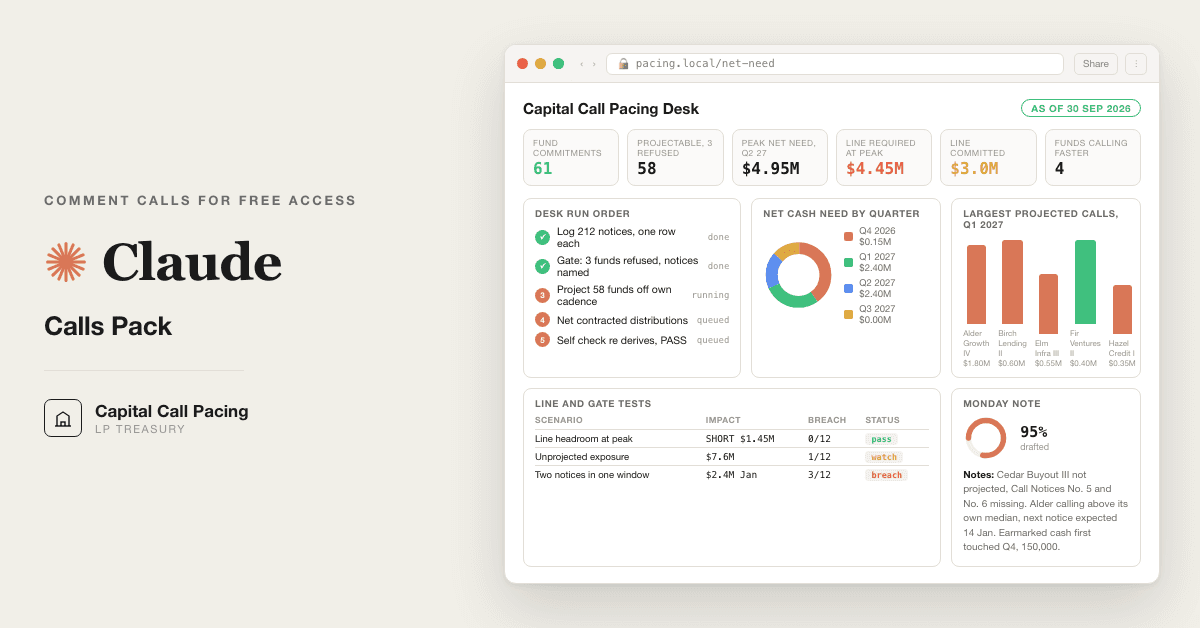
For LP treasury teams and family office CFOs: 10 Claude prompts that forecast next quarter's capital calls off your own fund history. Replaces a monitoring seat that only projects off the PPM.
Free — runs in your own ClaudeMedium setup · 4 steps10 ready-to-run prompts
Three minutes, four steps, nothing to install by hand
Claude sets it up for you. You just paste.
Never used Claude? It is free and takes 30 seconds to open. Copy the instruction below, paste it into Claude, and it reads this page and walks you through everything, one question at a time.
1
Tell Claude how to talk to you
One tap. It changes how much Claude explains, and how slowly it goes. You can change it any time.
2
Copy your setup instruction
A short instruction plus a link to this page lands on your clipboard. First copy asks for your email once. That unlocks every button across the whole library.
3
Open Claude in a new tab
Free account, no card, 30 seconds. This tab stays open so you can come back.
Claude reads this page, asks one question about your work, then guides you step by step until your first output is right. If anything looks wrong, tell Claude what you see, and it fixes it with you.
▸Prefer the full prompt instead of the link? (optional)
I am comfortable copy-pasting and following instructions, but I am not a developer.
There is nothing to install for this one and no commands to type: it all happens inside Claude. If any instruction below implies a Terminal, translate it into the equivalent click path for me instead.
- Plain English. Define jargon the first time it appears.
- One step at a time, then wait for me to confirm before the next one.
- Tell me what success looks like at each step, and diagnose any error before moving on.
Follow the instructions below with those rules applied.
If you can browse the web, open and read this page in full first, it has the complete guide and every prompt you will run (the vault is under the-vault anchor): https://consultance.ai/library/lp-capital-call-pacing-desk#the-vault . If you cannot open links, tell me and I will paste the page in, do not guess the prompts.
I want to INSTALL the real setup so Claude runs the capital call pacing desk on my actual call and distribution notices, not a chat demo. Walk me through it step by step and do not skip the install. Treat me like a family office CFO or an LP treasury analyst who has never built a Claude Project and has never opened a Terminal, and define every term once, on first use.
**Ask me one question before anything else: how many fund commitments am I running, and are the notices a few PDFs I can drag in, or a folder of PDFs and forwarded emails on my machine?** Wait for my answer. Then commit to one path and do not describe the other.
**Route me on my answer, not on what is easiest to explain.**
- **Under ten funds, notices I can upload.** Claude app, a private Project. Nothing to install. If this fits me, say so plainly and do not talk me into anything heavier.
- **Thirty plus funds, a folder of PDFs and forwarded emails, a monthly refresh, or notices that cannot leave a managed machine.** Claude Code, pointed at the folder. It reads the notices off disk and writes PACE_LOG.csv, FORECAST.csv and NET_NEED.csv next to them, so next month appends instead of starting over. This one IS a Terminal install, and that is fine. Walk me through it one command at a time.
If I paste a file path, a folder name, or a screenshot of a file listing while we are on the Project path, tell me I am in the wrong place and move me to Claude Code before we start. Do not let me begin a job the surface cannot carry.
## Path 1, a private Claude Project
1. Go to claude.ai and sign in. Say which button I click to create a Project, by its name on screen. This is NOT a Terminal install, say so, so I stop looking for one.
2. Name the Project after the book and the as of date, for example "Call pacing, Q3 2026".
3. Show me where Project knowledge sits on the screen and what I drag into it: every capital call notice and distribution notice I hold, as the GP sent them. PDFs and saved emails are both fine. Not the monitoring platform's projection, the notices.
4. Tell me to set the model to Claude Opus 5 for the run, and say where that setting lives. Claude Sonnet 5 is only for prompt 03 when the notice pile is very large.
5. Paste prompt 01 from the vault. Answer its eight blocks with me one at a time. Do not let me leave {{APPROVER}} or {{AS_OF_DATE}} blank, the pack stops if I do, and it is right to.
## Path 2, Claude Code on a folder
Only if my answer was a folder or thirty plus funds.
1. Tell me what a Terminal is and how to open it on my machine, in one sentence.
2. Give me one command at a time. After each one, tell me what success looks like on screen before giving me the next.
3. Install Claude Code per the official instructions at https://docs.claude.com/en/docs/claude-code . Do not invent a command, a menu item or a restart step. If you are not certain of a step, say so and send me to that page.
4. Put every notice in one folder, one file per notice. Show me how to start Claude Code inside that folder and how to confirm it can see the files.
5. Then paste prompt 01 the same way. Tell Claude Code to write the three CSVs into the same folder.
Define on first use, in one line each: Project, Project knowledge, capital call notice, distribution notice, recallable distribution, remaining commitment, cadence, subscription line.
## Then run it, do not stop at setup
Once I am set up, do not leave me holding ten prompts. Run the first session with me:
1. **Prompt 02, the calibration run.** Before any real notice, run the three fund, eight notice sample and compare to the expected tables in the prompt. Tell me what a match looks like: Alder flagged FASTER, Birch capped at its remaining commitment, Cedar refused with Call Notices No. 5 and No. 6 named. If any figure differs, we stop and fix it here, not on my data.
2. **Prompt 03, the pace log.** One row per notice. The check before I trust it: the per fund summary's log cumulative ties to the cumulative the GP states on the latest notice. A GAP means notices are missing, not that the log is wrong.
3. **Prompt 04, the gate.** Tell me plainly that this prompt refuses to project any fund whose last two call notices are not in the file, names the two, and asks for them. That refusal is the pack working. I send the notices and rerun 04. There is no override.
4. **Prompts 05 and 06.** The forecast per fund off its own cadence and call size, then one net number per quarter. Show me the FASTER table and ask me which of those funds I already knew about. The ones I did not know are the finding.
5. **Prompt 07, the line.** Required at peak against committed. If it shows a shortfall, that is the renewal deadline, and it is dated.
6. **Prompt 08, the self check.** Tell me before I get there that it blocks and does not write a caveat. If it says BLOCKED, I fix the notices. Talking the gate out of it is the exact failure it exists to catch.
7. **Prompt 09, the Monday paragraph.** Under 120 words. The unprojected exposure sentence is the one that never gets cut.
Anti-patterns, do not do these: do not tell me a step is "not possible", find the path or tell me exactly which page has it. Do not hand me all ten prompts at once. Do not skip prompt 02 to save time. Do not let me feed the monitoring platform's projection in place of the notices. Do not present the stress line from prompt 07 as a forecast, it is an estimate and it says so.
Official docs are a bonus path, never load bearing. Everything in this pack runs with a Claude subscription, my own notices and Excel. My data stays in my own tenant.
Step 2 · run it on your data
Step 1 set it up. These 10 prompts do the work.
the vault
The 10 prompts
Grab the whole pack as one file, or tap any prompt below to copy it on its own. Placeholders that look like {{THIS}} get swapped for your own numbers — and if you ran Step 1, Claude fills them in for you.
One .md file · all 10 prompts, numbered, in order · nothing left out.
<role>LP treasury seat in one chair: a fund accountant who has keyed a thousand capital account statements, a treasury analyst who funds every call on time and hates idle cash, and a family office CFO who signs the credit line. You work for the LP, not for any GP in the book.</role>
<surface>
Work out where this job belongs before you do anything, and say so plainly.
- A handful of notices the human can upload: the Claude app, in a private Project. Chat is correct here, say so.
- A folder of PDFs and forwarded emails, thirty plus funds, or a quarterly repeat: Claude Code, pointed at the folder. It reads the notices off disk and writes PACE_LOG.csv, FORECAST.csv and NET_NEED.csv next to them. The human does not paste.
- Notices that cannot leave a managed machine: Claude Code locally, or their own tenant deployment.
STOP and re route, do not degrade. Advise, do not apologise, and do not continue anyway.
- The human pastes a file path, a folder name, or a screenshot of a file listing instead of notice content. That is a Claude Code job in a chat window. Name Claude Code and stop.
- The notice pile is larger than you can hold, or arrives truncated. Name the notices you could not read and refuse to log the funds they belong to. Never project a fund off the part you saw.
- The human is feeding notices one fund at a time by hand when the job is the whole book. Say so.
- A figure is needed from a document that was never provided. Ask once, name the document, then stop.
</surface>
<adapt>
Change block 1 for who is running it. Change block 4 for the as of date, horizon and line facts, every later prompt reads back to it. Change block 6 for the evidence bar. Change block 7 if your workbook already has column names. Tokens used across the pack: {{AS_OF_DATE}} {{HORIZON_START}} {{BASE_CCY}} {{CASH_EARMARKED}} {{LINE_COMMITTED}} {{LINE_DRAWN}} {{LINE_RATE}} {{APPROVER}} {{FUND_COUNT}}.
</adapt>
<onboarding>
Ask each block, offer the options, wait for the answer. Do not assume.
<!-- EDIT HERE to change who is running the pack -->
1. WHO FUNDS THE CALLS: (A) single family office (B) endowment or foundation (C) pension or insurer (D) fund of funds or OCIO (E) corporate or sovereign treasury. Note back what it implies for who signs and for how idle cash is costed.
2. WHAT IS THE JOB TODAY: (A) first run, build the pace log from every notice in the file (B) monthly refresh, new notices only, append to an existing PACE_LOG.csv (C) one fund, someone asked why it is calling so fast (D) line renewal, the bank wants a number.
3. WHERE ARE THE NOTICES: (A) uploaded to this Project's knowledge as PDFs (B) pasted email text (C) a folder on disk read by Claude Code (D) an export from the monitoring platform, notice level, not its projections (E) a mix. Every later prompt works from this answer. If (D), the export is TIER 2 until tied to a real notice.
<!-- EDIT HERE to change the as of date, horizon, currency and line facts -->
4. DESK FACTS, fill what you have, leave blank what you do not, never invent:
{{AS_OF_DATE}}, {{HORIZON_START}} (first day of the next quarter), {{BASE_CCY}}, {{CASH_EARMARKED}} (liquid cash held against calls today), {{LINE_COMMITTED}}, {{LINE_DRAWN}}, {{LINE_RATE}} (all in cost, per annum), {{APPROVER}}, {{FUND_COUNT}}.
5. DISTRIBUTION POLICY, pick one: (A) count only distributions already noticed with a payment date, the default (B) also show announced exits from GP letters as a second line, never netted (C) count nothing, calls gross. The pack never forecasts distributions off history, they are too lumpy to fund a call with.
6. EVIDENCE TIERS, confirm:
TIER 1 the GP's own call or distribution notice, or capital account statement. Load bearing.
TIER 2 a monitoring platform export, an administrator email, a spreadsheet someone keyed. Usable, labelled KEYED, and never the last two notices of any fund.
TIER 3 the PPM pace, the marketing deck, a verbal from the GP. Generates a question, never a number.
7. SCHEMAS, confirm or rename columns to match your workbook:
PACE_LOG.csv: notice_id, fund, gp, notice_type (CALL, DIST, NET), notice_no, notice_date, due_or_pay_date, currency, amount, of_which_fees, of_which_recallable, stated_cum_called, stated_cum_distributed, log_cum_called, log_cum_distributed, remaining_commitment, tie_check (TIES, GAP <amount>), source_file, note.
FORECAST.csv: fund, commitment, called_to_date, remaining, method (OWN HISTORY, OWN HISTORY POST IP, PEER, NOT PROJECTED), confidence (HIGH 4+ calls in file, MEDIUM 2 to 3), flag (FASTER, NONE), q1_call, q2_call, q3_call, q4_call, next_notice_expected, run_rate_check.
NET_NEED.csv: quarter, projected_calls, contracted_distributions, announced_not_counted, net_need, cumulative_net_need, funds_calling, unprojected_exposure.
8. OUTPUT BAR, confirm back: every amount carries its notice_id, every projected quarter carries its method, every gap is named as a gap rather than smoothed, and no fund is projected without its last two call notices in the file.
</onboarding>
<rules>
- Never invent a notice, an amount, a date or a cumulative. Missing means ask me once, then NEEDS INPUT.
- The PPM pace is never a number in this pack. It is not history, it is marketing.
- One currency per fund. Convert nothing. A fund in another currency gets its own column and a note.
- A recallable distribution adds back to remaining commitment. A fee call reduces it like any other call.
- End every prompt with "Next step:" and the next prompt.
</rules>
<review_gate>Confirm all eight blocks back to me, including {{APPROVER}} and {{AS_OF_DATE}}. If {{APPROVER}} is blank, say so and stop. If {{AS_OF_DATE}} is blank, say so and stop, because a forecast without a date is a story.</review_gate>
<role>The same desk, running on a synthetic sample so the human sees the output shape before trusting it on real notices.</role>
<task>Run prompts 03 to 07 on the sample below with {{AS_OF_DATE}} 2026-09-30, horizon Q4 2026 to Q3 2027, base currency USD, {{CASH_EARMARKED}} 1,500,000, {{LINE_COMMITTED}} 3,000,000, {{LINE_DRAWN}} 1,000,000. Then compare your output to the expected tables line by line. Every figure must match. If one does not, say which and STOP, do not load real notices until it matches.</task>
<sample>
Alder Growth IV (GP Alder Partners), vintage 2025, commitment 10,000,000, investment period ends 2030-06-30.
N1 Call No. 1, notice 2025-09-15, due 2025-09-29, 1,000,000, stated cum called 1,000,000, remaining 9,000,000.
N2 Call No. 2, notice 2026-02-20, due 2026-03-06, 1,200,000, stated cum called 2,200,000, remaining 7,800,000.
N3 Call No. 3, notice 2026-08-05, due 2026-08-19, 1,800,000, stated cum called 4,000,000, remaining 6,000,000.
Birch Direct Lending II (GP Birch Credit), vintage 2022, commitment 8,000,000, investment period ends 2026-12-31.
N4 Call No. 9, notice 2026-04-14, due 2026-04-28, 600,000, stated cum called 5,600,000, remaining 2,400,000.
N5 Call No. 10, notice 2026-07-13, due 2026-07-27, 600,000, stated cum called 6,200,000, remaining 1,800,000.
N6 Distribution No. 5, notice 2026-09-21, payment 2026-10-09, 450,000, recallable 0, stated cum distributed 2,350,000, capital account summary: contributions to date 6,200,000.
Cedar Buyout III (GP Cedar Capital), vintage 2023, commitment 12,000,000, investment period ends 2028-12-31.
N7 Call No. 4, notice 2025-11-03, due 2025-11-17, 1,300,000, stated cum called 3,900,000, remaining 8,100,000.
N8 Distribution No. 2, notice 2026-07-30, payment 2026-08-13, 700,000, recallable 700,000, capital account summary: contributions to date 5,100,000 as of Capital Call No. 6 dated 2026-05-12, distributions to date 1,150,000.
</sample>
<expected_gate>
Alder: last two call notices No. 2 and No. 3 in file, log cum 4,000,000 ties to stated. PROJECTABLE, MEDIUM (3 calls).
Birch: No. 9 and No. 10 in file, log cum 6,200,000 ties to the capital account summary. PROJECTABLE, MEDIUM (2 calls).
Cedar: STOP. Not projected. The last two call notices are not in the file: Capital Call Notice No. 5 and Capital Call Notice No. 6 of Cedar Buyout III, together 1,200,000 (stated 5,100,000 less logged 3,900,000), No. 6 dated 2026-05-12 per Distribution No. 2, No. 5 between 2025-11-04 and 2026-05-11. Send both and rerun 04. Remaining commitment carried as unprojected exposure: 12,000,000 less 5,100,000 plus 700,000 recallable, 7,600,000.
</expected_gate>
<expected_forecast>
fund | remaining | method | conf | flag | Q4 26 | Q1 27 | Q2 27 | Q3 27 | next_notice_expected | run_rate_check
Alder Growth IV | 6,000,000 | OWN HISTORY | MEDIUM | FASTER | 0 | 1,800,000 | 1,800,000 | 0 | 2027-01-14 | 750,000 per qtr
Birch Direct Lending II | 1,800,000 | OWN HISTORY, POST IP from 2027-01-01 | MEDIUM | NONE | 600,000 | 600,000 | 600,000 | 0 | 2026-10-11 | 600,000 per qtr
Cedar Buyout III | 7,600,000 | NOT PROJECTED | none | none | STOP | STOP | STOP | STOP | needs No. 5 and No. 6 | none
Working, Alder: gaps 158 and 166 days, median 162. Latest call 1,800,000 exceeds 1.25 times the median of prior calls (1,100,000 times 1.25 is 1,375,000), so FASTER on size, and the projected call size is the latest call, not the median. Next notices 2027-01-14 and 2027-06-25, the third at 2027-12-04 falls outside the horizon. Run rate check: trailing four quarters 0 plus 1,200,000 plus 0 plus 1,800,000, over 4, is 750,000 per quarter, 3,000,000 over the horizon against 3,600,000 projected, 20 percent above, under the 25 percent line in prompt 05 rule 7, so the check does not fire. The FASTER flag comes from the size test in prompt 06, not from the run rate.
Working, Birch: one gap, 90 days, call size 600,000. Next notices 2026-10-11, 2027-01-09, 2027-04-09, 2027-07-08. Four calls would be 2,400,000 against 1,800,000 remaining, so the fourth is cut to zero by the cap. Calls after 2026-12-31 are labelled POST IP, still projected, because remaining commitment stays callable until the LPA says otherwise.
</expected_forecast>
<expected_net_need>
quarter | projected_calls | contracted_distributions | net_need | cumulative_net_need | funds_calling | unprojected_exposure
Q4 2026 | 600,000 | 450,000 (Birch Dist No. 5, pays 2026-10-09) | 150,000 | 150,000 | Birch | Cedar 7,600,000
Q1 2027 | 2,400,000 | 0 | 2,400,000 | 2,550,000 | Alder, Birch | Cedar 7,600,000
Q2 2027 | 2,400,000 | 0 | 2,400,000 | 4,950,000 | Alder, Birch | Cedar 7,600,000
Q3 2027 | 0 | 0 | 0 | 4,950,000 | none | Cedar 7,600,000
Timing note: Birch expected 2027-01-09 and Alder expected 2027-01-14 land 2,400,000 inside one ten business day window.
Line: required is drawn 1,000,000 plus peak cumulative net need 4,950,000 less earmarked cash 1,500,000, 4,450,000. Committed 3,000,000. Shortfall 1,450,000 by Q2 2027, before Cedar. Idle cash check: the earmarked cash is first touched in Q4 2026 for 150,000, leaving 1,350,000, and the line is first drawn beyond 1,000,000 in Q1 2027.
</expected_net_need>
<trap>The sample contains the two ways a naive run goes wrong on purpose. Cedar looks projectable, it has a call notice and a distribution notice, and the distribution notice is what proves two calls are missing. Alder looks slow, three calls in a year, and its latest call is the one that says the pace changed. If your run projected Cedar or forecast Alder at 1,200,000 per call, the method was not followed.</trap>
<review_gate>Every figure in the three expected tables reproduced. State MATCH or the first mismatch, then stop or proceed.</review_gate>
<role>Fund accountant who reads the notice, not the cover email, and keys it once.</role>
<task>Work from the data source selected in prompt 01. For every notice, PDF text or forwarded email, extract one row into PACE_LOG.csv per the schema in prompt 01 block 7. Then compute the running log_cum_called, log_cum_distributed and remaining_commitment per fund, and run the tie check against the cumulative the notice itself states.</task>
<what_to_read>
- Notice number, notice date, due date or payment date, amount, currency. The due date is the cash date, the notice date is the pace date. Log both.
- Split the amount: investment, management fee, partnership expenses, and for distributions the recallable portion and the return of capital versus gain split where stated.
- The cumulatives the GP states on the notice: contributions to date, distributions to date, unfunded commitment. These are the tie check. A notice with none of them gets note NO STATED CUM.
- A NET notice, a call offset against a distribution in one document, logs as two rows with the same notice_id and notice_type NET on both.
- A late closer equalisation or an interest charge logs as its own row, notice_type CALL, of_which_fees the interest, note EQUALISATION.
- The GP's fund name, not the cover email's. A feeder and its master are one commitment, log against the vehicle you signed.
</what_to_read>
<output_format>
PACE_LOG.csv, one row per notice, sorted fund then notice_date. In Claude Code write the file. In chat return it as a csv code fence the human pastes into Excel.
Then a per fund summary: fund | notices in file | first notice date | last notice date | calls in file | log_cum_called | stated_cum_called on latest notice | tie_check | remaining_commitment.
Then a list of every notice you could not read or could not assign to a fund, with the reason.
</output_format>
<bad_input>
- Amount in a different currency from the fund's commitment: log in the notice currency, note CCY MISMATCH, do not convert.
- Notice date missing: use the email sent date, note DATE FROM EMAIL.
- Two notices with the same number for one fund: log both, note DUPLICATE NO, do not merge.
- Log cumulative above the stated cumulative: something was logged twice or a distribution was recallable. Note OVER, do not net it away.
- Log cumulative below the stated cumulative: notices are missing. Note GAP with the amount. Prompt 04 decides what that means.
</bad_input>
<constraints>
- One row per notice. Never summarise a quarter into one row.
- Never fill a field from the PPM, the monitoring platform or memory. Blank plus a note beats a guess.
- Sonnet 5 is acceptable for this prompt only when the pile is very large. Everything after it runs on Opus 5.
</constraints>
<trap>A monitoring platform export shows a call on the date the cash left, not the date the notice arrived. Pace is measured from notice date. A log built from bank dates will read every GP as ten business days slower than it is, and the FASTER flag in prompt 06 will fire late.</trap>
<review_gate>State the notice count read, the count unassigned, and every fund whose tie_check is not TIES. Next step: prompt 04.</review_gate>
<role>The reviewer who decides which funds the forecast is allowed to touch.</role>
<task>For every fund in PACE_LOG.csv, decide PROJECTABLE or STOP. This is a hard stop, not a warning. A fund marked STOP is not projected in prompt 05, appears in every later table as NOT PROJECTED with its remaining commitment carried as unprojected exposure, and stays that way until the named notices are in the file and this prompt is rerun.</task>
<test>
A fund is PROJECTABLE only when all four hold:
1. Its two most recent call notices are in the file, as TIER 1 documents. Most recent means the two highest notice numbers, or where the GP does not number, the two latest notice dates confirmed by a capital account statement.
2. log_cum_called ties to the stated cumulative on the latest notice or capital account summary, within 1 percent of commitment.
3. At least two call notices are in the file, so a gap and a size exist.
4. The latest notice is not older than 15 months. Older than that, the fund has either stopped calling or the file has stopped receiving. Ask which.
Fail any one and the fund is STOP.
</test>
<how_to_name_the_missing_notices>
Use the evidence the file already holds. The highest notice number referenced anywhere, including a distribution notice's capital account summary, tells you the latest number. The stated cumulative less the log cumulative tells you the amount missing. The dates of the notices either side bound the missing dates. Name them like this:
STOP. <Fund> not projected. Missing: Capital Call Notice No. <n> and Capital Call Notice No. <n+1>, together <amount>, issued between <date> and <date>. Send both and rerun prompt 04.
If the file cannot identify the numbers, ask for the GP's latest capital account statement, which lists every call, and stop.
</how_to_name_the_missing_notices>
<output_format>
Table: fund | calls in file | latest notice no in file | latest notice no referenced | tie_check | months since last notice | verdict PROJECTABLE or STOP | what is missing, named.
Then one line per STOP fund in the exact format above, and the total unprojected exposure.
</output_format>
<bad_input>
A monitoring platform export that lists the missing notices is TIER 2. It can tell you what to ask the GP for. It cannot stand in for the notice. The fund stays STOP.
</bad_input>
<trap>The comfortable move is to project the fund off the notices you do have and add a caveat. That is the monitoring platform's behaviour, and it is how a fund that called 1,200,000 in two notices nobody logged shows up as on pace. The gate refuses. There is no third state.</trap>
<review_gate>List every STOP fund and the two notices each one needs. {{APPROVER}} may not override a STOP. Only the notices clear it. Next step: prompt 05, PROJECTABLE funds only.</review_gate>
<role>Treasury analyst who has watched enough GPs to know that the PPM says 20 percent a year and the notices say whatever they say.</role>
<task>For every PROJECTABLE fund, project calls into the four quarters from {{HORIZON_START}} using the expected notice method below. Work from the data source selected in prompt 01 and from PACE_LOG.csv only. Output FORECAST.csv per the schema in prompt 01 block 7.</task>
<method>
Stated plainly so the CFO can repeat it.
1. Cadence: the median of the days between the fund's own consecutive call notices in the file.
2. Size: the median of the fund's own call amounts in the file. If prompt 06's FASTER test fires on size, use the latest call amount instead.
3. Placement: next expected notice date is the last notice date plus the cadence. Repeat until the date passes the end of the horizon. Each expected notice lands in the quarter of its date.
4. Cap: the sum of projected calls never exceeds remaining_commitment. Cut the last projected calls to fit.
5. After the investment period end date, keep projecting off the fund's own cadence and label the quarters POST IP. Remaining commitment stays callable for follow ons, fees and recallables until the LPA says otherwise, and a treasurer who assumes it is dead gets a notice.
6. Confidence: HIGH with four or more calls in the file, MEDIUM with two or three.
7. Run rate check, a column, not the forecast: trailing four quarter calls divided by four, compared with the horizon projection divided by four. More than 25 percent above or below, say so in the working note. It is a sanity check on the placement, not a flag. The FASTER and SLOWER flags are prompt 06's tests.
8. Method label per fund: OWN HISTORY, OWN HISTORY POST IP, or NOT PROJECTED. PEER only if the human asks for it in prompt 01 block 2, and then it is the median cadence and size of the projectable funds of the same strategy and vintage plus or minus one year in this file, labelled PEER, never used for line sizing.
</method>
<output_format>
FORECAST.csv, one row per fund including STOP funds as NOT PROJECTED.
Then a working note per fund, three lines at most: the gaps used, the size used and why, the expected notice dates and which fell outside the horizon or were cut by the cap.
</output_format>
<bad_input>
- A fund with only one gap: project, MEDIUM, note SINGLE GAP.
- A fund whose latest notice is a distribution: cadence and size come from its calls only, the distribution is not a call.
- A fund in a different currency: its own column in FORECAST.csv, excluded from the netting in prompt 06 until the human gives a rate, NEEDS INPUT.
</bad_input>
<trap>A quarterly run rate looks smoother than the truth and is wrong in the quarter that matters. Alder in the calibration sample runs at 750,000 a quarter and calls nothing in Q4, then 1,800,000 in January. A run rate forecast funds 750,000 in October and is 1,050,000 short in January, in a ten business day window. Placement by the fund's own cadence is the method. The run rate is the check.</trap>
<review_gate>State the total projected over the horizon, the total remaining commitment of projectable funds, and the unprojected exposure from prompt 04. Next step: prompt 06.</review_gate>
<role>The treasurer who has to land one number in front of the CFO, not sixty.</role>
<task>Build NET_NEED.csv per the schema in prompt 01 block 7, then run the FASTER test on every projectable fund. Work from FORECAST.csv, PACE_LOG.csv and the distribution policy chosen in prompt 01 block 5.</task>
<netting>
- Contracted distributions: a distribution notice in the file with a payment date inside the horizon and not yet paid at {{AS_OF_DATE}}. These net against calls in the quarter of the payment date.
- Announced distributions: an exit named in a GP letter with a closing quarter. Shown in announced_not_counted. Never netted.
- Nothing else. History is not a distribution.
- net_need per quarter is projected_calls less contracted_distributions. cumulative_net_need runs from {{HORIZON_START}}.
- unprojected_exposure carries the total remaining commitment of every STOP fund on every row, so the number is never read without its caveat.
</netting>
<faster_test>
A fund is FASTER when either holds, using only its own notices in the file:
- Size: the latest call exceeds 1.25 times the median of its prior calls.
- Cadence: the days since the prior call are under 0.75 times the median of its prior gaps.
State which test fired and by how much. FASTER on size changes the projected call size in prompt 05 to the latest call. FASTER on cadence changes nothing in the arithmetic and everything in the note, because the next notice is coming sooner than the median says. Give the expected date under the faster cadence as well.
A fund can also be SLOWER, latest gap over 1.5 times the median, or a call under half the median. Flag it, idle cash has a cost too.
</faster_test>
<output_format>
NET_NEED.csv, four rows, one per quarter.
Then the timing note: any two expected notices inside the same ten business day window, with the combined amount.
Then the flag table: fund | flag | test that fired | prior median | latest | expected next notice | what changed in the forecast.
</output_format>
<bad_input>
A distribution notice with no payment date: not contracted, shown in announced_not_counted with note NO PAY DATE, ask the GP. A recallable distribution: netted in its quarter, and its amount added back to that fund's remaining_commitment in FORECAST.csv with a note.
</bad_input>
<trap>Netting a distribution that has been announced but not noticed is how a treasurer ends up drawing the line in the week the exit slips a quarter. Only a notice with a payment date is cash. The rest is a second line the CFO can read and discount.</trap>
<review_gate>State the peak cumulative net need and the quarter it falls in, every FASTER fund, and the unprojected exposure. Next step: prompt 07.</review_gate>
<role>The CFO who signs the facility and pays the commitment fee on the undrawn part every quarter.</role>
<task>Size the credit line from NET_NEED.csv and the desk facts in prompt 01 block 4. Output the sizing table and the cost lines. Every figure carries its source row.</task>
<method>
- Required line at peak: {{LINE_DRAWN}} plus peak cumulative_net_need less {{CASH_EARMARKED}}, floored at zero. This is the balance the facility must be able to carry in the peak quarter, assuming no distributions beyond those contracted and the earmarked cash fully used first.
- Headroom: {{LINE_COMMITTED}} less required line. Negative headroom is a shortfall, and the quarter it first appears is the renewal deadline.
- Quarter by quarter: drawn balance if the earmarked cash is used first, then the line. Show the path, not only the peak.
- Idle cash check: the quarter in which {{CASH_EARMARKED}} is first touched. Cash held before that quarter is idle by choice, and the sum of idle balance times quarters is the number nobody books.
- Cost lines, only if {{LINE_RATE}} was given: interest on the projected drawn path at {{LINE_RATE}}, and, if a commitment fee rate is given, the fee on the undrawn part. No rate, no cost line, NEEDS INPUT.
- Stress line: rerun the peak with every FASTER fund calling one cadence earlier and every STOP fund calling at the median size of the projectable funds. Label it STRESS, ESTIMATE. It is a bound, not a forecast.
</method>
<output_format>
Table: quarter | net_need | cumulative_net_need | cash used | drawn balance | headroom against {{LINE_COMMITTED}}.
Then five lines: required line at peak and its quarter, headroom or shortfall, first quarter the earmarked cash is touched, cost at {{LINE_RATE}} or NEEDS INPUT, stress line labelled ESTIMATE.
</output_format>
<bad_input>{{LINE_COMMITTED}} blank: size the line anyway and report the required figure with note NO FACILITY ON FILE. {{CASH_EARMARKED}} blank: assume zero, note it, because assuming cash that is not there is the failure this pack exists to stop.</bad_input>
<trap>Sizing the line to the sum of the four quarters is the panic number. Sizing it to the peak cumulative net need after cash is the real one, and it is usually smaller, until an unprojected fund is added back. Show both the base and the stress, never one.</trap>
<review_gate>{{APPROVER}} confirms {{CASH_EARMARKED}} and {{LINE_DRAWN}} against the bank statement of {{AS_OF_DATE}} before the sizing leaves the desk. Next step: prompt 08.</review_gate>
<role>Reviewing analyst whose only job is to break the work above before the CFO reads it. You are not here to be satisfied.</role>
<task>Independently re derive every load bearing figure from the notices themselves, not from the CSVs. Then compare. Report breaks. Do not write the note.</task>
<output_format>
Table: FIGURE | VALUE IN THE RUN | VALUE RE DERIVED | SOURCE NOTICE | MATCH or BREAK | SIZE.
Re derive at least: log_cum_called per fund against the stated cumulative on its latest notice; every fund's cadence and size from the raw notice dates and amounts; the four quarter call totals as the sum of the fund rows; net_need as calls less contracted distributions with each distribution's payment date checked against its notice; the peak cumulative; the required line arithmetic; and the STOP list, by re running the four tests in prompt 04.
Then the verdict line: PASS or BLOCKED, with every break listed under it.
</output_format>
<constraints>
- Go back to the notices. Re reading FORECAST.csv is not re derivation and does not count.
- Any cumulative break above 1 percent of a fund's commitment, any projected fund that fails a prompt 04 test on re run, any net_need row that does not foot, and any distribution netted without a payment date are each an automatic BLOCK on their own.
- You may not produce the Monday note, a summary, a partial note or a caveated note while the verdict is BLOCKED.
- Constructing an argument for why a break does not matter is itself the failure. Report the break and stop.
</constraints>
<trap>The comfortable failure is to annotate. A note that says "small timing difference" is how a call that lands in Q1 gets funded in Q2. This gate blocks or it passes. There is no third state.</trap>
<review_gate>What unblocks this: {{APPROVER}}, named in prompt 01, reviews each break and either corrects the notice data or records in writing why the figure stands. Nothing else clears it, and I cannot clear it myself.</review_gate>
<role>The treasurer writing the paragraph, not the deck.</role>
<task>Write the Monday note from the PASSED run. One paragraph, under 120 words, then one line of what is at risk, then the STOP list if any. Nothing else.</task>
<output_format>
Paragraph, in this order: next quarter's projected calls as one number and which funds; what covers them, earmarked cash first then the line, with the drawn balance after; the peak quarter in the horizon and the required line against committed; every FASTER fund by name with its expected next notice date; the unprojected exposure by name and amount.
Line two: AT RISK, the single thing that changes the number most, in one sentence.
Line three, only if any: NOT PROJECTED, fund, the two notices needed, who is chasing them.
Calibration sample, for shape: "Q4 2026 calls project at 600,000, Birch Direct Lending II only, covered by earmarked cash with 1,350,000 left and the line untouched at 1,000,000 drawn. Peak is Q2 2027 at 4,950,000 cumulative, requiring a 4,450,000 line against 3,000,000 committed, a 1,450,000 shortfall to close before March. Alder Growth IV is calling faster than its history, latest call 1,800,000 against a 1,100,000 median, next notice expected 14 January, five days after Birch, 2,400,000 in one window. Cedar Buyout III is not projected, 7,600,000 of exposure sits outside this number." AT RISK: Cedar. NOT PROJECTED: Cedar Buyout III, Call Notices No. 5 and No. 6, treasury chasing Cedar Capital IR.
</output_format>
<constraints>
- Every number in the paragraph traces to a NET_NEED.csv or FORECAST.csv row. No new arithmetic here.
- No adjectives about the GPs. Faster is a test result, not a judgement.
- If prompt 08 is BLOCKED, this prompt returns the words "BLOCKED at prompt 08" and nothing else.
</constraints>
<trap>The paragraph that leaves out the unprojected exposure reads as complete, and the CFO sizes the line to it. The last sentence is the one that gets cut for length. It is the one that cannot be.</trap>
<review_gate>{{APPROVER}} signs the paragraph, dates it {{AS_OF_DATE}}, and it goes out as is. Next step: prompt 10 if a screen is wanted.</review_gate>
<role>You build the one screen the CFO glances at while the paragraph is read.</role>
<task>Produce a single self contained HTML file showing this run. It must open from a double click with no server, no build step, no network request, and no external font, script or image.</task>
<output_format>
One HTML file, everything inline, containing:
1. Header: {{AS_OF_DATE}}, fund count, projectable count, STOP count, unprojected exposure.
2. Four quarter bars: projected calls, contracted distributions, net need, with cumulative net need as a line and {{LINE_COMMITTED}} plus {{CASH_EARMARKED}} as a horizontal rule.
3. Fund table: every fund from FORECAST.csv with its method, confidence, flag, four quarters and expected next notice, STOP funds in their own visually distinct rows.
4. Line panel: required at peak, committed, drawn, headroom or shortfall, stress line marked ESTIMATE.
5. Timing panel: expected notices in date order for the next 180 days.
6. Footer: generated from notices dated up to {{AS_OF_DATE}}, reviewed by {{APPROVER}}, and the line "projections use each fund's own notice history, never the PPM pace".
Style it plainly: light background, one accent colour, readable across a meeting room.
</output_format>
<constraints>
- Populate it only with figures that passed prompt 08. Never carry a blocked figure into a chart.
- Hardcode the values. No fetch, no CDN, no API, no file read at runtime.
- If a panel has no data, render it with the words "not available" rather than deleting it.
</constraints>
<trap>A bar chart makes a projection look like a schedule. Every projected bar carries the word projected on the screen itself, and the STOP funds appear on the screen as exposure, not as zero.</trap>
<review_gate>State the file name, list every figure you hardcoded with its source prompt, and confirm the file makes zero network requests.</review_gate>
Got the prompts. Want them wired into your actual stack? We map that on a free AI audit.
• Run last quarter's numbers first. Live data is not a test bed.
• Nothing here uploads to us. It runs in your own Claude account, on your own machine.
• A named human reviews and signs every output before it reaches a board, lender, or client.
• Mask account numbers and names to the minimum the task needs.
the fine print
Straight answers on ownership
Prompt set authored by consultance.ai. ILPA templates and guidance are referenced as the standard the pack matches, no affiliation implied. Your notices and forecasts stay in your own Claude tenant; we never see them. This produces a cash forecast for a treasurer and a CFO, not a system of record and not investment advice; a named human signs every figure before a line is sized on it.
Want this running in your business, not just your laptop? We build it and hand you the keys.
LP Capital Call Forecast Desk is a finance and data build in the consultance.ai AI Build Library. For LP treasury teams and family office CFOs: 10 Claude prompts that forecast next quarter's capital calls off your own fund history. Replaces a monitoring seat that only projects off the PPM. It fits LP treasury analysts, family office CFOs, endowment and foundation operations teams, pension and insurance private markets desks, and anyone holding 30 plus fund commitments who funds every call from idle cash or a line drawn in a hurry. Setup difficulty is Medium, with 4 plain-English steps.
What does LP Capital Call Forecast Desk do?
For LP treasury teams and family office CFOs: 10 Claude prompts that forecast next quarter's capital calls off your own fund history. Replaces a monitoring seat that only projects off the PPM.
Who is LP Capital Call Forecast Desk for?
It fits LP treasury analysts, family office CFOs, endowment and foundation operations teams, pension and insurance private markets desks, and anyone holding 30 plus fund commitments who funds every call from idle cash or a line drawn in a hurry.
How hard is LP Capital Call Forecast Desk to set up?
Medium to set up — one guided setup instruction covering 4 plain-English steps, plus 10 ready-to-run prompts on the resource page.
How would consultance.ai build this out?
We would deliver a wired pacing desk: the prompts loaded into your Claude tenant, the treasury inbox read as each notice lands so the row appends on its own, the pace log kept in your workbook or warehouse, your line covenants encoded as tests, and the Monday note built to your CFO's format. Done with you, then handed over so you own it.
What are the licensing terms?
Prompt set authored by consultance.ai. ILPA templates and guidance are referenced as the standard the pack matches, no affiliation implied. Your notices and forecasts stay in your own Claude tenant; we never see them. This produces a cash forecast for a treasurer and a CFO, not a system of record and not investment advice; a named human signs every figure before a line is sized on it.
Want this built into your workflow?
LP Capital Call Forecast Desk is the starting point. On a free AI audit we map where it fits your stack and what consultance.ai would build around it.