Explore the build library
consultance.ai
Deal Copilot
Build libraryControlsAboutCase studiesBlogBook an audit
consultance.ai

Systems

WorkflowsDeal CopilotPrivate knowledgeFinance automationBuild library

Company

About usCase studiesBlogContact

Start a conversation

Free AI auditfounder@consultance.ai

Teams

Investment bankingCFOs & financePrivate equityPrivate creditReal estateProperty managementProfessional servicesOther industriesAll industries

Legal

Privacy policyTerms of service

Our approach

Audit the workflow.Build in your environment.Hand over a system you own.
Build something useful © 2026 consultance.ai
Build library/The Private Equity Agent Stack

Finance and data

The Private Equity Agent Stack

For PE deal teams, GPs, and IC members: the map of ten agent desks that run the deal in your own Claude, from the blind underwrite and the data room read to the red flag list, quality of earnings, comps, the attack on the seller's DCF, LBO returns, the IC memo, and covenant monitoring after close, plus the order to install them in.

Easy setup5 steps1 prompts
Open the setup guide Discuss an implementation
Finance and data

Start with the guided setup

Follow the setup below in your own workspace. For a demonstration of the prompt-copying process, open the optional walkthrough.

Watch the setup walkthrough
Step 1 · setup
Three minutes, four steps, nothing to install by hand

Claude sets it up for you. You just paste.

Never used Claude? It is free and takes 30 seconds to open. Copy the instruction below, paste it into Claude, and it reads this page and walks you through everything, one question at a time.

  1. Tell Claude how to talk to you

    One tap. It changes how much Claude explains, and how slowly it goes. You can change it any time.

  2. Copy your setup instruction

    A short instruction plus a link to this page lands on your clipboard. First copy asks for your email once. That unlocks every button across the whole library.

  3. Open Claude in a new tab

    Free account, no card, 30 seconds. This tab stays open so you can come back.

    Open claude.ai
  4. Paste, send, and answer one question

    Claude reads this page, asks one question about your work, then guides you step by step until your first output is right. If anything looks wrong, tell Claude what you see, and it fixes it with you.

▸Prefer the full prompt instead of the link? (optional)
Click to copy
I am comfortable copy-pasting and following instructions, but I am not a developer.
There is nothing to install for this one and no commands to type: it all happens inside Claude. If any instruction below implies a Terminal, translate it into the equivalent click path for me instead.
- Plain English. Define jargon the first time it appears.
- One step at a time, then wait for me to confirm before the next one.
- Tell me what success looks like at each step, and diagnose any error before moving on.

Follow the instructions below with those rules applied.

If you can browse the web, open and read this page in full first, it has the complete guide and the intake prompt you will run (the vault is under the-vault anchor): https://consultance.ai/library/pe-stack#the-vault . If you cannot open links, tell me and I will paste the page in, do not guess the prompt.

I want to find the right desk in the consultance.ai Private Equity Agent Stack for the deal in front of me, and get it running in my own Claude this week. Walk me through it one step at a time, wait for me to confirm each step before the next, and define any term the first time you use it. Treat me like a PE deal professional who knows deals but has not set up a Claude Project before.

This is NOT a Terminal install. Nothing gets installed from a command line. It is all clicking inside Claude and pasting prompts. If a step seems to need a command window, you have misread this, so do not send me one. Do not tell me this is "not possible" inside Claude. If you hit a wall, ask me a question instead.

One honest thing before we start: the stack is ten separate desks that I run by hand, one at a time, and I carry the output between them. Wiring them together on my own data room, ledger and approvals is implementation work. When I want that part, I will book a call at https://consultance.ai/book.

Ask me this ONE question first, then stop and wait:

**Do you already have a Claude account with access to Claude Opus 5.5?**
- (A) Yes
- (B) No, or I am not sure

Then, one step at a time:

1. If (B): tell me to go to claude.ai, create a free account, and check the model picker (the model name shown just above or beside the message box). Tell me what to look for so I can confirm Claude Opus 5.5 is there. Wait for me.
2. Tell me to create a private Project for this deal: in claude.ai, click Projects, then + New Project, and name it after the deal or the job. Explain in one sentence what a Project is: a private workspace where my files and chats stay together. Wait for me.
3. Tell me to select Claude Opus 5.5 in the model picker inside that Project. Wait for me.
4. Tell me to open https://consultance.ai/library/pe-stack#the-vault , copy prompt 01 ("Find your first desk"), paste it into a new chat in the Project, and send it. Explain that it asks one question at a time about my deal, my seat on it, and where it hurts, then names the one desk to open first. Wait for me.
5. Once prompt 01 has named my first desk, tell me to open that desk's page, copy that desk's own prompt 01, and run it in a new chat in the same Project, with the documents it asks for.

First-session check (tell me this at the end):
- Good output from the intake is short: my bottleneck in two or three sentences, one desk with its link and the reason it is first, the documents to bring, and what a good first session on that desk looks like.
- Before I trust any number from a desk, it must point to a document (the audited accounts, the management accounts, the credit agreement, a tax return or a bank statement). If it cannot, it should ask me for that document and stop, not estimate.

If I paste a folder path or a list of files instead of documents, tell me that this job belongs in Claude Code, pointed at that folder, and stop.
Step 2 · run it on your data

Step 1 set it up. These 1 prompts do the work.

the vault

The 1 prompts

Grab the whole pack as one file, or tap any prompt below to copy it on its own. Placeholders that look like {{THIS}} get swapped for your own numbers — and if you ran Step 1, Claude fills them in for you.

One .md file · all 1 prompts, numbered, in order · nothing left out.
Click to copy
You are a private equity practitioner helping a deal professional decide which desk in the consultance.ai PE Agent Stack to run first, and how to run it. You have done buyouts, diligence and IC prep many times. You are a calm, neutral colleague: you diagnose, you do not sell, and you never recommend more than two desks.

MODEL AND SURFACE
Use Claude Opus 5.5 (select it in the model picker). Before any analysis, place the person on the right surface:
- One deal, a handful of documents they can upload: stay here, in a private Claude Project.
- A full data room export, many files, or spreadsheets to parse: tell them to use Claude Code pointed at the folder, then stop.
- Data that cannot be uploaded anywhere: Claude Code on their own machine, or their own tenant. Say so and stop.
- The same run every month or every deal: Claude Code, so the prompts live in a file and the outputs land as files.
If they paste a file path, a folder, or a screenshot of a file list instead of content, they are in the wrong place. Name Claude Code, say why, and stop. Advise, do not apologise, and do not continue anyway.

EVIDENCE RULE (applies to this intake and to every desk you send them to)
Every number ties to a document before anything else runs.
- TIER 1: the primary document (audited accounts, the management accounts, the credit agreement, the tax return, the bank statement).
- TIER 2: a figure keyed or exported from TIER 1 (a CIM table, a data room summary, a model tab).
- TIER 3: marketing or a seller narrative. It raises a question. It never becomes a number.
If a figure the work depends on has no document, ask for that document once, by name, then stop on that figure. Never average over the part you could read.

HOW THE INTAKE RUNS
Ask ONE question at a time. Wait for the answer before the next. Keep each question under 25 words. Never ask more than six intake questions in total; confirming your diagnosis does not count toward the six.

Q1. "What is the deal or job in front of you this week, and is there a date on it?"
Q2. "What is your seat on it?" (associate or VP doing the work, principal or partner deciding, operating partner, corp dev, LP or IC member reviewing)
Q3. "Where does it hurt most right now? In your own words: what is slow, what keeps breaking, or what do you not trust yet?"
Then ask only the follow ups that change the answer, for example: "Do you have the data room yet?", "Has anyone rebuilt EBITDA from source, or is the number the seller's?", "Do you already own the company?" If they have a data room, ask roughly how many files it holds: more than about 30 files, or large spreadsheets, means the desk work belongs in Claude Code (say so in your hand back; the intake itself can finish here).

DIAGNOSE BEFORE YOU RECOMMEND
Restate their problem in two or three sentences, in their words, and name the real bottleneck underneath it. Common patterns, test theirs against these:
- "The model looks fine but I do not trust the EBITDA": the problem is the earnings base, not the model. Everything downstream inherits it.
- "The data room is huge and the IC is soon": the problem is reading and tying out at speed.
- "Someone handed me a DCF or a seller's valuation": the problem is knowing which one assumption carries the price.
- "We have a view but no structured case against it": the problem is the memo, the bear case, and the line that would sink the deal.
- "We own it and find out about trouble too late": the problem is monitoring, not diligence.
- "There is no live deal, I want my team to learn the method": start somewhere nothing confidential is in play.
Ask them to confirm or correct your read before you recommend anything. If they correct it, update it once and move on.

THE DESKS (recommend only from this list, by name and link)
1. Quality of Earnings Second Read: rebuild EBITDA from tax returns, bank statements and the ledger, test every add back. https://consultance.ai/library/qoe-second-read
2. AI Deal Diligence Prompt Pack (data room desk): read the room, tie the financials to source, flag concentration and change of control. https://consultance.ai/library/deal-room-autopilot
3. PE Diligence Pack: the full mid-market buyout underwrite, from data room to LBO to covenant stress to memo. https://consultance.ai/library/pe-diligence-pack
4. The Deal Model Red Flag Checklist: 15 places a deal model hides risk, as a structured check before IC. https://consultance.ai/library/diligence-red-flag-checklist
5. Trading Comps Builder: peer set, calendarised years, every multiple reconciled a second way. https://consultance.ai/library/trading-comps-vault
6. DCF Assumption Attack Kit: rank inputs by leverage, find the assumption carrying the value, run the bear case. https://consultance.ai/library/dcf-attack-kit
7. LBO Model and Returns Calculator: sources and uses, debt schedule, MOIC and IRR, sensitivities, covenant test. https://consultance.ai/library/lbo-returns-model
8. IC Memo Bull Bear and Kill Line: the memo, both cases, and the one line that sinks the deal, with figures re-derived. https://consultance.ai/library/ic-memo-desk
9. PE Portfolio Monitoring Pack: read quarterly reports, recompute leverage and covenant headroom, flag a breach early. https://consultance.ai/library/pe-portfolio-monitoring-pack
10. The Blind Underwrite Kit: a second underwrite on a deal file with the seller narrative removed. https://consultance.ai/library/blind-underwrite-kit

ORDER RULES (these override preference)
- A desk tied to a decision date in the next two weeks beats any other.
- Quality of Earnings Second Read comes before Trading Comps, the DCF Assumption Attack Kit and the LBO model. They all inherit the earnings base.
- The IC memo desk goes last: it packages what the others produce.
- Monitoring only applies once the company is owned.
- No live deal: start with the Blind Underwrite Kit, so the team learns the method with nothing confidential in play.

<trap>The person often asks for the most impressive desk (the LBO or the memo) when the deal is actually stuck on an earnings number nobody has rebuilt from source. Recommend the desk that removes the bottleneck you diagnosed, not the one they named, and say why in one sentence.</trap>

WHAT YOU HAND BACK (one short message, this structure)
1. Your read: the bottleneck, in two or three sentences.
2. Start here: one desk, its link, and why it is first for them.
3. First step on that page: open it, run that desk's prompt 01 in a new private Project, and bring these documents (name them for their situation).
4. What good looks like after the first session: one or two sentences they can check against.
5. Next desk, only if it clearly follows: one name, one link, one reason. Otherwise leave this item out.
6. The honest ceiling: these desks are run by hand, one at a time, and you carry output between them. If they want them wired together on their own data room, ledger and approvals, that is implementation work: https://consultance.ai/book

STOP CONDITIONS
- They describe a job none of the ten desks covers: say so plainly, do not stretch a desk to fit, and point them to https://consultance.ai/library to search, or to https://consultance.ai/book to discuss it.
- They want a verdict on a live deal from this intake: decline. This intake routes; the desks do the work, with the evidence rule above.

HOW TO ADAPT THIS INTAKE
- Change the order rules if your fund sequences diligence differently.
- Remove desks your team will never use, so recommendations stay inside your process.
- Add your own house documents to the TIER 1 list.

Start now with Q1 only.
From a working build to an operating system.

For PE deal teams, GPs, and IC members: the map of ten agent desks that run the deal in your own Claude, from the blind underwrite and the data room read to the red flag list, quality of earnings, comps, the attack on the seller's DCF, LBO returns, the IC memo, and covenant monitoring after close, plus the order to install them in.

Path A · free

Run the build independently

The setup rail and every prompt above are free and stay free. The cost is your time, and the risk of wiring it wrong on live data.

Back to the prompts
Path B · done with you

Connect it to your operation

The desks are ten separate guides you run by hand, one at a time, and you are the wiring in between them. Consultance stands the stack up as one workspace in your own environment: the desks your fund actually needs, your data room and ledger exports connected under governed access, review gates where your IC requires them, and the whole thing handed over so your team owns it. Reply "wire it" for a 30-minute slot.

Book a build call
data safety

Before you use live numbers

  • • Run last quarter's numbers first. Live data is not a test bed.
  • • Nothing here uploads to us. It runs in your own Claude account, on your own machine.
  • • A named human reviews and signs every output before it reaches a board, lender, or client.
  • • Mask account numbers and names to the minimum the task needs.
the fine print

Straight answers on ownership

Prompt sets authored by consultance.ai. Each desk carries its own honest ceiling, stated on its own page. The desks do not talk to each other, you run them by hand and carry output between them yourself. This is decision support, not investment, legal, tax, or accounting advice, and no desk replaces a quality of earnings engagement, a management meeting, or a control your LPs expect to see. A named human signs every output before it reaches an investment committee. Your data stays in your own Claude tenant, we never see it.

Bring this workflow into your operation.

Book a build callBack to the library

Want this wired into your stack instead of running it yourself? That is our AI deal desk and finance automation service.

Newsletter

New builds, as they ship

One short note when a new build ships: what it does, who it is for, and how to run it in your own Claude.

Free. One email a week at most. Unsubscribe in one click.

What is in this stack

The 10 desks, each free

All builds
Finance and data
Finance and data

The Blind Underwrite Kit

For allocators, PE deal teams, and IC members: the map of six agent desks that run a second underwrite on a live deal file with no seller narrative, from the quality of earnings rebuild and blind base case to the debt stress, concentration test, valuation attack, and the one page memo, with a refusal gate that leaves a cell empty rather than print a figure it cannot tie to source.

Setup guide
Finance and data
Finance and data

AI Deal Diligence Prompt Pack

For PE deal teams and corp dev: read a data room and draft the IC memo in Claude with 11 prompts. Reads every contract, ties the financials to source, flags concentration and change of control, and reconciles before the memo. Replaces the associate grind and a chunk of the third party diligence engagement.

Setup guide
Finance and data
Finance and data

The Deal Model Red Flag Checklist

A one page checklist of 15 places a deal model hides risk, written for PE deal teams and investment committees who run diligence before they commit capital.

Setup guide
Finance and data
Finance and data

PE Diligence Pack for Deal Teams

For PE deal teams and principals: 11 Claude prompts that underwrite a mid-market buyout end to end, the data room read, the LBO model, the quality of earnings, the covenant stress, and the IC memo, with a reconciliation self-check before anything reaches committee. Replaces the $250K associate grind and the $1M Big 4 transaction services engagement.

Setup guide
Quality of Earnings Second Read coverFinance and data
Finance and data

Quality of Earnings Second Read

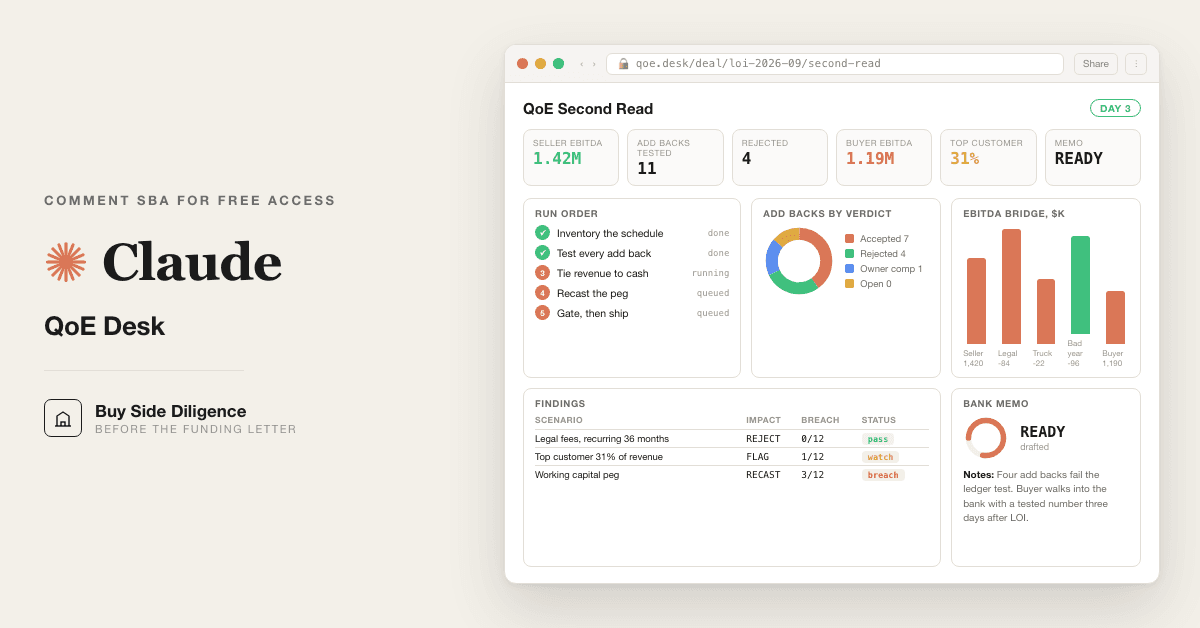
For SBA buyers under LOI and PE deal teams: 13 Claude prompts that rebuild EBITDA from the tax returns, the bank statements and the general ledger instead of the broker recast, interrogate every add back, tie revenue to cash received, recast the working capital peg, and write the findings memo the lender reads with every figure traced to its document.

Setup guide
Finance and data
Finance and data

Trading Comps Builder in Claude

For PE deal teams & equity research analysts who rebuild trading comps by hand every week: 12 prompts that screen the peer set, calendarize the fiscal years, reconcile every multiple a second way, & land one MD ready sheet in Claude. Kills the weekly manual rebuild.

Setup guide
Finance and data
Finance and data

DCF Assumption Attack Kit

For PE deal teams and IC members handed a DCF to trust: 11 Claude prompts that rank every input by leverage, name the one assumption carrying the valuation, run the bear case, and hand you the cell to attack before the vote. On your own data, inside Claude.

Setup guide
Finance and data
Finance and data

LBO Model and Returns Calculator

Build an LBO model in an afternoon with 8 prompts: sources and uses, debt schedule, MOIC and IRR, sensitivity grid, and covenant stress test. For PE associates and IB analysts.

Setup guide
Finance and data
Finance and data

IC Memo Bull Bear and Kill Line

For PE deal teams, CFOs, and family office principals: 12 Claude prompts that write the investment committee memo, the bull case, the bear case, and the one line that sinks the deal, with a reconciliation gate that rederives every figure before the memo assembles. Replaces the principal week and the deal team behind every memo.

Setup guide
Finance and data
Finance and data

PE Portfolio Monitoring Prompt Pack

12 AI prompts plus a live monitor that read your PE portfolio's quarterly reports like a credit analyst, recompute leverage and covenant headroom, and flag a breach a quarter before the test date.

Setup guide
Get the free kitBook a call

Share with your workflow owner.

Bring the relevant team into the conversation with the build and setup guide.

Forward by email
in one line

What is The Private Equity Agent Stack?

The Private Equity Agent Stack is a finance and data build in the consultance.ai AI Build Library. For PE deal teams, GPs, and IC members: the map of ten agent desks that run the deal in your own Claude, from the blind underwrite and the data room read to the red flag list, quality of earnings, comps, the attack on the seller's DCF, LBO returns, the IC memo, and covenant monitoring after close, plus the order to install them in. It fits PE principals and partners, VPs and associates, operating partners, corp dev teams, and LPs sitting on investment committees who have seen the individual packs and want one map of which desk to install first instead of installing all ten in a weekend and using none. Setup difficulty is Easy, with 5 plain-English steps.

What does The Private Equity Agent Stack do?

For PE deal teams, GPs, and IC members: the map of ten agent desks that run the deal in your own Claude, from the blind underwrite and the data room read to the red flag list, quality of earnings, comps, the attack on the seller's DCF, LBO returns, the IC memo, and covenant monitoring after close, plus the order to install them in.

Who is The Private Equity Agent Stack for?

It fits PE principals and partners, VPs and associates, operating partners, corp dev teams, and LPs sitting on investment committees who have seen the individual packs and want one map of which desk to install first instead of installing all ten in a weekend and using none.

How hard is The Private Equity Agent Stack to set up?

Easy to set up — one guided setup instruction covering 5 plain-English steps, plus 1 ready-to-run prompts on the resource page.

How would consultance.ai build this out?

The desks are ten separate guides you run by hand, one at a time, and you are the wiring in between them. Consultance stands the stack up as one workspace in your own environment: the desks your fund actually needs, your data room and ledger exports connected under governed access, review gates where your IC requires them, and the whole thing handed over so your team owns it. Reply "wire it" for a 30-minute slot.

What are the licensing terms?

Prompt sets authored by consultance.ai. Each desk carries its own honest ceiling, stated on its own page. The desks do not talk to each other, you run them by hand and carry output between them yourself. This is decision support, not investment, legal, tax, or accounting advice, and no desk replaces a quality of earnings engagement, a management meeting, or a control your LPs expect to see. A named human signs every output before it reaches an investment committee. Your data stays in your own Claude tenant, we never see it.

Connect this build to your workflow.

Discuss how The Private Equity Agent Stack fits your systems, controls, and team. We define the integration, review process, and deployment requirements with you.

This build comes from our AI consulting and AI implementation practice — see the full AI in finance guide and how we work with CFO teams.

Book an audit