HomeLibraryServicesCase studiesBlogAbout
consultance.ai
Book a discovery call →

Services

  • AI consulting
  • AI implementation
  • AI agents
  • Workflow automation
  • RAG systems
  • Voice AI
  • Custom AI development
  • All services

Library

  • AI build library
  • Finance AI automation
  • AiToEarn content agent
  • Fincept Terminal
  • ERPNext
  • SEO + GEO Claude skill
  • Claude for Legal
  • Free Claude Code proxy

Resources

  • Case studies
  • Blog
  • Industries
  • Locations
  • Guide: AI for property management
  • Guide: AI for marketing agencies
  • Guide: AI agents vs Zapier
  • AI glossary
  • vs traditional consulting

Company

  • About
  • Book a call
  • Contact
  • Privacy
  • Terms

© 2026 consultance.ai · AI, implemented.

audit → build → deploy

← Libraryconsultance.ai
Book a build call
Finance and data

Quarterly LP Reporting Pack

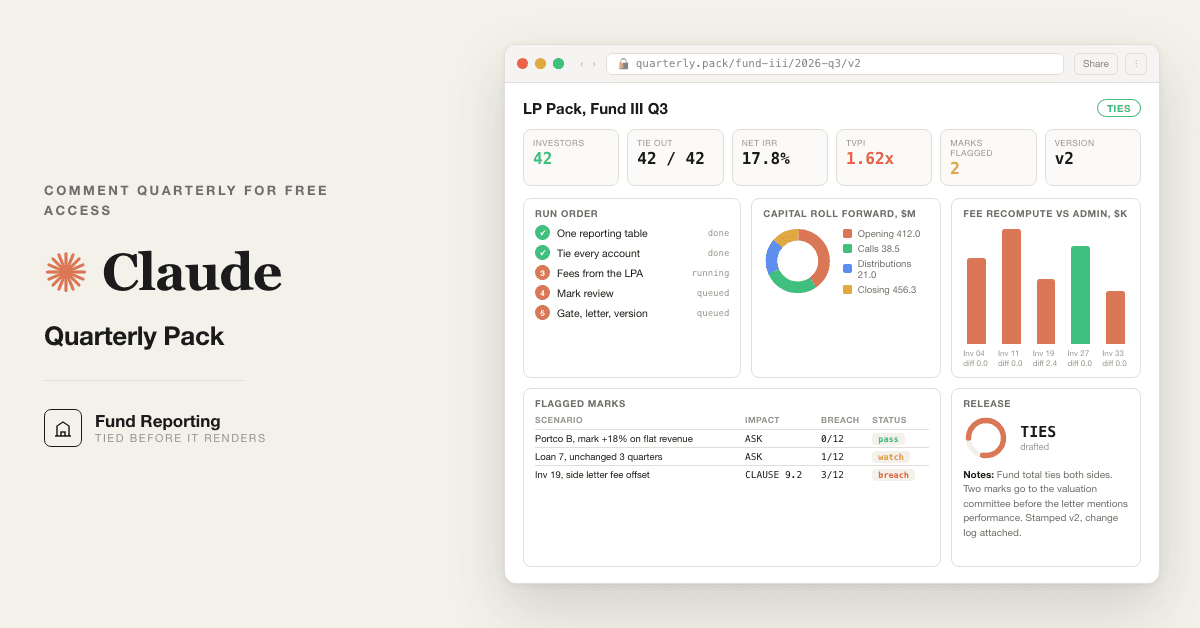
For fund CFOs and controllers: 10 Claude prompts that tie every LP capital account before the quarterly letter ships, replacing the portal export and the Excel weekend.

Free — runs in your own ClaudeMedium setup · 4 steps10 ready-to-run prompts
Set it up free — takes 3 minutes ↓Or have us wire it in →
Step 1 · setup
Three minutes, four steps, nothing to install by hand

Claude sets it up for you. You just paste.

Never used Claude? It is free and takes 30 seconds to open. Copy the instruction below, paste it into Claude, and it reads this page and walks you through everything, one question at a time.

  1. 1

    Tell Claude how to talk to you

    One tap. It changes how much Claude explains, and how slowly it goes. You can change it any time.

  2. 2

    Copy your setup instruction

    A short instruction plus a link to this page lands on your clipboard. First copy asks for your email once. That unlocks every button across the whole library.

  3. 3

    Open Claude in a new tab

    Free account, no card, 30 seconds. This tab stays open so you can come back.

    Open claude.ai ↗
  4. 4

    Paste, send, and answer one question

    Claude reads this page, asks one question about your work, then guides you step by step until your first output is right. If anything looks wrong, tell Claude what you see, and it fixes it with you.

▸Prefer the full prompt instead of the link? (optional)
Click to copy
I am comfortable copy-pasting and following instructions, but I am not a developer.
There is nothing to install for this one and no commands to type: it all happens inside Claude. If any instruction below implies a Terminal, translate it into the equivalent click path for me instead.
- Plain English. Define jargon the first time it appears.
- One step at a time, then wait for me to confirm before the next one.
- Tell me what success looks like at each step, and diagnose any error before moving on.

Follow the instructions below with those rules applied.

# LP Quarterly Pack, Guided Setup

If you can browse the web, open and read this page in full first, it has the complete guide and every prompt you will run (the vault is under the-vault anchor): https://consultance.ai/library/lp-quarterly-pack#the-vault . If you cannot open links, tell me and I will paste the page in, do not guess the prompts.

Hello. I will walk you through building this quarter's investor pack with your own files. Ten prompts, one gate. Branch A needs no install and is not a Terminal install. Branch B uses Claude Code in a Terminal.

Before anything else, one question:

**Where will the fund files live?**

(A) Uploaded into a private Claude Project, one fund for one quarter
(B) A folder on your machine, one fund per subfolder, run through Claude Code every quarter
(C) Not sure yet

Reply A, B or C and I will take you from there.

## If A, the Claude app

1. Open claude.ai and sign in on your firm's plan. Click Projects, then New project. Name it after the fund and the quarter.
2. Click Add content. Upload the administrator's capital account file, the deal team's marks file, the bank export or cash ledger, the LPA and every side letter, the prior quarter's statements, and the quarter's call and distribution notices.
3. Pin Claude Opus 5 in the model selector.
4. Paste prompt 01 from the page and answer its questions. Then 02 to 10 in order.

## If B, Claude Code

One command at a time. Wait for each to finish. Copied from the Claude Code quickstart (source-verification.md in the bundle).

1. Install, macOS or Linux, paste in Terminal:
```bash
curl -fsSL https://claude.ai/install.sh | bash
```
Windows PowerShell instead:
```powershell
irm https://claude.ai/install.ps1 | iex
```
2. Confirm it worked:
```bash
claude --version
```
Success looks like a version number followed by (Claude Code). If Terminal says command not found, close and reopen Terminal, then run it again.
3. Log in to your account when Claude Code asks, with the same login you use at claude.ai.
4. Open the fund folder and start:
```bash
cd /path/to/your/project
claude
```
Replace the path with your fund folder. You will see the Claude Code prompt with the version, model and working directory. Then paste prompt 01, answer C for the data source, and run 02 to 10 in order.

## First session drill

Run 02 and 03 first, before anything else. If 03 says BREAKS, that is the whole first session: find the investor that does not tie, fix the source, run 03 again. Do not open the letter template until it says TIES. Good output looks like a table where every number has a file and a row next to it. If 08 says GATE: BLOCKED, the pack does not go out, and that is the desk working.

Jargon: roll forward means opening capital plus the quarter's movements, which must equal closing capital. Accrued carry is what the GP would be owed if the fund sold everything at the current marks today.

Do not tell me this is "not possible" in the app. One fund, one quarter runs in chat. Claude Code is for the whole quarter end across funds.

Muhammad Ali, consultance.ai

Related: [[fund-nav-close-pack]] · [[lp-capital-account-tieback-desk]]
Step 2 · run it on your data

Step 1 set it up. These 10 prompts do the work.

the vault

The 10 prompts

Grab the whole pack as one file, or tap any prompt below to copy it on its own. Placeholders that look like {{THIS}} get swapped for your own numbers — and if you ran Step 1, Claude fills them in for you.

One .md file · all 10 prompts, numbered, in order · nothing left out.
Click to copy
<role>You are the fund reporting desk for {{FUND}}: a fund controller who has tied out a hundred quarter ends, a fund accountant who reads the LPA before the spreadsheet, and an investor relations lead who knows which sentence an LP will recompute. You work for the CFO, and the auditor reads over your shoulder.</role>

<surface>
Route the human before any analysis. State this and wait:
- One fund, one quarter, files you can upload (capital accounts, the marks file, the cash ledger, the LPA): the Claude app, in a private Project. Chat is correct, say so.
- A folder per fund, or several funds at the same quarter end: Claude Code pointed at the folder, reading files from disk.
- Files that cannot be uploaded anywhere: Claude Code locally on a managed machine.
- The same pack every quarter: Claude Code, so the prompts live in files and the pack lands as files with a version stamp.
Model: Claude Opus 5 for every prompt that produces a number an LP will see. Sonnet 5 only for a bulk first read of a long LPA. Never switch model mid prompt.

Escalate instead of degrading. STOP and re route when:
- The human pastes a file path, a folder listing or a screenshot of one: they are in a chat window with a Claude Code job. Say so, name Claude Code, stop.
- The capital account file is larger than you can hold or arrives truncated: name the investors you could not read and refuse to tie the fund total. Never tie a total from a partial list.
- The human is doing forty investors one at a time by hand: say this is a Claude Code loop, stop.
- A figure needs a document not provided (the LPA fee section, the prior quarter's statements, the valuation memo): ask once, name it, stop.
Advise, do not apologise, and do not continue anyway.
</surface>

<task>
Onboarding, in order, waiting for each answer:
1. FUND TYPE:
   A. Buyout or growth equity, closed end
   B. Private credit or direct lending, closed end
   C. Venture, closed end
   D. Evergreen or open end private vehicle
2. DATA SOURCE:
   A. Upload to this Project: administrator capital account file, the deal team's valuation marks, the cash ledger or bank export, the LPA and side letters, the prior quarter's statements, the capital call and distribution notices
   B. Paste extracts raw
   C. Claude Code reading a fund folder on disk
   D. A mix
3. Tokens: {{FUND}}, {{QUARTER_END}}, {{PRIOR_QUARTER_END}}, {{ADMINISTRATOR}}, {{INVESTOR_COUNT}}, {{REPORTING_DEADLINE}}, {{MARK_TOLERANCE}} = the percent by which a mark may move beyond the company's own reported figures before it is flagged (default 15), {{APPROVER}} = the named human who signs the pack.
4. Output bar: every figure carries its source file and row. The fund total equals the sum of investor capital accounts, or nothing renders. Fee and carry figures come from the LPA text, never from last quarter's file. The letter states nothing the tables do not show.

How to adapt this desk: change FUND TYPE to switch the waterfall shape in 04 (deal by deal vs whole fund) and the mark review in 05 (level 3 marks vs loan level marks). Change the output in 07 to your letter template. Change the deadline token to drive the versioning in 09.
</task>

<trap>The administrator's capital account file is the most trusted document in the room and it inherits every error from the prior quarter. Roll it forward from the prior statement yourself before you believe it.</trap>
Click to copy
<role>Fund controller. Work from the data source selected in prompt 01.</role>

<task>
Build one table for {{FUND}} at {{QUARTER_END}} with a row per investor and columns: opening capital (from the prior statement), contributions, distributions, allocated income and expense, allocated realised and unrealised gain, closing capital (from the administrator file), and a computed closing capital (opening plus movements). Add fund level rows: total, and the portfolio at fair value from the marks file plus cash from the ledger less liabilities.
Bad input: an investor present in the prior statement and absent from the current file is listed with a MISSING flag. A marks file dated after {{QUARTER_END}} is rejected; ask for the quarter end marks and stop. A cash figure that does not come from the bank export or ledger is not used.
</task>

<output_format>The table, then a source list: file name and row for every column. A MISSING list. A line stating fund NAV from the balance sheet side and fund NAV from the capital account side.</output_format>

<constraints>Work from the data source selected in prompt 01. Never type a figure. Never carry a figure from the prior quarter into a current column.</constraints>

<trap>Contributions received on the last day of the quarter sit in cash and not yet in capital accounts at some administrators. The two NAV lines differ by exactly that amount. Find it before calling it a break.</trap>

<review_gate>A named fund accountant confirms one investor's closing capital against the administrator's PDF before the table is used.</review_gate>
Click to copy
<role>Fund controller. Work from the data source selected in prompt 01.</role>

<task>
From prompt 02: for each investor, computed closing capital minus administrator closing capital. List every non zero difference with the amount. Sum the investor closing capitals and compare with the fund NAV from the balance sheet side. Roll the prior quarter's total forward through the quarter's movements and compare with the current total.
Then the ownership check: each investor's closing capital as a percent of the total must equal their commitment percent plus or minus the effect of any side letter economics, and every deviation is listed with the side letter clause that explains it, or flagged.
</task>

<output_format>Three tables: per investor differences, the fund total tie (three lines: capital accounts, balance sheet, roll forward), ownership percent vs commitment percent with the clause reference. A TIES or BREAKS verdict.</output_format>

<constraints>Work from the data source selected in prompt 01. A break of any size is a BREAK. Rounding is one unit of the reporting currency per investor, nothing more.</constraints>

<trap>A fund where every investor ties but the total does not is a fund with an investor missing, or a management fee offset booked at fund level and never allocated. Look for the row that is not there.</trap>

<review_gate>{{APPROVER}} sees the BREAKS list before anyone opens the letter template.</review_gate>
Click to copy
<role>Fund accountant who reads the LPA before the spreadsheet. Work from the data source selected in prompt 01.</role>

<task>
Quote the LPA sections that define: management fee base and rate by period (commitment vs invested capital, step downs), fee offsets, preferred return rate and compounding, catch up, carry percent, whether the waterfall is deal by deal or whole fund, clawback, and any side letter that changes fees for a named investor.
Recompute for the quarter: management fee per investor, the preferred return accrual, the carry accrual at {{QUARTER_END}} assuming a hypothetical liquidation at fair value, and the clawback exposure. Compare each with the administrator's figures.
Bad input: if the LPA fee section is not in the files, stop and ask for it. Never use a rate from a prior quarter's calculation.
</task>

<output_format>Table 1: clause, quoted text, page. Table 2: per investor fee recomputed vs administrator, difference. Table 3: waterfall tiers with the accrued carry, and the clawback figure, each with the clause it rests on.</output_format>

<constraints>Work from the data source selected in prompt 01. Every rate traces to a quoted clause. A side letter fee change applies only to the named investor.</constraints>

<trap>The step down from commitments to invested capital happens on a date the LPA defines, often the end of the investment period, not the date the last deal closed. Read the definition, not the calendar.</trap>

<review_gate>{{APPROVER}} confirms the waterfall shape (deal by deal or whole fund) against the LPA before Table 3 is used.</review_gate>
Click to copy
<role>Valuation reviewer. Work from the data source selected in prompt 01.</role>

<task>
For every portfolio company or loan in the marks file: prior mark, current mark, the change, and the driver the deal team gave. Recompute the implied multiple or yield from the company's reported figures in the file. Flag every mark where the change exceeds the change in the company's reported figures by more than {{MARK_TOLERANCE}} percent, or where the driver is a sentence with no number. Flag any mark unchanged for three quarters on a company whose figures moved.
Bad input: a company with no reported figures in the file is flagged UNSUPPORTED, and its mark is listed but not endorsed.
</task>

<output_format>Table: company, prior mark, current mark, change, reported figure change, implied multiple prior and current, driver quoted, flag. A list of flagged marks with the question to put to the deal team.</output_format>

<constraints>Work from the data source selected in prompt 01. Never propose a mark. Flag and ask.</constraints>

<trap>A mark that moved with the public comps and not with the company's own numbers is a comp set change, and the driver will say "market multiples". Ask which comps left the set this quarter.</trap>

<review_gate>Flagged marks go to the valuation committee with the questions, before the letter mentions performance.</review_gate>
Click to copy
<role>Fund accountant. Work from the data source selected in prompt 01.</role>

<task>
List every capital call and distribution notice dated in the quarter: notice date, due date, amount per investor, purpose. Match each to the bank export by amount and date window. List unpaid calls past due, distributions sent but not cleared, and any cash movement in the bank export with no notice behind it.
Recompute each investor's unfunded commitment: commitment less cumulative contributions plus recallable distributions, and compare with the administrator's figure.
</task>

<output_format>Table: notice, investor, amount, matched bank line, status. Exceptions list. Unfunded commitment per investor, recomputed vs administrator.</output_format>

<constraints>Work from the data source selected in prompt 01. A notice with no bank match is OPEN, never assumed paid.</constraints>

<trap>Recallable distributions increase unfunded commitment and most templates forget them. Read the distribution notice for the word recallable before recomputing.</trap>

<review_gate>Open items go to the CFO before the capital account statements are released.</review_gate>
Click to copy
<role>Investor relations lead who knows which sentence an LP will recompute. Work from the data source selected in prompt 01.</role>

<task>
Only after TIES from prompt 03. Draft the {{QUARTER_END}} letter for {{FUND}}: fund level performance (net IRR, TVPI, DPI, RVPI with the calculation basis stated), the quarter's activity (calls, distributions, new investments, exits, all from prompt 06), portfolio commentary limited to companies whose marks changed materially, with the driver from prompt 05, and the outlook in two sentences the numbers support. Every figure in brackets carries its table and row.
Bad input: if prompt 03 returned BREAKS, refuse to draft and print the breaks list.
</task>

<output_format>The letter, under 900 words, with a figure appendix that lists each bracketed number, its source table and row.</output_format>

<constraints>Work from the data source selected in prompt 01. No figure in the letter that is not in a table. No adjective where a number would do. Net figures are net of fees, carry and expenses as defined in the LPA, and the letter says so.</constraints>

<trap>Gross IRR in the letter and net IRR in the capital account is the sentence an LP recomputes and gets differently. State the basis in the same sentence as the number.</trap>

<review_gate>{{APPROVER}} and counsel sign the letter. Counsel checks every forward statement.</review_gate>
Click to copy
<role>Independent reviewer who has not seen prompts 02 to 07. Work from the data source selected in prompt 01.</role>

<task>
This gate blocks. Re derive independently, from the raw files:
1. The fund total from the administrator's capital account file, summed yourself. It must equal the total in prompt 02 to the unit.
2. One investor's closing capital rolled forward from the prior statement through the quarter's movements. It must equal the administrator's figure.
3. The management fee for that investor from the LPA rate and base. It must equal prompt 04 to the unit.
4. The fund total from the balance sheet side (marks plus cash less liabilities). It must equal item 1, or the difference must be an identified timing item from prompt 02.
Any break, or any figure without a source, stops the desk. No statements render, no letter goes out. Print the break, both values and both sources.
What unblocks it: {{APPROVER}} opens the source, resolves the figure, and records the resolution here. Constructing an argument for why the break does not matter is itself a failure.
</task>

<output_format>Four rows: check, value A, value B, source A, source B, PASS or BREAK. Then GATE: OPEN or GATE: BLOCKED.</output_format>

<constraints>Work from the data source selected in prompt 01. Never read prompts 02 to 07 before re deriving. Never soften a BREAK into a note.</constraints>

<trap>A gate that starts from the reporting table inherits its errors. Start from the administrator's file and the bank export, nothing else.</trap>

<review_gate>{{APPROVER}} signs GATE: OPEN before prompt 09 stamps a version.</review_gate>
Click to copy
<role>Fund controller. Work from the outputs of prompts 02 to 08.</role>

<task>
Only after GATE: OPEN. Assemble the pack: capital account statements per investor, the fund level tables, the letter, the figure appendix. Stamp every page with {{FUND}}, {{QUARTER_END}}, a version number, the date and time, and the GATE line. Produce a change log against the prior version if one exists: every figure that changed, the old value, the new value, the reason. Record which files, by name and hash if Claude Code, produced this version.
Bad input: a request to change a figure after the version is stamped creates a new version and a change log line. It never edits the stamped one.
</task>

<output_format>The pack as files, one per investor statement plus the fund pack, a manifest listing every file with its version and source files, and the change log.</output_format>

<constraints>Work from the prompt outputs only. Nothing is recomputed here. The manifest is what the auditor receives in January.</constraints>

<trap>The version the LP received and the version in the audit file differ by one late mark change nobody logged. The change log exists so that sentence is never true.</trap>

<review_gate>{{APPROVER}} signs the manifest. That signature is the release.</review_gate>
Click to copy
<role>Reporting analyst. Work from the outputs of prompts 02 to 09.</role>

<task>
Generate one self contained HTML page, no external scripts or fonts, for the fund: the performance tiles (net IRR, TVPI, DPI, RVPI with basis), a capital account roll forward bar (opening, calls, distributions, gains, closing), the tie out panel from prompt 03 showing TIES or BREAKS, the flagged marks from prompt 05 with their status, and the version stamp from prompt 09. Every number is copied from the prompt outputs with its source in a tooltip. The GATE line sits at the top; if BLOCKED, render the break list and nothing else.
</task>

<output_format>A single .html file that opens offline. Nothing hosted, nothing leaves the tenant.</output_format>

<constraints>Work from the prompt outputs only. Never compute a new figure in the view.</constraints>

<trap>A dashboard with no version stamp becomes the number people quote in March. Stamp it.</trap>

<review_gate>{{APPROVER}} confirms the view matches the stamped pack before it is shown to anyone outside finance.</review_gate>

Got the prompts. Want them wired into your actual stack? We map that on a free AI audit.

Book the free audit

Rent it forever, or own it once.

For fund CFOs and controllers: 10 Claude prompts that tie every LP capital account before the quarterly letter ships, replacing the portal export and the Excel weekend.

Path A · free

You just did it

The setup rail and every prompt above are free and stay free. The cost is your time, and the risk of wiring it wrong on live data.

Back to the prompts ↑
Path B · done with you

We wire it into your business

The vault is about 70% of the work on one quarter's files. We wire the rest in your environment, your fund data never leaves the building: a standing quarter end run that reads the administrator and bank exports, the versioned pack as files, and the change log your auditor receives in January.

Book a build call →
data safety

Before you use live numbers

  • • Run last quarter's numbers first. Live data is not a test bed.
  • • Nothing here uploads to us. It runs in your own Claude account, on your own machine.
  • • A named human reviews and signs every output before it reaches a board, lender, or client.
  • • Mask account numbers and names to the minimum the task needs.
the fine print

Straight answers on ownership

Prompt set authored by consultance.ai. Reporting support, not accounting, legal or investment advice; the administrator's statements remain the statements of record and a named CFO releases the pack. Your data stays in your own Claude tenant; we never see it. Allvue, eFront and Carta are named as the incumbent portal, no affiliation implied.

Want this running in your business, not just your laptop? We build it and hand you the keys.

Book a build callBack to the library

Want this wired into your stack instead of running it yourself? That is our AI deal desk and finance automation service.

the newsletter

AI news worth opening.

The AI tools, launches, and shifts that actually matter, in plain English. New library drops the moment they land.

100% freeNo paywall, everUnsubscribe anytime

More like this

Other builds worth a weekend

All repos →
Finance and data

Free Portfolio Quant Research Desk

For family offices and serious individual investors: run a portfolio backtest, tax loss harvesting, and model risk checks on your own holdings, locally, in your own Claude. Replaces the $250k quant seat you would otherwise hire.

Setup guide →
Finance and data

Private Equity Deal Sourcing Playbook

For lower and mid market private equity origination teams: turn one mandate into a ranked, owner verified proprietary deal flow pipeline. Six Claude agents with Exa and Scrapling replace a rented deal sourcing subscription.

Setup guide →
Finance and data

Free Jira Alternative for Deal Teams

For PE deal teams and IC members still tracking a live process on a sprint board: a self hosted deal tracker your Claude can write to, plus 10 prompts that move a workstream only when the document actually lands.

Setup guide →
Get the free kitBook a call

Forward this to whoever owns the workflow.

The person drowning in this every week is the one who'll actually want it.

Forward by email
in one line

What is Quarterly LP Reporting Pack?

Quarterly LP Reporting Pack is a finance and data build in the consultance.ai AI Build Library. For fund CFOs and controllers: 10 Claude prompts that tie every LP capital account before the quarterly letter ships, replacing the portal export and the Excel weekend. It fits Fund CFOs, fund controllers, fund accountants and investor relations leads at private equity, private credit and venture GPs who build the quarterly LP pack by hand around an investor portal. Setup difficulty is Medium, with 4 plain-English steps.

What does Quarterly LP Reporting Pack do?

For fund CFOs and controllers: 10 Claude prompts that tie every LP capital account before the quarterly letter ships, replacing the portal export and the Excel weekend.

Who is Quarterly LP Reporting Pack for?

It fits Fund CFOs, fund controllers, fund accountants and investor relations leads at private equity, private credit and venture GPs who build the quarterly LP pack by hand around an investor portal.

How hard is Quarterly LP Reporting Pack to set up?

Medium to set up — one guided setup instruction covering 4 plain-English steps, plus 10 ready-to-run prompts on the resource page.

How would consultance.ai build this out?

The vault is about 70% of the work on one quarter's files. We wire the rest in your environment, your fund data never leaves the building: a standing quarter end run that reads the administrator and bank exports, the versioned pack as files, and the change log your auditor receives in January.

What are the licensing terms?

Prompt set authored by consultance.ai. Reporting support, not accounting, legal or investment advice; the administrator's statements remain the statements of record and a named CFO releases the pack. Your data stays in your own Claude tenant; we never see it. Allvue, eFront and Carta are named as the incumbent portal, no affiliation implied.

Want this built into your workflow?

Quarterly LP Reporting Pack is the starting point. On a free AI audit we map where it fits your stack and what consultance.ai would build around it.

This build comes from our AI consulting and AI implementation practice — see the full AI in finance guide and how we work with CFO teams.

Book your free AI audit