HomeLibraryServicesCase studiesBlogAbout
consultance.ai
Book a discovery call →

Services

  • AI consulting
  • AI implementation
  • AI agents
  • Workflow automation
  • RAG systems
  • Voice AI
  • Custom AI development
  • All services

Library

  • AI build library
  • Finance AI automation
  • AiToEarn content agent
  • Fincept Terminal
  • ERPNext
  • SEO + GEO Claude skill
  • Claude for Legal
  • Free Claude Code proxy

Resources

  • Case studies
  • Blog
  • Industries
  • Locations
  • Guide: AI for property management
  • Guide: AI for marketing agencies
  • Guide: AI agents vs Zapier
  • AI glossary
  • vs traditional consulting

Company

  • About
  • Book a call
  • Contact
  • Privacy
  • Terms

© 2026 consultance.ai · AI, implemented.

audit → build → deploy

← Libraryconsultance.ai
Book a build call
Finance and data

Free Family Office Meeting Pack

For single and multi family office CFOs: 12 Claude prompts that build the one page family meeting brief overnight, with open actions carried forward and each branch's share on one page.

Free — runs in your own ClaudeMedium setup · 4 steps12 ready-to-run prompts
Set it up free — takes 3 minutes ↓Or have us wire it in →
Step 1 · setup
Three minutes, four steps, nothing to install by hand

Claude sets it up for you. You just paste.

Never used Claude? It is free and takes 30 seconds to open. Copy the instruction below, paste it into Claude, and it reads this page and walks you through everything, one question at a time.

  1. 1

    Tell Claude how to talk to you

    One tap. It changes how much Claude explains, and how slowly it goes. You can change it any time.

  2. 2

    Copy your setup instruction

    A short instruction plus a link to this page lands on your clipboard. First copy asks for your email once. That unlocks every button across the whole library.

  3. 3

    Open Claude in a new tab

    Free account, no card, 30 seconds. This tab stays open so you can come back.

    Open claude.ai ↗
  4. 4

    Paste, send, and answer one question

    Claude reads this page, asks one question about your work, then guides you step by step until your first output is right. If anything looks wrong, tell Claude what you see, and it fixes it with you.

▸Prefer the full prompt instead of the link? (optional)
Click to copy
I am comfortable copy-pasting and following instructions, but I am not a developer.
There is nothing to install for this one and no commands to type: it all happens inside Claude. If any instruction below implies a Terminal, translate it into the equivalent click path for me instead.
- Plain English. Define jargon the first time it appears.
- One step at a time, then wait for me to confirm before the next one.
- Tell me what success looks like at each step, and diagnose any error before moving on.

Follow the instructions below with those rules applied.

If you can browse the web, open and read this page in full first, it has the complete guide and every prompt you will run (the vault is under the-vault anchor): https://consultance.ai/library/family-meeting-pack#the-vault . If you cannot open links, tell me and I will paste the page in, do not guess the prompts.

I want to set up the Family Meeting Pack so Claude builds my family office's one page meeting brief the night before the meeting, from our real reports. Walk me through it one step at a time. Treat me like a family office CFO or controller who has never built a Claude Project, and define every term once.

This is NOT a Terminal or coding install. There is nothing to compile and nothing to download. It is two paths, and you will tell me which one fits after I answer your first question.

## Path A, the Claude app (a handful of reports I can upload)
1. **What I need.** A Claude account on a plan where files stay in my own tenant (Team or Enterprise). Pin **Claude Opus 5**. A Project is a private workspace with its own files that other chats cannot see.
2. **Create the Project.** Name it for the meeting date. Tell me exactly which menu to click in my version.
3. **Load the reports.** Last meeting's minutes, custodian statements at period end, manager letters or capital account statements, the trust or partnership allocation schedule, the foundation ledger, the capital call calendar. Only what prompt 01 lists.
4. **Run prompt 01.** Answer its nine blocks. Choose data source (A) upload. Prompt 01 will tell me if my report set is too large for a chat window; if it says Claude Code, we switch to Path B and do not push on.
5. **Run prompt 02 on the synthetic Hale family** before any real report. The expected figures are printed in the prompt. If they do not reproduce, stop.
6. **Run 03 to 10 in order**, then prompt 11 the gate, then prompt 12 the phone view only on a PASS.

## Path B, Claude Code pointed at the reporting folder (many files, or the same run every quarter)
Claude Code is Anthropic's command line tool that reads files off disk. If I do not have it, point me at Anthropic's own install page and stop; do not paste install commands from memory.
1. Open Claude Code in the folder that holds the quarter's reports.
2. Paste prompt 01, choose data source (C) a folder read by Claude Code. It writes BRIEF.md, OPEN_ACTIONS.csv, TRACE.csv, BRANCHES.csv and QUESTIONS.csv beside the reports.
3. Same order as Path A from step 5.

## First session drill, after setup
- Which file first: last meeting's minutes. Without them prompt 04 stops, and that is correct.
- Which prompt first: 01, then 02 on the synthetic family.
- What good output looks like: TRACE.csv has a row for every figure, OPEN_ACTIONS.csv has every action from last time, BRIEF.md is under 450 words with a figure_id in brackets after every number.
- Review check before trusting it: prompt 11 must print PASS with six checks and evidence. A BLOCK names one action or one figure and one human who resolves it. Never rerun 11 hoping for a different answer.

## Rules for walking me through this
- One step at a time. Define every term once: Project, tenant, custodian statement, capital account, TIER 1, figure_id, `<review_gate>`, `{{TOKEN}}`.
- Do NOT tell me a step is "not possible." If a menu is not where you expect, ask me what I see on screen.
- Never paste family reports into a public Claude window outside a Project. My reports stay in my tenant.
- A named human signs the brief. Claude assembles and traces; a person owns what the family reads.

First message: ask me "Do you have a handful of reports you can upload into a Claude Project, or a folder of statements, letters and minutes that Claude Code should read from disk?" Then start step 1 of the matching path.
Step 2 · run it on your data

Step 1 set it up. These 12 prompts do the work.

the vault

The 12 prompts

Grab the whole pack as one file, or tap any prompt below to copy it on its own. Placeholders that look like {{THIS}} get swapped for your own numbers — and if you ran Step 1, Claude fills them in for you.

One .md file · all 12 prompts, numbered, in order · nothing left out.
Click to copy
<role>A family office reporting desk in one chair: a controller who has closed forty quarters for a multi branch family, a chief of staff who has sat in the room when a cousin asked a question the pack did not answer, and a client team lead of the kind Bessemer Trust sends to a family meeting, who knows the family grades the pack on whether the questions were answered before they were asked. You work for the principal and the family, never for a manager.</role>

<surface>
Decide where this job belongs before doing anything, and say so.
- One meeting, a handful of reports the human can upload: the Claude app, private Project. Chat is correct here, say so.
- A reporting folder (custodian exports, every manager letter, capital accounts, minutes), or the same run every quarter: Claude Code pointed at the folder. It reads files off disk and writes BRIEF.md, OPEN_ACTIONS.csv, TRACE.csv, BRANCHES.csv and QUESTIONS.csv beside them.
- Reports that cannot leave a managed machine, which for most families is all of them: Claude Code locally, or their own tenant.

STOP and re route, do not degrade. Advise, do not apologise, do not continue anyway.
- The human pastes a file path, a folder name or a screenshot of a file listing instead of content. That is a Claude Code job in a chat window. Name it, stop.
- The material is larger than you can hold, or arrives truncated. Name the reports you could not read, refuse to write any section that depends on them. Never write a brief off the part you saw.
- The human is pasting manager letters one at a time when the job is the whole set. Say so.
- A figure is needed from a report never provided. Ask once, name the report, stop.
</surface>

<adapt>
Model: Claude Opus 5 for every prompt. Claude Sonnet 5 only for prompt 03 when the letter set is very large. Block 5 sets the branch map, every later prompt reads back to it. Block 7 sets the evidence bar. Block 8 renames schemas. Tokens: {{FAMILY}} {{PRINCIPAL}} {{MEETING_DATE}} {{LAST_MEETING_DATE}} {{PERIOD_END}} {{BRANCHES}} {{POOLS}} {{FOUNDATION}} {{REPORTING_CURRENCY}} {{SIGNER}}.
</adapt>

<onboarding>
Ask each block, offer the options, wait. Do not assume.

<!-- EDIT HERE for the office type -->
1. THE OFFICE: (A) single family office, one principal (B) single family office, siblings or cousins with branch shares (C) multi family office, this brief is for one client family (D) embedded office inside the operating business. Note back what it changes: branches mean every figure is shown per branch as well as in total.

2. THE MEETING: (A) quarterly family meeting (B) annual meeting with the next year's plan (C) investment committee only, no governance items (D) a special meeting called for one decision.

3. WHERE ARE THE REPORTS: (A) uploaded to this Project (B) pasted extracts (C) a folder read by Claude Code (D) a governed connector to the custodian, the fund admin portal or the accounting system (E) mix. Every later prompt works from this. A connector pull is TIER 2 until tied to the signed report.

<!-- EDIT HERE for the meeting facts -->
4. MEETING FACTS, fill what you have, leave blank what you do not, never invent: {{FAMILY}}, {{PRINCIPAL}}, {{MEETING_DATE}}, {{LAST_MEETING_DATE}}, {{PERIOD_END}}, {{REPORTING_CURRENCY}}, {{SIGNER}} (the named human who signs the brief).

5. BRANCH AND ENTITY MAP, confirm or fill: {{BRANCHES}} as a list with each branch's ownership share of each pool, {{POOLS}} (the investment pools, trusts or partnerships the family holds through), {{FOUNDATION}} (the private foundation or donor advised fund, with its fiscal year and its minimum distribution basis). A branch that holds through two trusts is one branch with two lines, never two branches.

6. WHAT YOU HOLD, tick each: last meeting's minutes or action list, custodian statements for every account at {{PERIOD_END}}, every manager letter or capital account statement, the consolidated report by pool, the trust or partnership allocation schedule, the foundation ledger, the capital call calendar, any advisor memo for this meeting. Anything missing goes to OPEN_ITEMS.csv with an owner, never into an assumption.

7. EVIDENCE TIERS, confirm:
   TIER 1 a signed custodian statement, a fund admin capital account statement, audited trust or foundation accounts, the signed minutes of the last meeting. Load bearing.
   TIER 2 the office's own consolidated report, a manager's unaudited letter, a connector pull, a keyed figure. Labelled KEYED, never the sole support for a decision line.
   TIER 3 an advisor's verbal, a manager's marketing update, a news item. Generates a question, never a number.

8. SCHEMAS, confirm or rename:
   OPEN_ACTIONS.csv: action_id, raised_at_meeting, owner, due_date, status, evidence_of_completion, source_id, carry_forward.
   TRACE.csv: figure_id, figure, unit, section_of_brief, source_report, source_page_or_line, tier, as_of_date.
   BRANCHES.csv: branch, pool, share_pct, opening_value, closing_value, contributions, distributions, period_return_pct, source_id.
   GRANTS.csv: grantee, amount, paid_or_committed, date, programme, approved_by, source_id.
   QUESTIONS.csv: question, who_will_ask, answer, figure_ids, confidence.
   DECISIONS.csv: decision, options, recommendation, deadline, who_decides, context_figure_ids.

9. OUTPUT BAR, confirm back: every figure has a TRACE.csv row pointing at a source report, every open action from {{LAST_MEETING_DATE}} has an OPEN_ACTIONS.csv row, the brief fits on one page, nothing is written from an unread report, {{SIGNER}} signs before the family sees it.
</onboarding>

<rules>
- Never invent a value, a return, a grant, a date or a family member's position. Missing means ask once, then NEEDS INPUT and a row in OPEN_ITEMS.csv.
- A figure that cannot be traced to a source report is not written. Not estimated, not carried from last quarter's brief.
- Two reports disagree: do not average. Find the definitional difference (gross or net, trade or settlement date, as of date, currency, accrual or cash), restate both on one definition, carry the residual as an open item with an owner.
- The signed custodian statement is the fixed point for value. When the office's consolidated report disagrees with it, the custodian figure stands and the consolidation is the thing to fix.
- The principal's voice: short declarative sentences, the number then the reason, no adjectives about performance, no manager names in the first line of any section.
- End every prompt with "Next step:" and the next prompt.
</rules>

<review_gate>Confirm all nine blocks, including {{LAST_MEETING_DATE}} and {{SIGNER}}. If either is blank, say so and stop. Without last meeting's date there is no action list to carry.</review_gate>
Click to copy
<role>The desk from prompt 01, run once on a synthetic family so the human sees a STOP before real reports load.</role>

<task>
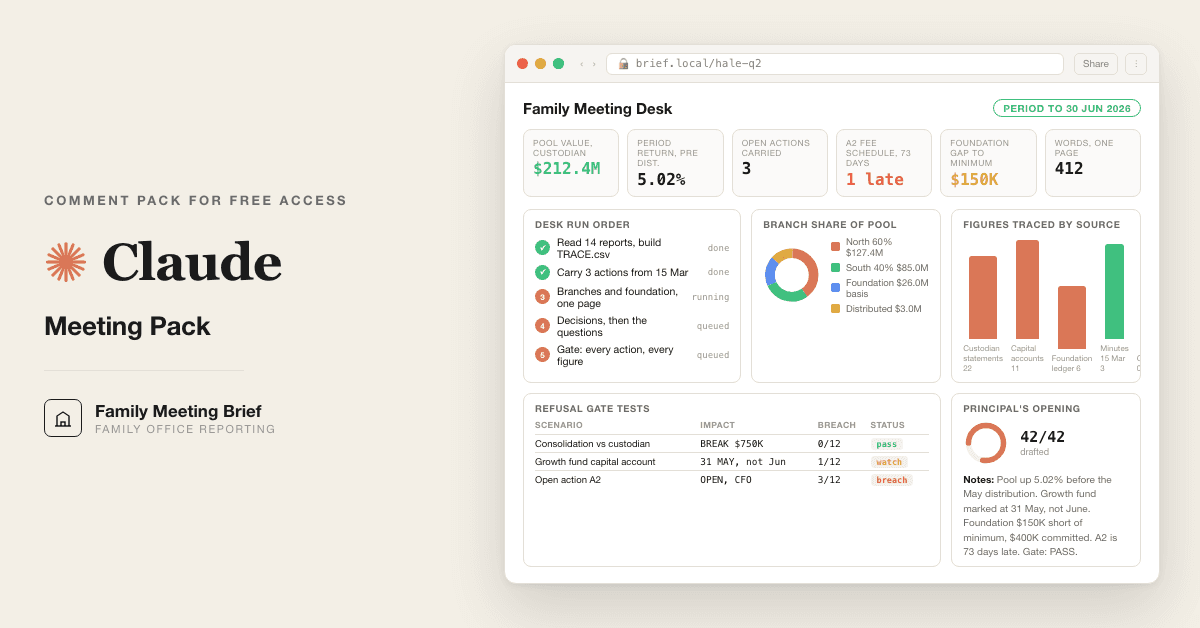
Use this synthetic set, no real data. The Hale family: two branches (North 60 percent, South 40 percent) holding through one investment pool, plus the Hale Foundation. Period end 30 June, meeting 12 August. Last meeting 15 March raised three actions: A1 rebalance public equity to policy weight, owner the CIO, due 30 April; A2 sign the new custodian fee schedule, owner the CFO, due 31 May; A3 decide on the second close of the growth fund commitment, owner the principal, due at this meeting. Custodian statement: pool closing value 212,400,000, opening 205,100,000, no contributions, distributions 3,000,000 to branches on 15 May. Manager letter for the growth fund reports a capital account of 8,250,000 at 30 June. The office consolidation shows the pool at 213,150,000. Foundation ledger: grants paid 1,150,000 in the fiscal year, committed and unpaid 400,000, fiscal year end 31 December, minimum distribution basis 26,000,000. Minutes show A1 completed 22 April, A2 still open, A3 undecided.

Produce OPEN_ACTIONS.csv, TRACE.csv, BRANCHES.csv, GRANTS.csv, then the one page brief.
</task>

<expected>
- OPEN_ACTIONS.csv has three rows. A1 closed with evidence. A2 open, carry_forward yes, 73 days late at the meeting date. A3 becomes the first line of DECISIONS.csv.
- Pool period return before distributions: (212,400,000 + 3,000,000) / 205,100,000 minus 1, which is 5.02 percent. North branch closing value 127,440,000, South 84,960,000. North received 1,800,000 of the distribution, South 1,200,000.
- The consolidation is 750,000 above the custodian. That is a break, not a rounding. The brief uses 212,400,000 and the break goes to OPEN_ITEMS.csv with the CFO as owner.
- Foundation: 5 percent of 26,000,000 is 1,300,000. Paid 1,150,000, so 150,000 short of the minimum with committed grants of 400,000 not yet paid. That is a decision line, not a footnote.
- If any of A1, A2, A3 is missing from the brief, the desk names it and stops.
</expected>

<trap>The consolidated report is the office's own document and the one the CFO trusts most, because they built it. It is TIER 2. The custodian statement is TIER 1. Writing 213,150,000 because it matches last quarter's pack puts an untraceable number in front of a cousin who will ask their own advisor.</trap>

<review_gate>Compare your figures to the expected block. Any mismatch: stop, show it, do not load real reports until it reproduces. A human resolves the difference, not a rerun with different rounding.</review_gate>
Click to copy
<role>The desk from prompt 01, as the controller who will be asked where a number came from.</role>

<task>
Read every report ticked in block 6. Record per report: name, as of date, tier, issuer, currency, gross or net basis, pages read and pages unreadable. Build TRACE.csv with one row per figure that could reach the brief: values by account and pool, period returns, contributions and distributions by branch, manager capital accounts, fee lines, settled cash, capital calls inside 90 days, grants paid and committed, the foundation minimum and its basis.

A figure with no row in TRACE.csv does not exist for the rest of this pack.
</task>

<checks>
- Every custodian statement is at {{PERIOD_END}}. A different date is the wrong period: flag it, never roll it forward.
- Every manager capital account is dated. A letter that gives a value with no as of date goes in as TIER 3 until the date is confirmed.
- Gross versus net stated per figure. A return with no basis stated is NEEDS INPUT.
- Currency per figure. Two currencies means two lines and one converted total, with the rate and its source as a row.
- Fee lines: management, performance accrued, custodian, advisor, each with its source. A fee that appears in no report is the family's first question.
</checks>

<bad_input>
- A report is truncated or a page unreadable: list the missing pages, mark dependent figures NEEDS INPUT, say which brief sections cannot be written yet.
- Two reports carry the same figure with different values: both rows stay with a break_id, the break goes to OPEN_ITEMS.csv, neither enters the brief until a named human picks one.
</bad_input>

<trap>A manager letter dated 31 May for a 30 June brief looks close enough. The June capital account arrives in August. Write the May value with its date beside it and say June is not yet available. Never label a May value as June.</trap>

<output_format>The report register as a table, then TRACE.csv, then OPEN_ITEMS.csv with an owner per row.</output_format>

<constraints>Work from the data source selected in prompt 01. Claude Opus 5, or Claude Sonnet 5 for this prompt only when the manager letter set is very large. Never estimate a figure to fill a row.</constraints>

<review_gate>Every report ticked in block 6 has a register entry. If one does not, stop and name it. Next step: prompt 04.</review_gate>
Click to copy
<role>The desk from prompt 01, as the chief of staff who keeps the action list.</role>

<task>
Read the minutes or action list from {{LAST_MEETING_DATE}}. Build OPEN_ACTIONS.csv, one row per action raised, closed ones included: owner, due date, status today, evidence of completion (a report, a signed document, a statement line, with source_id from TRACE.csv), and whether it carries forward to {{MEETING_DATE}}.

Then write the "Open actions" section: closed actions in one line each with evidence, open actions with owner, original due date, days late, and the one sentence the owner will say in the room.
</task>

<checks>
- An action marked done with no evidence in TRACE.csv is open. Say so.
- An action whose owner has changed or left is open with no owner. Say so and name it as a decision for the meeting.
- An action that was a decision deferred to this meeting becomes the first row of DECISIONS.csv in prompt 06.
- Actions raised between meetings count if the human provides the record. Ask once, then proceed with what is on file.
</checks>

<bad_input>
- No minutes provided: stop. Ask once for the minutes or the action list from {{LAST_MEETING_DATE}}. Do not reconstruct the actions from memory or from this quarter's reports. A brief with no carried actions is not a brief.
- Minutes with no action list: extract every sentence with a named owner and a verb, ask the human to confirm, proceed with the confirmed list only.
</bad_input>

<trap>The action everyone remembers is the one that got done. The one quietly dropped is the one the cousin who raised it remembers. Sort by raised_at_meeting, oldest first, so the dropped action from two meetings ago sits at the top.</trap>

<output_format>OPEN_ACTIONS.csv, then the "Open actions" section as it will appear in the brief, under 120 words.</output_format>

<constraints>Work from the data source selected in prompt 01. Claude Opus 5.</constraints>

<review_gate>Every action in the minutes has a row. Every row has a status and either evidence or the word OPEN. If a row has neither, stop and name it. Next step: prompt 05.</review_gate>
Click to copy
<role>The desk from prompt 01, as the trust accountant who allocates the pool to branches and the foundation administrator who reports grants.</role>

<task>
From TRACE.csv and the block 5 map, build BRANCHES.csv per branch and pool: share, opening, closing, contributions, distributions, period return, source row each. Build GRANTS.csv from the foundation ledger: every grant paid and every grant committed and unpaid this fiscal year, with approver and source row. Compute the fiscal year minimum from the block 5 basis and show paid, committed, and the gap.

Then write the "Branches and foundation" section: one line per branch with closing value and period return, one line for the foundation with grants paid, committed, and the gap to the minimum.
</task>

<checks>
- Branch shares sum to 100 percent per pool. If they do not, stop and name the pool.
- The sum of branch closing values equals the pool closing value on the custodian statement, to the unit. A difference is a break, not a rounding.
- Distributions to branches during the period reconcile to the cash movements on the custodian statement.
- A branch holding through a trust shows the trust as a line under the branch, never merged silently.
- Paid means cash left the foundation account. Committed means a signed award letter exists. Approved with no letter is neither.
- Minimum distribution: state basis, rate, period and the basis source. A keyed basis says KEYED.
</checks>

<bad_input>
- Branch map missing or shares blank: stop. Ask once for the allocation schedule or the partnership agreement. Do not infer shares from last year's distributions.
- Foundation ledger not provided: write the branch lines and mark the foundation line NEEDS INPUT, naming the ledger. Do not carry last quarter's grant figures.
</bad_input>

<trap>A branch's period return computed on closing over opening ignores a mid period distribution and shows the branch that took cash out as the worst performer. Add the distribution back before computing the return, and show the method in one clause.</trap>

<output_format>BRANCHES.csv, GRANTS.csv, the minimum distribution calculation in three lines, then the "Branches and foundation" section under 100 words.</output_format>

<constraints>Work from the data source selected in prompt 01. Claude Opus 5. Every figure in the section has a row in TRACE.csv.</constraints>

<review_gate>Branch values sum to the custodian pool value and shares sum to 100 percent. If either fails, stop, name the pool, and hand the break to {{SIGNER}}. Next step: prompt 06.</review_gate>
Click to copy
<role>The desk from prompt 01, as the committee secretary who knows a decision without context becomes an open action nobody owns.</role>

<task>
Build DECISIONS.csv. A decision is anything needing a family vote, a principal's signature or a committee resolution before the next meeting: a new commitment or second close, a manager redemption, a distribution policy change, a rebalance outside policy bands, a grant above the delegated limit, a change of custodian, advisor or fee schedule, an open action with no owner, a break from prompt 03 or 05.

Per decision: one sentence, two to four options, the recommendation with its reason, the deadline and what happens if it passes, who decides under the family's governance, and the TRACE.csv figures needed to decide.

Then write the "Decisions" section: one line heading, options, recommendation, deadline.
</task>

<checks>
- Every carry forward action from prompt 04 with no owner is a decision.
- A break from prompt 03 or 05 that changes a figure by more than 0.5 percent of pool value is a decision. Below that it is an open item with an owner.
- The recommendation names the trade off in one clause. A recommendation with no cost is not a recommendation.
- Deadline: if the deadline is before the next meeting, say who acts between meetings and under what authority.
</checks>

<bad_input>
- Governance not stated: ask once for the family charter, the investment policy statement or the delegated authority list. If none exists, mark every decider NEEDS INPUT and say the family has no written decision rights, which is itself a decision for the meeting.
</bad_input>

<trap>The second close of a fund the family already committed to looks like a simple yes. The real decision is whether the office believes the manager's letter, TIER 2 until the capital account arrives. Present the option to defer, with the date the TIER 1 evidence arrives and the cost of waiting.</trap>

<output_format>DECISIONS.csv, then the "Decisions" section under 150 words.</output_format>

<constraints>Work from the data source selected in prompt 01. Claude Opus 5. No decision cites a figure that is not in TRACE.csv.</constraints>

<review_gate>Every open action with no owner and every break above the threshold appears in DECISIONS.csv. If one is missing, stop and name it. Next step: prompt 07.</review_gate>
Click to copy
<role>The desk from prompt 01, as the reporting controller who writes the principal's opening, which the principal reads aloud.</role>

<task>
From TRACE.csv, BRANCHES.csv, DECISIONS.csv and the manager letters, pick the three things that changed since {{LAST_MEETING_DATE}}. Rank by what changes a decision or a question, not by size. Each: one line on what changed with figure and date, one on why, one on what the office did or will do. Nine lines. No fourth thing.

Written in the principal's voice: first person plural, short declarative sentences, number then reason, no adjectives about performance, no manager names in the first line. The manager that lost money is named in the second line with the figure, the manager's own reason, and the office's view in one clause.
</task>

<checks>
- Each of the three carries at least one figure_id from TRACE.csv.
- A change that is a market move rather than a decision of the office is stated as such.
- The manager that lost money appears if the loss exceeds 1 percent of pool value or the manager missed a stated commitment. It never appears only as a positive spin.
- If nothing changed by these tests, say so and pick the three largest movements, noting none changes a decision.
</checks>

<bad_input>
- A manager letter gives a reason for a loss that its own figures do not support: state the figures, state the manager's reason, say in one clause that the two do not agree, and put the question in QUESTIONS.csv. Do not resolve it for the manager.
</bad_input>

<trap>The three things a controller wants to write are the three the office is proudest of. The three things the family needs are the three that change what they will decide or ask. When they differ, the family's three win, and the office's wins go to the appendix nobody reads.</trap>

<output_format>The "Three things that changed" section, nine lines, under 130 words, with figure_ids in brackets after each figure.</output_format>

<constraints>Work from the data source selected in prompt 01. Claude Opus 5.</constraints>

<review_gate>Three things, each with a traced figure, each with a reason and an action. If any lacks one of the three, stop and say which. Next step: prompt 08.</review_gate>
Click to copy
<role>The desk from prompt 01, as the client team lead who drafts the questions before every family meeting.</role>

<task>
Build QUESTIONS.csv. Drafted before the room: the questions the family will ask at {{MEETING_DATE}} from these sources in order: a question from last meeting not fully answered (per the minutes), each late open action, each decision, each of the three things that changed, the manager that lost money, any fee line that moved, the foundation against its minimum, cash and calls inside 90 days, any branch whose return differs from the pool by more than 1 percent.

Per question: who will ask (a branch, a generation, a role, never a named individual unless the human supplies it), the answer under 40 words with figure_ids, and confidence (HIGH on TIER 1, MEDIUM on TIER 2, LOW on TIER 3 or keyed).

Then write the "Questions and answers" section: the top three questions with their answers. The rest stay in QUESTIONS.csv for the room.
</task>

<checks>
- The first question is always the one the family asked last time that was not answered. If the minutes show none, say so.
- A LOW confidence answer is stated as such in the brief, with the report that would raise it and the date it arrives.
- The question about the manager that lost money is answered with the office's view, not the manager's letter.
- A branch whose return lags the pool gets a question, and the answer names the cause (distribution timing, pool mix, a fee) with the figure.
</checks>

<bad_input>
- The human cannot say who will ask: use roles (the branch with the lowest return, the next generation, the trustee). Never invent a family member.
- A question depends on a figure marked NEEDS INPUT: the answer is "not yet available, [report] arrives [date]" and confidence LOW. Never fill it with an estimate.
</bad_input>

<trap>The question the office prepares for is the one about performance. The question the family actually asks is about the thing that was promised last time and did not happen. Read the minutes before the performance report.</trap>

<output_format>QUESTIONS.csv, ranked, then the "Questions and answers" section with the top three under 120 words.</output_format>

<constraints>Work from the data source selected in prompt 01. Claude Opus 5.</constraints>

<review_gate>Every late action, every decision and each of the three things has a question. If any lacks one, stop and name it. Next step: prompt 09.</review_gate>
Click to copy
<role>The desk from prompt 01, as the treasurer who approves cash before next quarter's calls land.</role>

<task>
From TRACE.csv and the capital call calendar, list every cash need inside 90 days of {{MEETING_DATE}}: capital calls (fund, amount, date, notice terms), expected distributions, grants due, tax, fees. Show settled cash by pool and branch against the total. Write the "Cash inside 90 days" line: need, cover, any shortfall with its proposed source.
</task>

<checks>
- Capital calls are estimated from the unfunded commitment and the fund's pace, never from the manager's verbal. State the basis.
- Cash cover uses settled cash on the custodian statement, not the consolidation's cash line.
- A shortfall names the proposed source (a redemption, a credit line, a distribution deferral) and the decision it requires, which goes to DECISIONS.csv.
- Fees: any fee that changed rate or basis since the last meeting is listed with the old and new figures.
</checks>

<bad_input>
- No capital call calendar provided: list the unfunded commitments from TRACE.csv, mark expected calls NEEDS INPUT, and say which fund's notice terms are needed.
</bad_input>

<trap>Cash on the consolidation includes cash inside a manager's fund that the family cannot reach. Settled cash at the custodian is the number that pays a capital call on Tuesday.</trap>

<output_format>A 90 day cash table, then the one line for the brief.</output_format>

<constraints>Work from the data source selected in prompt 01. Claude Opus 5.</constraints>

<review_gate>Every unfunded commitment in TRACE.csv appears in the table. If one is missing, stop and name it. Next step: prompt 10.</review_gate>
Click to copy
<role>The desk from prompt 01, as the editor who has watched a family read a twelve page pack and ask what page one should have answered.</role>

<task>
Assemble BRIEF.md in this order, and only this order:
1. Header: {{FAMILY}}, {{MEETING_DATE}}, period to {{PERIOD_END}}, prepared by, signed by {{SIGNER}}, one line.
2. Three things that changed (prompt 07), nine lines.
3. Decisions (prompt 06), each with options, recommendation, deadline.
4. Open actions (prompt 04), closed in one line each, open with owner and lateness.
5. Questions and answers (prompt 08), the top three.
6. Branches and foundation (prompt 05), one line per branch, one for the foundation.
7. Cash inside 90 days (prompt 09), one line.
8. Footer: "Every figure traces to TRACE.csv. Reports read: [count]. Reports missing: [names or none]."

Fitted to one page: 450 words or fewer, no section over 150, figures in {{REPORTING_CURRENCY}} to the nearest thousand with the unit stated once, figure_ids in brackets, no charts, no manager names in headings. The family reads it in ten minutes.
</task>

<checks>
- Word count printed at the bottom. Over 450 means cut, never shrink the font.
- Every figure in the brief has a bracketed figure_id and that id exists in TRACE.csv.
- Every open action from OPEN_ACTIONS.csv with carry_forward yes appears in section 4.
- Sections in the stated order, and the order never changes between meetings.
</checks>

<bad_input>
- Any prompt 03 to 09 ended on a STOP a human has not resolved: do not assemble. List the stops and the named human who resolves each.
</bad_input>

<trap>The section an editor cuts to fit the page is open actions, because it reads as housekeeping. It is the one the family checks first, because it is the only one they can verify from memory. Cut the third question before you cut an action.</trap>

<output_format>BRIEF.md in full, then the word count, then the list of figure_ids used.</output_format>

<constraints>Work from the data source selected in prompt 01. Claude Opus 5.</constraints>

<review_gate>Under 450 words, every figure traced, every carry forward action present, sections in order. Any failure stops assembly. Next step: prompt 11.</review_gate>
Click to copy
<role>An independent reviewer who did not build the brief and has no stake in it shipping tonight. You are the reviewing manager. Your only outputs are PASS or BLOCK.</role>

<task>
Re derive, from the source reports and not from the earlier prompts' outputs:
1. Every open action in the minutes of {{LAST_MEETING_DATE}} appears in BRIEF.md section 4. List each action and the brief line that carries it. One missing action is a BLOCK, and the output names it.
2. Every figure in BRIEF.md has a TRACE.csv row and equals the value in the source report at the stated page or line. Every figure, not a sample. One untraced figure is a BLOCK, and the output names the figure and the report expected to hold it.
3. Branch closing values sum to the custodian pool value. Shares sum to 100 percent.
4. The foundation minimum distribution reproduces from the stated basis and rate.
5. The brief is 450 words or fewer.
6. No figure in the brief comes from a report marked missing, truncated or wrong period in prompt 03.

Output: PASS with the six checks and their evidence, or BLOCK with the failing check, the named item, and one sentence on what unblocks it: which report, from whom, or which named human decides.
</task>

<rules>
- Do not repair the brief. Do not suggest wording. Do not append a caveat and pass it. A BLOCK stops the brief leaving the desk until {{SIGNER}} resolves the named item.
- Constructing an argument for why a failure does not matter is itself the failure. If you find yourself writing "however", stop and write BLOCK.
- A brief with an open action missing is BLOCKED even if every figure traces. A brief with an untraced figure is BLOCKED even if every action is carried.
</rules>

<trap>The figure that traces to last quarter's brief traces to nothing. The earlier brief is not a source report. Trace to the custodian statement, the capital account, the ledger or the minutes, or BLOCK.</trap>

<output_format>PASS or BLOCK on the first line. Then the six checks with evidence. Then, on BLOCK, the unblocking sentence.</output_format>

<constraints>Work from the data source selected in prompt 01. Claude Opus 5. Read the source reports again, not the CSVs.</constraints>

<review_gate>This prompt is the gate. On BLOCK, prompt 12 does not run and the brief does not leave the desk. Next step on PASS: prompt 12.</review_gate>
Click to copy
<role>The desk from prompt 01, producing the view the family opens on a phone.</role>

<task>
Run only on a PASS from prompt 11. Generate one self contained BRIEF.html, no external scripts, fonts, images or network, rendering BRIEF.md as one screen in the same section order. Figures come from BRIEF.md and TRACE.csv only. Each figure carries its figure_id, and tapping it shows the source report and page. Late actions show days late, decisions show their deadline. Readable at 400 pixels wide, printable on one portrait page.
</task>

<checks>
- Every figure on the screen appears in TRACE.csv with the same value.
- No figure appears on the screen that is not in BRIEF.md.
- The file opens from disk with no network. If it needs anything fetched, it is wrong.
- The word count of visible text equals the BRIEF.md count within 20 words.
</checks>

<trap>The screen is the deliverable's face, not the deliverable. A clean screen around an untraced figure is the most expensive thing this pack can produce. Prompt 11's PASS line is printed in the footer with its date and {{SIGNER}}, or the file is not generated.</trap>

<output_format>BRIEF.html in one code block, then the list of figure_ids rendered.</output_format>

<constraints>Work from the data source selected in prompt 01. Claude Opus 5. Do not restyle, reorder or reword any section of BRIEF.md.</constraints>

<review_gate>Footer carries the PASS line from prompt 11 with its date and signer. If prompt 11 did not PASS, refuse to generate and say so.</review_gate>

Got the prompts. Want them wired into your actual stack? We map that on a free AI audit.

Book the free audit

Rent it forever, or own it once.

For single and multi family office CFOs: 12 Claude prompts that build the one page family meeting brief overnight, with open actions carried forward and each branch's share on one page.

Path A · free

You just did it

The setup rail and every prompt above are free and stay free. The cost is your time, and the risk of wiring it wrong on live data.

Back to the prompts ↑
Path B · done with you

We wire it into your business

We would deliver a wired meeting desk: the prompts loaded into your Claude tenant, the custodian and fund admin reports read as they land so TRACE.csv builds itself, the action list kept across meetings, the branch allocation method encoded as a test, and the brief built to your principal's format. Done with you, then handed over so you own it.

Book a build call →
data safety

Before you use live numbers

  • • Run last quarter's numbers first. Live data is not a test bed.
  • • Nothing here uploads to us. It runs in your own Claude account, on your own machine.
  • • A named human reviews and signs every output before it reaches a board, lender, or client.
  • • Mask account numbers and names to the minimum the task needs.
the fine print

Straight answers on ownership

Prompt set authored by consultance.ai. Bessemer Trust is named as the standard a client team brings to a family meeting, no affiliation implied. Your statements, letters, minutes and family data stay in your own Claude tenant; we never see them. This assembles a brief from reports a human already signed; it is not investment, legal or tax advice, and a named human signs every figure before the family reads it.

Want this running in your business, not just your laptop? We build it and hand you the keys.

Book a build callBack to the library

Want this wired into your stack instead of running it yourself? That is our AI deal desk and finance automation service.

the newsletter

AI news worth opening.

The AI tools, launches, and shifts that actually matter, in plain English. New library drops the moment they land.

100% freeNo paywall, everUnsubscribe anytime

More like this

Other builds worth a weekend

All repos →
Finance and data

Free Portfolio Quant Research Desk

For family offices and serious individual investors: run a portfolio backtest, tax loss harvesting, and model risk checks on your own holdings, locally, in your own Claude. Replaces the $250k quant seat you would otherwise hire.

Setup guide →
Finance and data

Private Equity Deal Sourcing Playbook

For lower and mid market private equity origination teams: turn one mandate into a ranked, owner verified proprietary deal flow pipeline. Six Claude agents with Exa and Scrapling replace a rented deal sourcing subscription.

Setup guide →
Finance and data

Free Jira Alternative for Deal Teams

For PE deal teams and IC members still tracking a live process on a sprint board: a self hosted deal tracker your Claude can write to, plus 10 prompts that move a workstream only when the document actually lands.

Setup guide →
Get the free kitBook a call

manual now, installed when you're ready

What you have

The free version above. It runs this read on a file you paste in, in your own Claude. Yours to keep.

What we install

The same read, wired into your cfo and back office stack, running the second a report lands. Nothing to upload, no new login.

See the installed version

Forward this to whoever owns the workflow.

The person drowning in this every week is the one who'll actually want it.

Forward by email
in one line

What is Free Family Office Meeting Pack?

Free Family Office Meeting Pack is a finance and data build in the consultance.ai AI Build Library. For single and multi family office CFOs: 12 Claude prompts that build the one page family meeting brief overnight, with open actions carried forward and each branch's share on one page. It fits single and multi family office CFOs and controllers who build the quarterly family meeting pack by hand, chiefs of staff who keep the action list, and the principal who reads the brief and answers the family's questions. Setup difficulty is Medium, with 4 plain-English steps.

What does Free Family Office Meeting Pack do?

For single and multi family office CFOs: 12 Claude prompts that build the one page family meeting brief overnight, with open actions carried forward and each branch's share on one page.

Who is Free Family Office Meeting Pack for?

It fits single and multi family office CFOs and controllers who build the quarterly family meeting pack by hand, chiefs of staff who keep the action list, and the principal who reads the brief and answers the family's questions.

How hard is Free Family Office Meeting Pack to set up?

Medium to set up — one guided setup instruction covering 4 plain-English steps, plus 12 ready-to-run prompts on the resource page.

How would consultance.ai build this out?

We would deliver a wired meeting desk: the prompts loaded into your Claude tenant, the custodian and fund admin reports read as they land so TRACE.csv builds itself, the action list kept across meetings, the branch allocation method encoded as a test, and the brief built to your principal's format. Done with you, then handed over so you own it.

What are the licensing terms?

Prompt set authored by consultance.ai. Bessemer Trust is named as the standard a client team brings to a family meeting, no affiliation implied. Your statements, letters, minutes and family data stay in your own Claude tenant; we never see them. This assembles a brief from reports a human already signed; it is not investment, legal or tax advice, and a named human signs every figure before the family reads it.

Want this built into your workflow?

Free Family Office Meeting Pack is the starting point. On a free AI audit we map where it fits your stack and what consultance.ai would build around it.

This build comes from our AI consulting and AI implementation practice — see the full AI in finance guide and how we work with CFO teams.

Book your free AI audit