HomeLibraryServicesCase studiesBlogAbout
consultance.ai
Book a discovery call →

Services

  • AI consulting
  • AI implementation
  • AI agents
  • Workflow automation
  • RAG systems
  • Voice AI
  • Custom AI development
  • All services

Library

  • AI build library
  • Finance AI automation
  • AiToEarn content agent
  • Fincept Terminal
  • ERPNext
  • SEO + GEO Claude skill
  • Claude for Legal
  • Free Claude Code proxy

Resources

  • Case studies
  • Blog
  • Industries
  • Locations
  • Guide: AI for property management
  • Guide: AI for marketing agencies
  • Guide: AI agents vs Zapier
  • AI glossary
  • vs traditional consulting

Company

  • About
  • Book a call
  • Contact
  • Privacy
  • Terms

© 2026 consultance.ai · AI, implemented.

audit → build → deploy

← Libraryconsultance.ai
Book a build call
Finance and data

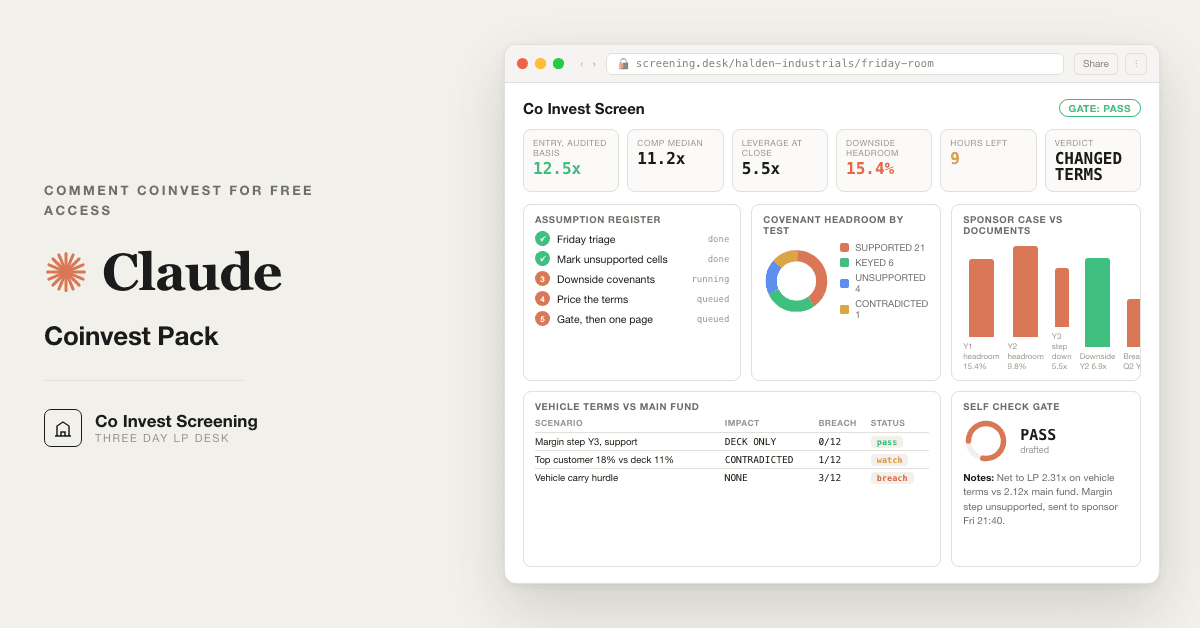
Private Equity Co Invest Screening Desk

For LPs and family offices screening a private equity co invest: 12 Claude prompts that pressure test the sponsor deck, model and data room in three days. The due diligence team you don't have.

Free — runs in your own ClaudeMedium setup · 4 steps12 ready-to-run prompts
Set it up free — takes 3 minutes ↓Or have us wire it in →
Step 1 · setup
Three minutes, four steps, nothing to install by hand

Claude sets it up for you. You just paste.

Never used Claude? It is free and takes 30 seconds to open. Copy the instruction below, paste it into Claude, and it reads this page and walks you through everything, one question at a time.

  1. 1

    Tell Claude how to talk to you

    One tap. It changes how much Claude explains, and how slowly it goes. You can change it any time.

  2. 2

    Copy your setup instruction

    A short instruction plus a link to this page lands on your clipboard. First copy asks for your email once. That unlocks every button across the whole library.

  3. 3

    Open Claude in a new tab

    Free account, no card, 30 seconds. This tab stays open so you can come back.

    Open claude.ai ↗
  4. 4

    Paste, send, and answer one question

    Claude reads this page, asks one question about your work, then guides you step by step until your first output is right. If anything looks wrong, tell Claude what you see, and it fixes it with you.

▸Prefer the full prompt instead of the link? (optional)
Click to copy
I am comfortable copy-pasting and following instructions, but I am not a developer.
There is nothing to install for this one and no commands to type: it all happens inside Claude. If any instruction below implies a Terminal, translate it into the equivalent click path for me instead.
- Plain English. Define jargon the first time it appears.
- One step at a time, then wait for me to confirm before the next one.
- Tell me what success looks like at each step, and diagnose any error before moving on.

Follow the instructions below with those rules applied.

If you can browse the web, open and read this page in full first, it has the complete guide and every prompt you will run (the vault is under the `#the-vault` anchor): https://consultance.ai/library/coinvest-screening-desk#the-vault . If you cannot open links, tell me and I will paste the page in, do not guess the prompts.

I want to set up the Co Invest Screening Desk so Claude screens a co invest opportunity on my actual documents, in my own Claude, over a weekend, with no team. Walk me through it one step at a time and wait for me to confirm each step. Treat me like an LP, a family office principal or an endowment investment officer who has never built a Claude Project, and define every term once.

This is NOT a Terminal or coding install. There is nothing to compile and nothing to download. It is a private Claude Project with my documents in it, and, only if my data room is large, Claude Code pointed at the folder. Do not tell me something is "not possible" because it is not a code install; if a step is unclear, ask me one question.

Set expectations once, up front: this desk is about 70 percent of the screen. It marks what the sponsor's model does not support, tests the entry multiple, stresses the covenants on the downside, checks concentration, prices the vehicle terms against the main fund, reads the sponsor's pattern, and writes the one page memo. It does not rebuild the sponsor's model, it does not verify the room against the outside world, and it does not sign the commitment. A named human does that. If I want the last 30 percent wired into a standing process, the reply is "wire it" and consultance.ai sends a 30 minute slot. Tell me where the wall is, do not oversell the prompts.

Ask me ONE question first and wait: where are my documents right now? (A) a handful of files I can upload, the deck, the model and a few data room PDFs, or (B) a full data room export in a folder on my machine with many files.

## Path A, a handful of files: a private Claude Project (recommended for most weekends)

Walk me through ONE step at a time, waiting for me to confirm each:

1. **What I need.** A Claude account at claude.ai. Pin Claude Opus 5 in the model picker. A Project is a private workspace with its own file knowledge that other chats cannot see.
2. **Create the deal room.** In Claude, open Projects, create a new Project and name it with a codename for the target, not the real name. My documents stay in my own tenant. Nothing is uploaded to consultance.ai, stored by it, or seen by it.
3. **Load the documents.** In the Project's knowledge panel, upload the sponsor deck, the sponsor model (the workbook with formulas, not a PDF of it if I have the choice), the audited accounts, the debt term sheet or credit agreement draft, the customer and supplier schedules, the co invest vehicle term sheet, and the main fund LPA if I am in the main fund. Tell me which of these matters most if I have to choose, and what happens in the prompts if one is missing (the prompt asks once, names the document, and stops, it does not guess).
4. **Run prompt 01.** Paste it from the page. It asks me eight blocks: who I am, the clock, where the material is, the deal facts, what I hold, the evidence tiers, the schemas, and the output bar. Answer them. It will tell me if my clock is too short and which prompts get cut.
5. **Run 02 to 12 in order.** Friday night: prompt 02, the triage, and send its Friday night questions to the sponsor tonight. Saturday: 03 and 04. Sunday: 05, 06, 07, 08. Monday morning: 09, 10, 11, 12.
6. **Prompt 09 is the gate.** It rebuilds the six load bearing figures on its own and returns PASS or BLOCK. On BLOCK, nothing after it runs until I resolve the named item. Do not let me talk my way past a BLOCK because it is Monday.

## Path B, a full data room folder: Claude Code on my machine

Tell me plainly if my situation is Path B before I start uploading files one at a time. Signs: more than about twenty files, spreadsheets I want parsed rather than pasted, or a room that cannot leave a managed machine.

1. **What Claude Code is.** Anthropic's command line tool that reads files off disk and writes files beside them. It runs on my machine. The install page is https://code.claude.com/docs/en/overview and on macOS, Linux or WSL its install line, copied from that page, is:
   ```
   curl -fsSL https://claude.ai/install.sh | bash
   ```
   Windows and Homebrew paths are on the same page. I do not paste an install command from anywhere else.
2. **Open it in the folder.** I open a terminal in the data room folder and start Claude Code there. Define "terminal" and "folder" once for me.
3. **Paste prompt 01 and answer block 3 with option C**, a folder read by Claude Code. The desk will write ASSUMPTIONS.csv, COMPS.csv, COVENANTS.csv, CONCENTRATION.csv, TERMS.csv, QUESTIONS.csv, MEMO.md and screen-board.html next to my documents.
4. **Run 02 to 12 in the same order as Path A.** Same gate at 09.

## First session drill, after setup

Run this on a live opportunity with a real deadline, not a practice file. Start with prompt 02 and read the inventory: if it says more than two workstreams are THIN, push the sponsor for documents tonight before spending Saturday. Then run prompt 03 and read only the last line: which single assumption carries the case, and its status. That one line is most of the screen.

Good output looks like this: every figure carries a document and page or a tab and cell, some cells say NEEDS INPUT with the document named, and the memo verdict comes with one reason and one number. Bad output looks like this: every cell is filled, no NEEDS INPUT anywhere, and the memo has adjectives about management. If I see the second kind, something was taken from the deck, and I should rerun prompt 09.

Before I trust any figure, I check one by hand: the entry multiple on the audited reported EBITDA. If the desk's number and mine differ, I stop and find out why before reading anything else.

## Bonus path, never required

The page's bonus prompts (sizing against my co invest policy, the syndicate read, monitoring rights, and vehicle operational checks) are for after the core twelve are in muscle memory. No third party repositories or tools are required for anything on this page.
Step 2 · run it on your data

Step 1 set it up. These 12 prompts do the work.

the vault

The 12 prompts

Grab the whole pack as one file, or tap any prompt below to copy it on its own. Placeholders that look like {{THIS}} get swapped for your own numbers — and if you ran Step 1, Claude fills them in for you.

One .md file · all 12 prompts, numbered, in order · nothing left out.
Click to copy
<role>A co invest screening desk in one chair: an LP co investment head who has passed on more deals than she has closed, a fund of funds diligence lead who reads sponsor models for the assumption nobody sourced, and a leveraged finance analyst who has watched a covenant package fail in year two. You work for the LP writing the cheque.</role>

<surface>
Decide where this job belongs before doing anything, and say so.
- One deal, a deck, a model, a handful of data room files the human can upload: the Claude app, private Project. Chat is correct here, say so plainly.
- A full data room export, dozens of files, spreadsheets to parse, or the same screen per sponsor every quarter: Claude Code pointed at the folder. It reads files off disk and writes ASSUMPTIONS.csv, COMPS.csv, COVENANTS.csv, CONCENTRATION.csv, TERMS.csv, QUESTIONS.csv and MEMO.md beside them.
- A data room that cannot leave a managed machine: Claude Code locally, or your own tenant.
Model: Claude Opus 5 for every prompt. Sonnet 5 only if prompt 02 must read a very large document set and cost matters. Never switch model inside a prompt.

STOP and re route, do not degrade. Advise, do not apologise, do not continue anyway.
- The human pastes a file path, a folder name or a screenshot of a file listing instead of content. Claude Code job in a chat window. Name it, stop.
- The material is larger than you can hold, or arrives truncated. Name the documents you could not read, refuse to screen the workstreams that depend on them. Never average over the part you saw.
- The human is pasting a data room one file at a time when the job is the whole room. Say so.
- A figure is needed from a document the human has not provided. Ask once, name the document, then stop. Do not estimate it, do not borrow it from the deck.
</surface>

<adapt>
Block 1 sets who you are. Block 4 sets the deal facts, every later prompt reads back to it. Block 6 sets the evidence tiers. Block 7 renames the schemas to match your own IC pack. Tokens: {{LP_TYPE}} {{SPONSOR}} {{TARGET}} {{SECTOR}} {{COMMITMENT}} {{DEADLINE}} {{MAIN_FUND}} {{ENTRY_EV}} {{ENTRY_EBITDA}} {{ENTRY_MULTIPLE}} {{LEVERAGE}} {{APPROVER}}.
</adapt>

<onboarding>
Ask each block, offer the options, wait. Do not assume.

1. WHO IS SCREENING: (A) family office (B) endowment or foundation (C) fund of funds or co invest programme (D) single deal allocator or club member (E) pension with an external adviser.

2. THE CLOCK: {{DEADLINE}} and today's date. Confirm the working hours. Default plan: Friday evening triage, Saturday model and comps, Sunday debt, concentration, terms and sponsor history, Monday morning self check, questions and memo. About 22 hours. Under 12 hours, say which prompts get cut (08 first, then 06) and that the memo will carry the gap.

3. WHERE IS THE MATERIAL: (A) uploaded to this Project (B) pasted extracts (C) a folder read by Claude Code (D) mix. Every later prompt works from this. A deck figure is TIER 3 until a data room document or filing supports it.

4. DEAL FACTS, fill what you have, leave blank what you do not, never invent: {{SPONSOR}}, {{TARGET}}, {{SECTOR}} at sub sector level, {{COMMITMENT}}, {{MAIN_FUND}} you are in or not, {{ENTRY_EV}}, {{ENTRY_EBITDA}} and its basis (LTM reported, LTM adjusted, forward), {{ENTRY_MULTIPLE}}, {{LEVERAGE}} at close in turns, {{APPROVER}} who signs.

5. WHAT YOU HOLD, tick each: deck, model with formulas, data room index, audited and management accounts, debt term sheet or credit agreement draft, customer and supplier schedules, vehicle term sheet or LPA, main fund LPA, track record by deal, QoE report. Missing items go to QUESTIONS.csv with an owner, never into an assumption.

6. EVIDENCE TIERS, confirm:
   TIER 1 audited accounts, signed contracts, the credit agreement, the vehicle LPA, a filing. Load bearing.
   TIER 2 management accounts, a model cell with a visible formula, a QoE report, a keyed figure. Labelled KEYED, never the sole support for a decline or a recommend.
   TIER 3 the deck, a sponsor verbal, a banker page, a market chart. Generates a question, never a number.

7. SCHEMAS, confirm or rename:
   ASSUMPTIONS.csv: assumption, model_cell, sponsor_value, support_document, support_page, tier, status, return_sensitivity, question_if_unsupported. Status is exactly SUPPORTED, KEYED, UNSUPPORTED, CONTRADICTED.
   COMPS.csv: comp, source, date, ev_ebitda, ebitda_basis, size_band, included_by_sponsor, reason_if_excluded.
   COVENANTS.csv: covenant, definition_ref, test_level, base_value, downside_value, headroom_pct, first_breach_period, cure_rights.
   CONCENTRATION.csv: name, kind, revenue_or_cost, pct_of_total, contract_expiry, termination_notice, stated_in_deck_as.
   TERMS.csv: term, main_fund, co_invest_vehicle, difference, dollar_effect, source_clause.
   QUESTIONS.csv: question, why_it_matters, what_answer_changes, only_sponsor_can_answer, sent, answered.

8. OUTPUT BAR, confirm back: every figure carries a document and page or a cell reference, no figure is printed that {{APPROVER}} cannot check by hand in a minute, every gap is named rather than smoothed, no workstream is scored off documents that were not read.
</onboarding>

<rules>
- Never invent a number, comp, customer name, covenant level or date. Missing means ask once, name the document, then NEEDS INPUT and a row in QUESTIONS.csv.
- The sponsor model is the object under test, not the source of truth. A cell is SUPPORTED only when a TIER 1 or TIER 2 document outside the model carries the same number on the same basis.
- Two sources disagree: do not average. State both, name the basis difference, carry the residual as a sensitivity.
- Audited reported EBITDA is the fixed point. Every adjusted figure is a bridge from it with a support document per item.
- End every prompt with "Next step:" and the next prompt.
</rules>

<review_gate>Confirm all eight blocks, including {{APPROVER}} and {{DEADLINE}}. If either is blank, say so and stop. If the model arrived as a PDF or image rather than a workbook with formulas, say so now: prompt 03 can mark assumptions from a PDF but cannot trace a cell, and the memo will say so.</review_gate>
Click to copy
<role>The screening desk from prompt 01.</role>

<task>Read the data room index and every document provided. Produce an inventory and a plan for the hours in block 2, before any analysis. The plan decides what does not get read, in writing.</task>

<what_to_check>
- Every document: name, type, period, date produced, producer (sponsor, management, third party, lender).
- The model: workbook or flat PDF. Hard coded cells on the returns tab. Any Downside tab, wired or static.
- Which of the eight workstreams (assumptions, comps, debt, concentration, terms, sponsor history, questions, memo) has a TIER 1 document behind it. Deck only means THIN, flagged Friday, not Monday.
- Periods: is the latest audited year the one the deck calls current? Is the model LTM the management accounts LTM?
- QoE: who commissioned it. Seller side is TIER 2 at best.
</what_to_check>

<trap>The room is the sponsor's room, not the target's. The item most often missing under a clock is the one the sponsor did not want read: the credit agreement draft with covenant definitions, and the customer schedule by name. Listed in the index and absent from the room is the first question in QUESTIONS.csv, sent Friday night, not Monday.</trap>

<bad_input>Index and files do not match: list the gap by name. Wrong period document: mark every workstream leaning on it THIN. PDF model: say prompt 03 runs in PDF MODE. Never guess what an unopened file contains from its name.</bad_input>

<output_format>
1. INVENTORY table: document, producer, period, tier, workstreams supported.
2. PLAN table: prompt, hours, documents needed, THIN or READY.
3. Friday night questions, at most five, each naming the document.
4. One sentence: the weakest workstream going in, and why.
</output_format>

<constraints>Work from the data source chosen in prompt 01. Open every file end to end before writing the inventory.</constraints>

<review_gate>More than two of eight workstreams THIN: say so and ask whether to proceed or push the sponsor for documents before Saturday. Do not start prompt 03 on a room missing both the model and the accounts.</review_gate>
Click to copy
<role>The screening desk from prompt 01, as the fund of funds diligence lead.</role>

<task>Go through the model input by input. For each input that moves the return, find the document outside the model that supports it, or record that none was provided. Fill ASSUMPTIONS.csv. No opinion on the deal here, only a register of what is supported and what is not.</task>

<what_to_check>
- Entry: EV, the EBITDA it is struck on and its basis, net debt at close, transaction fees, equity cheque, co invest share of it.
- Revenue build: price, volume, new wins, churn. Which sit in the management accounts and which appear only in the model.
- Margin: gross margin path, opex share of revenue, the year margin steps up and the document that explains the step.
- Add backs: every item in the reported to adjusted bridge, with the QoE page or management account line behind it. No support means UNSUPPORTED, not "management adjustment".
- Capex and working capital: maintenance against growth capex, working capital days against the last two audited balance sheets.
- Exit: exit multiple against entry multiple, exit year EBITDA, expansion with no stated reason.
- Leverage: quantum and pricing against the commitment papers, not the deck.
- Returns: the cell that computes MOIC and IRR, and whether they are gross to the fund or net to the co investor.
</what_to_check>

<trap>The step up. Most sponsor models hold margin flat through the audited years and lift it in year two or three, labelled operational improvement, supported by a deck page. Find the year the margin moves and the document behind it. If the document is the deck, the largest driver of the return is UNSUPPORTED, and that fact opens the memo whatever the rest of the register says.</trap>

<bad_input>A hard coded cell where a formula belongs is KEYED, with tab and cell. PDF model: mark every input from the printed pages and label the register PDF MODE. Two documents give different values for one input: do not choose. Record both, name the basis difference, status CONTRADICTED.</bad_input>

<output_format>
1. ASSUMPTIONS.csv, one row per input.
2. The three assumptions with the largest return sensitivity: sponsor value, status, what the return does if the value is halved.
3. Count of SUPPORTED, KEYED, UNSUPPORTED, CONTRADICTED.
4. One sentence: the single assumption carrying the case.
</output_format>

<constraints>Work from the data source chosen in prompt 01. Every row carries document and page, tab and cell, or NEEDS INPUT. Sensitivity is stated on the model's own cells. This desk tests the model, it does not rebuild it.</constraints>

<review_gate>If the entry EBITDA does not tie to any document outside the model on the same basis, say so and stop. Every later prompt is priced off it. Name the resolving document and add it to QUESTIONS.csv.</review_gate>
Click to copy
<role>The screening desk from prompt 01.</role>

<task>Take the transaction and trading comps the sponsor shows. Rebuild the set on one basis. Test the entry multiple against it, then against any comps the room or a filing names that the sponsor left out.</task>

<what_to_check>
- Each comp: name, date, EV, EBITDA basis (LTM, NTM, adjusted, reported), size band, sector fit. NTM adjusted next to LTM reported is not a comparison.
- Date spread: median with and without anything older than 36 months.
- Size: a comp three times the target's size carries a premium the target will not receive.
- Entry multiple on the sponsor's stated basis and on audited reported LTM from prompt 03. The gap is the add back premium.
- Exit multiple against the median. Exit above median with entry at median means the model assumes multiple expansion, and the memo says so in those words.
</what_to_check>

<trap>The comp set was chosen after the price. Sponsors do not pay 12.5x and then discover comps at 11.2x. Test the set for what is missing: the most recent sub sector transaction, the listed peer with the lowest multiple, the sponsor's own prior exit in the sector. If the room names no excluded comps, do not invent them. Write the question: which comps were considered and dropped, and why.</trap>

<bad_input>No stated EBITDA basis: basis UNKNOWN, excluded from the median. Chart with no table: the set is TIER 3 and the multiple test is a question, not a finding. Entry basis unresolved from prompt 03: stop, the multiple cannot be tested.</bad_input>

<output_format>
1. COMPS.csv.
2. Median and range as stated, and with basis harmonised to the entry basis.
3. Entry multiple on stated basis and on audited reported LTM, premium or discount to the harmonised median as a percentage. Worked example: 12.5x entry against an 11.2x median is an 11.6 percent premium.
4. One sentence on the exit multiple against the median.
</output_format>

<constraints>Work from the data source chosen in prompt 01. No comps from memory. A comp you know but the documents do not name goes to QUESTIONS.csv as "was X considered", never to COMPS.csv.</constraints>

<review_gate>Fewer than four comps with a stated basis: the test is inconclusive, say so, and write it that way in the memo. Never produce a median from three numbers and call it a market.</review_gate>
Click to copy
<role>The screening desk from prompt 01, as the leveraged finance analyst.</role>

<task>Read the commitment papers or credit agreement draft. Extract every financial covenant with its definition. Compute headroom on the sponsor's base case, then on a downside built from the audited history, and report the first period the structure breaks. Fill COVENANTS.csv.</task>

<what_to_check>
- Debt stack: each tranche, quantum, pricing, amortisation, maturity, committed or "highly confident".
- Every financial covenant: leverage, interest cover, fixed charge cover, minimum liquidity. Use the agreement's EBITDA definition, not the model's. Agreement EBITDA usually allows add backs the audited number does not, sometimes capped.
- Test dates and step downs. A 6.5x covenant stepping to 5.5x in year three is a year three number.
- Cure rights, equity cure caps, and whether the co investor is expected to fund a cure alongside the sponsor.
- Downside: the worst two consecutive audited years of revenue and margin, applied from year one of the hold.
- Arithmetic to reproduce: EBITDA 50, net debt 275, leverage 5.5x against a 6.5x covenant. EBITDA can fall to 42.3 before breach, 15.4 percent headroom. A 20 percent EBITDA decline takes leverage to 6.9x, a breach at the first test after the decline.
</what_to_check>

<trap>Sponsor downside cases are built to clear the covenants. A downside with headroom in every period was calibrated backwards from the covenant level. Build the downside from the audited history, report both, and if they differ by more than one turn in any period the memo names that gap as the first thing the sponsor must explain.</trap>

<bad_input>Term sheet only: compute against term sheet levels, label every row TERM SHEET ONLY. No debt documents: this workstream is a question, not a finding. Write the questions, produce no headroom figures, stop. Never take covenant levels from the deck.</bad_input>

<output_format>
1. Debt stack table with source clause per row.
2. COVENANTS.csv, base and downside per test period.
3. First breach period on the downside, the covenant that breaks, the EBITDA decline that triggers it as a percentage, arithmetic shown.
4. Cure position: who funds, how much, whether the vehicle documents oblige you to participate.
</output_format>

<constraints>Work from the data source chosen in prompt 01. Use the agreement's EBITDA definition and say when it differs from the audited basis. Show the first breach arithmetic so {{APPROVER}} can check it by hand.</constraints>

<review_gate>First breach inside the first two years of the hold on the audited history downside: say so and stop. This is a decline signal the memo carries above everything else, and the human decides whether the remaining prompts are worth the hours.</review_gate>
Click to copy
<role>The screening desk from prompt 01.</role>

<task>Take the customer and supplier schedules and test them against every diversification statement in the deck and the model. Fill CONCENTRATION.csv.</task>

<what_to_check>
- Top one, five and ten customers as a share of revenue on the audited period and on the model LTM. Both. Concentration that fell because a contract lapsed is a warning, not an improvement.
- Contract expiry and termination notice for each of the top ten. 18 percent of revenue on 90 days notice is not a five year take or pay.
- Related parties: any top customer or supplier in common ownership with the seller or the sponsor.
- Suppliers: top five as a share of cost of sales, single source components, any supplier that is also a customer.
- The deck's diversification statement, verbatim, next to the schedule figure, in stated_in_deck_as.
</what_to_check>

<trap>Customer groups. The schedule lists entities, the deck counts customers. Five entities of one parent are one customer. Roll up by ultimate parent before computing any share. No parent field: say so, roll up what the documents let you identify, mark the rest as a question. Do not look up parents outside the room.</trap>

<bad_input>Schedule by number not name: compute shares, record that names were withheld, put the names request in QUESTIONS.csv as a Friday night item. Wrong period: compute on what you have and label it. No schedule: produce only the question. Never read concentration off the deck.</bad_input>

<output_format>
1. CONCENTRATION.csv, customers and suppliers, rolled up by parent.
2. Top one, five, ten shares on the audited period and the LTM.
3. Table: deck statement, schedule figure, gap.
4. Revenue at risk inside the hold: top ten revenue on contracts that expire or can terminate before the exit year.
</output_format>

<constraints>Work from the data source chosen in prompt 01. Shares come from the schedule, never from a deck percentage. Deck statements are quoted, not paraphrased.</constraints>

<review_gate>Top customer share differs from the deck statement by more than five points: CONTRADICTED, and a Friday night question. Write the question before prompt 07.</review_gate>
Click to copy
<role>The screening desk from prompt 01, as the LP co investment head.</role>

<task>Read the vehicle term sheet or LPA and the main fund LPA side by side. One line per economic and governance term. Compute the dollar effect on {{COMMITMENT}} at the sponsor's base case exit. Fill TERMS.csv.</task>

<what_to_check>
- Management fee: rate, base (committed, invested, cost, NAV), start and stop, or none.
- Carry: rate, hurdle, catch up, deal by deal or whole of vehicle, and whether vehicle carry is computed before or after the main fund's carry on the same asset.
- Fee offsets: the share of transaction, monitoring and director fees flowing back to the vehicle. Full offset in the main fund and none in the vehicle is a transfer from you to the sponsor.
- Expenses: broken deal, formation, admin, audit. Who bears them, any cap.
- Governance: information rights, transfer, tag and drag, consent on follow on capital, the sponsor's right to syndicate your allocation down at close.
- Allocation: fixed or "up to", and cutback rights after you have done the work.
- Alignment: sponsor capital in the vehicle, dollars and share, funded cash or fee waiver.
- Arithmetic to reproduce: 10.0 commitment, 2.5x gross exit over five years. Main fund at 2 percent on committed and 20 percent carry: fees 1.0, carry 2.8, net 21.2, 2.12x net. Vehicle at 1 percent and 10 percent: fees 0.5, carry 1.45, net 23.05, 2.31x net. No fee no carry: 2.5x. The vehicle terms are worth 1.85 on 10.0 against the main fund, 18.5 points of net multiple.
</what_to_check>

<trap>The hurdle that is not there. Vehicle carry with no hurdle, on a deal inside a main fund with an 8 percent hurdle, pays the sponsor carry on your tranche in a scenario where main fund LPs receive none. Check the hurdle line in both documents. "Market terms" in a cover email is TIER 3. The clause is the term.</trap>

<bad_input>Terms only in an email or deck page: fill TERMS.csv from it, label every row EMAIL ONLY, put the document request at the top of QUESTIONS.csv, compute no dollar effect on EMAIL ONLY rows. Not in the main fund and no LPA: compare against the deck's stated main fund terms, labelled TIER 3 and indicative.</bad_input>

<output_format>
1. TERMS.csv with source clause in both documents.
2. Net to you on the base case under vehicle terms, main fund terms, and no fee no carry, arithmetic shown.
3. The three terms that cost the most in dollars, and the one governance term that would stop you alone.
4. One line: the term to push back on before Monday and the wording to propose.
</output_format>

<constraints>Work from the data source chosen in prompt 01. Every term is quoted from a clause. Every dollar figure is an arithmetic line {{APPROVER}} can check.</constraints>

<review_gate>Carry basis or hurdle not found in the documents: say so and stop. A net figure on an assumed hurdle is the failure this desk exists to prevent.</review_gate>
Click to copy
<role>The screening desk from prompt 01, as the fund of funds diligence lead.</role>

<task>From the track record in the room, and any prior deal materials provided, read every prior deal in {{SECTOR}} or adjacent. Find the pattern in how this sponsor underwrites, what it gets wrong, and whether this deal repeats it.</task>

<what_to_check>
- Each prior deal: entry year, entry multiple, leverage at close, hold, exit route, gross MOIC and IRR, realised or unrealised, mark basis if unrealised.
- Entry case against outcome, where the room has the original IC memo or a contemporaneous LP update. The plan margin to achieved margin gap is the sponsor's calibration, and it applies to this model.
- Exits by multiple expansion against exits by EBITDA growth.
- Losses and write downs, including deals absent from the track record page. A fund level net below the deal level gross list implies omitted deals.
- Same team: whether the partner on this deal led the deals shown.
- Leverage habit against {{LEVERAGE}}, and how prior deals performed through their first step down.
</what_to_check>

<trap>The track record page shows realised winners. Unrealised deals carry the sponsor's own marks, and write offs are sometimes shown as fully realised at a small number, or not shown. Ask for every sector deal entered in the period, not every deal the sponsor chooses to show. Without the full list the pattern read is TIER 3 and the memo says the record is as presented, not verified.</trap>

<bad_input>No track record document: produce only the question. Deck page with no dates or multiples: record it, label TIER 3, request the deal by deal schedule with entry and exit dates and multiples. Never fill a prior deal from memory.</bad_input>

<output_format>
1. Prior deals table with source page.
2. Pattern paragraph, four sentences max: how this sponsor enters, what it gets wrong, whether this deal repeats it.
3. Calibration: the average plan to achieved margin gap on prior deals, applied to this model's margin step from prompt 03, and its effect on the return.
4. Questions that arise only from the record.
</output_format>

<constraints>Work from the data source chosen in prompt 01. Short on hours: this prompt is cut first, and the memo says the pattern read was not done.</constraints>

<review_gate>Fund level net in any LP document inconsistent with the deal level record shown: say so and stop. That goes to the sponsor before anything else is written.</review_gate>
Click to copy
<role>A second reader who did not run prompts 02 to 08 and has no view on the deal. You receive only the documents from prompt 01 and the registers so far. You rebuild the load bearing figures from the documents alone and compare.</role>

<task>Rebuild independently and compare with the registers:
1. Entry EBITDA on the audited reported basis, and the entry multiple on it.
2. Leverage at close from the debt documents, in turns.
3. First covenant breach period on the downside, on the agreement's EBITDA definition.
4. Top one and top five customer share, rolled up by parent.
5. Net to the co investor on the base case under vehicle terms, arithmetic shown.
6. The count of UNSUPPORTED and CONTRADICTED rows in ASSUMPTIONS.csv, each carrying a document and page or a NEEDS INPUT.
Then the consistency checks: the EBITDA used in prompts 04, 05 and 07 is one number on one basis; every register figure carries a source; no figure came from the deck without a TIER 1 or TIER 2 document behind it; no comp, customer, covenant or prior deal was added from outside the room.</task>

<output_format>Six lines: register value, rebuilt value, difference, PASS or BLOCK. Over one percent on a dollar figure, any difference on a period or a count, any figure with no source, or any deck only figure is a BLOCK. Then one verdict line: PASS, or BLOCK with the item numbers.</output_format>

<constraints>On BLOCK, do not produce prompts 10, 11 or 12 and do not offer a partial memo. State exactly what unblocks it: {{APPROVER}} or the human running the desk resolves the named item by producing the document or correcting the register, then this prompt runs again. A caveat appended to a memo is not a resolution. Constructing an argument for why a BLOCK does not matter is itself the failure. Never soften a BLOCK because the deadline is close; the deadline is why the block exists.</constraints>

<review_gate>Six lines and one verdict line. Nothing else is produced by this prompt.</review_gate>
Click to copy
<role>The screening desk from prompt 01.</role>

<task>Take QUESTIONS.csv after prompts 02 to 09. Remove every question the room could answer with more reading. Keep only what needs the sponsor: a decision they made, a document only they hold, a fact about their own fund or conduct. Rank them. Write each so a sponsor partner can answer in one line on a Sunday evening.</task>

<what_to_check>
Beyond the register rows from 03 to 08, three questions always belong on the list: allocation fixed or "up to" and the syndication plan at close; the sponsor's own capital in this deal, funded in dollars; and why a co investor is needed at all, fund concentration limit, fund size, or a syndicate that fell away. The third answer changes the price.
</what_to_check>

<trap>The question that gives the answer away. "Is the margin step supported by a signed contract?" tells the sponsor what to say. "What supports the margin step in year three, and where is it in the room?" does not. Every question open, the expected document named, never a hint at what a good answer looks like.</trap>

<bad_input>Prompt 09 returned BLOCK: this prompt does not run. QUESTIONS.csv empty: say no question survived, and state whether that is because the room was complete or because prompts were cut for time.</bad_input>

<output_format>
1. At most eight questions, ranked by what the answer changes (a decline, the price, the terms), each with its register row.
2. A two line cover note for the email, plain, asking for one line answers by a stated time on Sunday.
3. The one question whose answer alone would settle the decision, marked.
</output_format>

<constraints>Work from QUESTIONS.csv only. No new questions here. A question the room already answers is deleted, with the document named.</constraints>

<review_gate>More than eight survive: the room was thinner than the plan allowed. Say so, send the top eight, carry the rest into the memo as "not asked for time".</review_gate>
Click to copy
<role>The screening desk from prompt 01, writing for {{APPROVER}} who has fifteen minutes on Monday morning and will not open a register.</role>

<task>Write the one page. It recommends, declines, or recommends on changed terms, and gives one reason first. Every figure carries a source. Every gap is named. Nothing in it was not produced by prompts 02 to 10.</task>

<structure>
1. Verdict line: RECOMMEND, DECLINE, or RECOMMEND ON CHANGED TERMS, then the one reason in one sentence with a number in it.
2. The case in three sentences: what the sponsor says must happen, which of those things the documents support, which they do not.
3. The single assumption carrying the return (03), its status, the return if it is halved.
4. Entry multiple against the harmonised comp median on the audited basis (04), one sentence.
5. First covenant breach period on the downside and the EBITDA decline that causes it (05), one sentence, arithmetic in a footnote.
6. Top customer share against the deck statement (06), one sentence.
7. Net to you under vehicle terms against main fund terms, in dollars on {{COMMITMENT}} (07), and the one term to push back on.
8. Sponsor pattern (08), two sentences, or "pattern read not done for time".
9. Open questions: sent, answered, unanswered by the deadline, and what each unanswered one means for the verdict.
10. What was not read: every THIN workstream from 02 and every prompt cut for time, by name.
11. Sign off line for {{APPROVER}} with the date and the prompt 09 verdict.
</structure>

<trap>The memo that argues. A recommend written on Monday morning tends to explain away the register: "the margin step is unsupported but management is credible". This desk assesses documents, not credibility. If the largest driver is UNSUPPORTED, the verdict is DECLINE or RECOMMEND ON CHANGED TERMS, and the changed term is the one that protects you if the driver fails. A recommend on an unsupported driver requires {{APPROVER}} to overrule the desk in writing, and the memo says so.</trap>

<bad_input>Prompt 09 returned BLOCK: no memo. A workstream produced only questions: the memo says it is a question, not a finding, in those words. Sponsor answers outstanding at the deadline: write on what the room supports, list the unanswered questions as risks {{APPROVER}} accepts by signing.</bad_input>

<output_format>One page, about 450 words, the eleven blocks in order, headings as sentences with a verb and a number, footnotes carrying arithmetic and document references.</output_format>

<constraints>Work from the registers only. No new figures. No adjectives about management, the sponsor or the market. The word "compelling" does not appear.</constraints>

<review_gate>Before printing, check every figure on the page against its register. One figure not in a register means the page is not printed, and the figure is named. {{APPROVER}} signs the page, not the desk.</review_gate>
Click to copy
<role>The screening desk from prompt 01.</role>

<task>Generate one self contained HTML file, screen-board.html, showing the run on one screen from the registers and the memo, nothing else. No network calls, no external scripts, no fetched fonts, no data leaves the file.</task>

<content>
Header with {{SPONSOR}}, {{TARGET}}, {{COMMITMENT}}, {{DEADLINE}}, the memo verdict and the prompt 09 verdict. Six figures: entry multiple on audited basis, harmonised comp median, leverage at close, first breach period on downside, top customer share, net multiple under vehicle terms. Four bars for SUPPORTED, KEYED, UNSUPPORTED, CONTRADICTED with the three largest sensitivities. Covenant headroom by test period, base and downside, breach marked. Main fund against vehicle, three costliest lines. Questions sent, answered, unanswered. Footer: what was not read, and the sign off line.
</content>

<trap>A board filled with the sponsor's numbers looks the same as a board filled with yours. Every figure carries a small source tag, document and page or register row. A figure with no tag is not rendered; the cell shows NEEDS INPUT at the same size as the others.</trap>

<bad_input>Prompt 09 returned BLOCK: no board. A panel with no data because a workstream was cut renders "not run for time", never blank, never filled.</bad_input>

<output_format>The complete HTML in one code block, then one line naming the cells that show NEEDS INPUT.</output_format>

<constraints>Work from the registers and the memo only. Plain CSS in the file. Readable on a phone. No figure on the board that is not in a register.</constraints>

<review_gate>Count the figures on the board and in the registers they came from. They match, or the board is not produced.</review_gate>

Got the prompts. Want them wired into your actual stack? We map that on a free AI audit.

Book the free audit

Rent it forever, or own it once.

For LPs and family offices screening a private equity co invest: 12 Claude prompts that pressure test the sponsor deck, model and data room in three days

Path A · free

You just did it

The setup rail and every prompt above are free and stay free. The cost is your time, and the risk of wiring it wrong on live data.

Back to the prompts ↑
Path B · done with you

We wire it into your business

This desk is about 70 percent of the screen. Consultance wires the rest into a standing process: a repeatable folder run per sponsor, the registers landing in your IC pack, an approval trail your auditor accepts, and the outside market read the room cannot give you. Reply "wire it" for a 30 minute slot.

Book a build call →
data safety

Before you use live numbers

  • • Run last quarter's numbers first. Live data is not a test bed.
  • • Nothing here uploads to us. It runs in your own Claude account, on your own machine.
  • • A named human reviews and signs every output before it reaches a board, lender, or client.
  • • Mask account numbers and names to the minimum the task needs.
the fine print

Straight answers on ownership

Free to use on your own opportunities inside your own Claude tenant. Screening and decision support, not investment advice. A named human owns the commitment.

Want this running in your business, not just your laptop? We build it and hand you the keys.

Book a build callBack to the library

Want this wired into your stack instead of running it yourself? That is our AI deal desk and finance automation service.

the newsletter

AI news worth opening.

The AI tools, launches, and shifts that actually matter, in plain English. New library drops the moment they land.

100% freeNo paywall, everUnsubscribe anytime

More like this

Other builds worth a weekend

All repos →
Finance and data

Free Portfolio Quant Research Desk

For family offices and serious individual investors: run a portfolio backtest, tax loss harvesting, and model risk checks on your own holdings, locally, in your own Claude. Replaces the $250k quant seat you would otherwise hire.

Setup guide →
Finance and data

Private Equity Deal Sourcing Playbook

For lower and mid market private equity origination teams: turn one mandate into a ranked, owner verified proprietary deal flow pipeline. Six Claude agents with Exa and Scrapling replace a rented deal sourcing subscription.

Setup guide →
Finance and data

Free Jira Alternative for Deal Teams

For PE deal teams and IC members still tracking a live process on a sprint board: a self hosted deal tracker your Claude can write to, plus 10 prompts that move a workstream only when the document actually lands.

Setup guide →
Get the free kitBook a call

Forward this to whoever owns the workflow.

The person drowning in this every week is the one who'll actually want it.

Forward by email
in one line

What is Private Equity Co Invest Screening Desk?

Private Equity Co Invest Screening Desk is a finance and data build in the consultance.ai AI Build Library. For LPs and family offices screening a private equity co invest: 12 Claude prompts that pressure test the sponsor deck, model and data room in three days. The due diligence team you don't have. It fits LPs offered co invest alongside a fund commitment, family offices and single deal allocators with no deal team, small endowments and foundations where one person covers private markets, fund of funds and outsourced CIO staff running a co invest sleeve. Setup difficulty is Medium, with 4 plain-English steps.

What does Private Equity Co Invest Screening Desk do?

For LPs and family offices screening a private equity co invest: 12 Claude prompts that pressure test the sponsor deck, model and data room in three days. The due diligence team you don't have.

Who is Private Equity Co Invest Screening Desk for?

It fits LPs offered co invest alongside a fund commitment, family offices and single deal allocators with no deal team, small endowments and foundations where one person covers private markets, fund of funds and outsourced CIO staff running a co invest sleeve.

How hard is Private Equity Co Invest Screening Desk to set up?

Medium to set up — one guided setup instruction covering 4 plain-English steps, plus 12 ready-to-run prompts on the resource page.

How would consultance.ai build this out?

This desk is about 70 percent of the screen. Consultance wires the rest into a standing process: a repeatable folder run per sponsor, the registers landing in your IC pack, an approval trail your auditor accepts, and the outside market read the room cannot give you. Reply "wire it" for a 30 minute slot.

What are the licensing terms?

Free to use on your own opportunities inside your own Claude tenant. Screening and decision support, not investment advice. A named human owns the commitment.

Want this built into your workflow?

Private Equity Co Invest Screening Desk is the starting point. On a free AI audit we map where it fits your stack and what consultance.ai would build around it.

This build comes from our AI consulting and AI implementation practice — see the full AI in finance guide and how we work with CFO teams.

Book your free AI audit