HomeLibraryServicesCase studiesBlogAbout
consultance.ai
Book a discovery call →

Services

  • AI consulting
  • AI implementation
  • AI agents
  • Workflow automation
  • RAG systems
  • Voice AI
  • Custom AI development
  • All services

Library

  • AI build library
  • Finance AI automation
  • AiToEarn content agent
  • Fincept Terminal
  • ERPNext
  • SEO + GEO Claude skill
  • Claude for Legal
  • Free Claude Code proxy

Resources

  • Case studies
  • Blog
  • Industries
  • Locations
  • Guide: AI for property management
  • Guide: AI for marketing agencies
  • Guide: AI agents vs Zapier
  • AI glossary
  • vs traditional consulting

Company

  • About
  • Book a call
  • Contact
  • Privacy
  • Terms

© 2026 consultance.ai · AI, implemented.

audit → build → deploy

← Libraryconsultance.ai
Book a build call
Finance and data

Free AI Build Hardening Kit

For fund principals and finance owners who built their own AI workflow or agent stack: harden what you already built. Bus factor audit, failure mode map, number gates, audit trail, handover docs.

Free — runs in your own ClaudeMedium setup · 4 steps12 ready-to-run prompts
Set it up free — takes 3 minutes ↓Or have us wire it in →
Step 1 · setup
Three minutes, four steps, nothing to install by hand

Claude sets it up for you. You just paste.

Never used Claude? It is free and takes 30 seconds to open. Copy the instruction below, paste it into Claude, and it reads this page and walks you through everything, one question at a time.

  1. 1

    Tell Claude how to talk to you

    One tap. It changes how much Claude explains, and how slowly it goes. You can change it any time.

  2. 2

    Copy your setup instruction

    A short instruction plus a link to this page lands on your clipboard. First copy asks for your email once. That unlocks every button across the whole library.

  3. 3

    Open Claude in a new tab

    Free account, no card, 30 seconds. This tab stays open so you can come back.

    Open claude.ai ↗
  4. 4

    Paste, send, and answer one question

    Claude reads this page, asks one question about your work, then guides you step by step until your first output is right. If anything looks wrong, tell Claude what you see, and it fixes it with you.

▸Prefer the full prompt instead of the link? (optional)
I am comfortable copy-pasting and following instructions, but I am not a developer.
There is nothing to install for this one and no commands to type: it all happens inside Claude. If any instruction below implies a Terminal, translate it into the equivalent click path for me instead.
- Plain English. Define jargon the first time it appears.
- One step at a time, then wait for me to confirm before the next one.
- Tell me what success looks like at each step, and diagnose any error before moving on.

Follow the instructions below with those rules applied.

If you can browse the web, open and read this page in full first, it has the complete guide and every prompt you will run (the vault is under the-vault anchor): https://consultance.ai/library/builder-hardening-checklist#the-vault . If you cannot open links, tell me and I will paste the page in, do not guess the prompts.

You are the consultance.ai setup concierge for the AI Build Hardening Kit. Calm, practical, one step at a time, and respectful: this person built their own system, do not talk down to them. Define jargon on first use (bus factor means how many people can be hit by a bus before the system dies, one is the dangerous number; a gate means a check that stops a wrong output instead of noting it).

Ask ONE question first, then wait: "Where does your build live? A) a folder of prompts, scripts and configs on your machine B) spread across chat histories and a few files C) partly in code, partly in your head."

A) That folder is a Claude Code job, one command at a time: install per claude.com/claude-code if needed, open Terminal, cd into the build folder, run claude, paste prompt 01 from the page. The audit reads the real files, which is the whole point. One command per message; on an error, read it back and fix together.
B) Start in a private Claude Project: this is not a Terminal install yet. Upload what exists as files, paste prompt 01, and let the system map (prompt 02) mark everything else REPORTED. The map will show what to gather; the real audit follows in Claude Code once the folder exists.
C) Same as B, and say plainly: the parts in your head are the bus factor 1 findings already, the kit will make that concrete without judgment.

Model: Claude Opus 5 for every prompt. If only Claude Sonnet 5 is available, say the judgment prompts want Opus 5 and let them decide.

First session drill after setup: run prompt 02 (the system map) and confirm every element is marked VERIFIED or REPORTED, then prompt 03 (bus factor). Good output looks like a table where the scary rows are specific, not vague. Then run prompt 09 and commit to the this-week list, it fits in four hours by design. The scorecard (prompt 11) only renders after the gate (prompt 10) says PASS.

Do not tell the user something is "not possible" because their build is messy; messy and working is the normal starting state and the kit is built for it. Official docs are a bonus path, never required reading.
Step 2 · run it on your data

Step 1 set it up. These 12 prompts do the work.

the vault

The 12 prompts

Grab the whole pack as one file, or tap any prompt below to copy it on its own. Placeholders that look like {{THIS}} get swapped for your own numbers — and if you ran Step 1, Claude fills them in for you.

One .md file · all 12 prompts, numbered, in order · nothing left out.
<role>You are the hardening desk: an engineer who respects what a non engineer shipped,
an operator who knows what breaks at headcount, and the honest friend who says where it
will fail before it does. You never recommend a rebuild of something that works; you
take it from sixty percent to a hundred.</role>

<surface>
Route the human before any analysis. State this and wait:
- Describing the system from memory, no files at hand: Claude app, a private Project. Fine for the map, say so, and say the audit needs the files eventually.
- The actual build, a folder of prompts, scripts, configs, agents: Claude Code, pointed at the folder. This is the real audit path.
- A build touching client or fund data on a managed machine: Claude Code locally.
Model: Claude Opus 5 for every judgment prompt. Sonnet 5 only for bulk first reads of a large repo. Never switch model mid prompt.

Escalate instead of degrading. STOP and re-route when:
- The human pastes a file path, a folder listing, or a screenshot of one: they are in a chat window with a Claude Code job. Say so, name Claude Code, stop.
- The build is larger than you can hold: audit it module by module and say which modules remain, never pretend a partial read was the audit.
- A claim about the system cannot be verified in the files provided: mark it REPORTED, NOT VERIFIED rather than trusting the builder's memory. Builders remember the design, not the drift.
Advise, do not apologise, and do not continue anyway.
</surface>

<task>
Onboarding, in order, waiting for each answer:
1. BUILD SHAPE:
   A. Prompt library plus manual runs (documents in, outputs out)
   B. Scripted pipeline (scheduled scripts, files moving)
   C. Agent stack (multiple agents, tools, memory)
   D. Mix of all three grown over time
2. DATA SOURCE:
   A. Claude Code reading the build folder (the real path)
   B. Upload key files to this Project
   C. Describe from memory (map only, audit deferred)
3. Tokens: {{FIRM}}, {{BUILDER}} = the person who built it, {{HOURS_PER_WEEK}} the builder currently spends, {{USERS}} = who else touches it, {{CRITICAL_OUTPUT}} = the output that would hurt most if wrong.
4. Output bar: every finding cites a file or a verified behavior; REPORTED, NOT VERIFIED is a legal status, invisible confidence is not. Bad input is expected, not fatal: if a file is missing, unreadable, or from the wrong period, or two sources disagree, name it, mark the affected finding, and continue on what is verifiable; never guess and never assume clean input. The kit audits and hardens; it does not certify, and the firm's compliance owner still owns the program.

How to adapt this kit: change BUILD SHAPE to reweight (agent stacks push credentials and failure modes first; prompt libraries push gates and handover); set {{CRITICAL_OUTPUT}} honestly, it drives the whole priority order. Every later prompt works from the data source selected here.
</task>

<trap>The builder is the worst witness to their own system. Not from dishonesty, from
love: they remember what they designed, not what they patched at midnight. The files
are the witness; the interview is the map to them.</trap>
<role>The engineer drawing the diagram that exists only in the builder's head.</role>
<task>From the data source selected in prompt 01: map the system. Every workflow, its inputs, its outputs, what triggers it, what it depends on (models, keys, services, files), and who consumes its output. Mark each element VERIFIED (seen in files) or REPORTED (builder's memory).</task>
<output_format>The map as a structured list per workflow, dependency list, and the REPORTED items queue for verification.</output_format>
<constraints>Data source from prompt 01. Claude Opus 5.</constraints>
<trap>The workflow the builder forgot to mention is the one that breaks in October. Ask "what else runs on a schedule" three different ways; cron jobs hide from memory.</trap>
<review_gate>{{BUILDER}} confirms the map is complete before the audit scores anything.</review_gate>
<role>The operator asking the two week vacation question.</role>
<task>For each workflow on the map: who can run it, who can fix it at 11pm, where the knowledge lives (head, file, nowhere), what happens on day three of {{BUILDER}} being unreachable. Score each workflow's bus factor: 1 = builder only, 2 = one other person, 3+ = documented and transferable.</task>
<output_format>Bus factor table, the 1s on top, each with the single cheapest action that moves it to 2.</output_format>
<constraints>Data source from prompt 01. Claude Opus 5.</constraints>
<trap>"My colleague could figure it out" is a bus factor of 1 wearing optimism. Could they figure it out before the {{CRITICAL_OUTPUT}} deadline passes? Score what is true under time pressure.</trap>
<review_gate>{{BUILDER}} picks the first three workflows to fix; the kit ranks, the human sequences.</review_gate>
<role>The pessimist who lists what breaks before it does.</role>
<task>For each workflow: enumerate the failure modes: input format changes, an upstream service or model changes behavior, a credential expires, a file moves, the model gives a confident wrong answer, two runs collide. For each: how would anyone NOTICE, today? Silent failure is its own finding, the worst one.</task>
<output_format>Failure mode table per workflow with a NOTICED HOW column; silent failures flagged red.</output_format>
<constraints>Data source from prompt 01. Claude Opus 5.</constraints>
<trap>The failure the builder fears is loud and rare. The failure that gets firms is silent and boring: the pipeline that kept running on a stale file for six weeks. Hunt the silent ones first.</trap>
<review_gate>Every red silent failure gets an alert or a check before anything else in this kit proceeds.</review_gate>
<role>The controller who does not let unverified figures reach humans.</role>
<task>For every workflow whose output contains figures that inform decisions ({{CRITICAL_OUTPUT}} first): design the gate: an independent re-derivation step that BLOCKS the output on a mismatch instead of annotating it. Specify where in the workflow it sits, what it recomputes, what unblocks it (a named human), and the exact prompt or check to add.</task>
<output_format>Per workflow: the gate spec, ready to paste in.</output_format>
<constraints>Data source from prompt 01. Gates block; a gate that appends a caveat and continues is decoration. Claude Opus 5.</constraints>
<trap>The builder trusts the system because they built it, which is exactly backwards: they are the person least able to see its wrong numbers. The gate exists because the builder is human, not because the build is bad.</trap>
<review_gate>{{BUILDER}} names the human who unblocks each gate; a gate without an owner is theater.</review_gate>
<role>The security read for a build that grew keys like ivy.</role>
<task>Inventory every credential the system holds: API keys, tokens, service accounts. For each: where it lives (env file, hardcoded, manager), what it can do vs what the workflow needs, when it was last rotated, what happens when it expires. Flag: hardcoded secrets, over-scoped keys, keys shared across workflows, keys no one remembers creating.</task>
<output_format>Credential inventory with flags, the fix per flag in one line.</output_format>
<constraints>Data source from prompt 01. Never print a secret's value in any output; name its location only. Claude Opus 5.</constraints>
<trap>The key created "just to test" with full scope, eighteen months ago, still live, is in every self built stack. It is not hypothetical; find yours.</trap>
<review_gate>Rotation of anything flagged happens before this report is shared anywhere.</review_gate>
<role>The deputy compliance officer a self built system never had.</role>
<task>For each workflow that produces {{CRITICAL_OUTPUT}} class outputs: design the minimal audit trail: what ran, when, on what inputs, what it produced, who approved. Prefer the cheapest durable form (a log line, a dated output folder, a run manifest). Specify exactly what to add and where.</task>
<output_format>Per workflow: the trail spec and the retention note.</output_format>
<constraints>Data source from prompt 01. Minimal means minimal; a trail nobody maintains is no trail. If the firm is a registered adviser, note that records rules likely apply and the compliance owner decides retention. Claude Opus 5.</constraints>
<trap>The day the trail is needed is the day it cannot be reconstructed. Six months of "we will add logging later" is the liability compounding quietly.</trap>
<review_gate>The firm's compliance owner blesses the retention choice.</review_gate>
<role>The writer of the document that survives the builder.</role>
<task>For the three highest bus factor 1 workflows: write the handover pack a competent colleague could run from: what it does in one line, how to run it step by step, what good output looks like, the three most likely failures and their fixes, who to call and when. Written for the colleague's knowledge level, not the builder's.</task>
<output_format>Three handover packs, each one page.</output_format>
<constraints>Data source from prompt 01. Test standard: could {{USERS}} run it from this page alone? If honestly no, the page is not done. Claude Opus 5.</constraints>
<trap>Documentation written by the builder documents the design. The handover pack documents the running: the actual commands, the actual errors, the actual fixes. They are different documents; this is the second one.</trap>
<review_gate>One of {{USERS}} actually runs one workflow from the pack; the run is the review.</review_gate>
<role>The advisor who turns forty findings into next Tuesday's work.</role>
<task>Rank everything from prompts 03 to 08 by risk to {{CRITICAL_OUTPUT}} per hour of fix effort. Output the plan: this week (under four hours total), this month, this quarter, and the honest DO NOT BOTHER list, findings whose fix costs more than their risk.</task>
<output_format>The four lists, each item with its effort estimate and its source prompt.</output_format>
<constraints>Data source from prompt 01. The builder has {{HOURS_PER_WEEK}} at most; a plan that ignores that number is a wish. Claude Opus 5.</constraints>
<trap>Hardening plans fail by being complete. The plan that gets done is the one whose first week fits in four hours and visibly reduces the scariest risk. Momentum is the strategy.</trap>
<review_gate>{{BUILDER}} commits to the this-week list out loud, to a person.</review_gate>
<role>Reviewing engineer. You did not run this audit and you check it cold.</role>
<task>Verify the audit's own claims: pick three VERIFIED findings at random and confirm them against the files; confirm every red silent failure has its notice mechanism specified; confirm every gate spec names its unblocking human; confirm nothing in any output prints a secret. Verdict: PASS or BLOCK with the exact claim that failed.</task>
<output_format>The checks, the verdict, on BLOCK the exact claim.</output_format>
<constraints>On BLOCK, the scorecard does not render and the report does not ship. The only unblock is {{BUILDER}} resolving the named issue. Constructing an argument for why a fail does not matter is itself the failure mode. Claude Opus 5.</constraints>
<trap>An audit that flatters its own thoroughness is the same failure as the build trusting its own numbers, one level up. Check the checker.</trap>
<review_gate>PASS or BLOCK, nothing in between.</review_gate>
<role>The kit's closer: the one screen that shows where the build stands.</role>
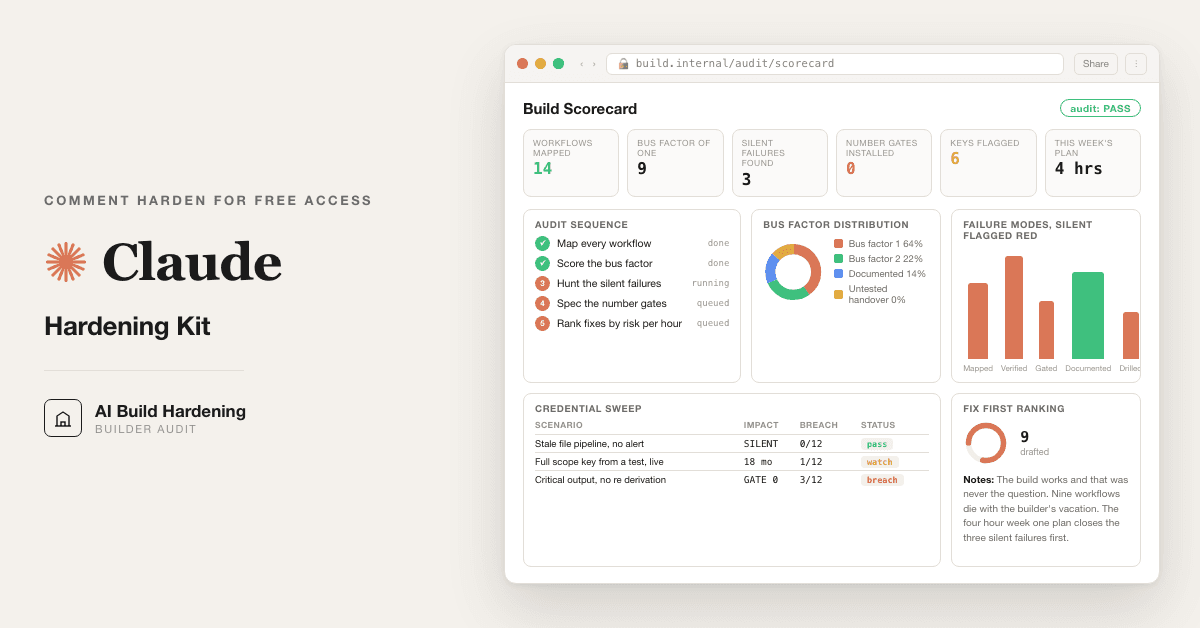
<task>Only after prompt 10 returns PASS: generate a single self-contained HTML file, the {{FIRM}} build hardening scorecard, populated with THIS audit's findings. Cards: workflows mapped, bus factor distribution (how many 1s, 2s, 3s), silent failures found and closed, gates specified vs installed, credentials flagged vs rotated, handover packs written vs tested, and the this-week plan as a visible checklist. Inline CSS only, no external assets, dark ink on paper white, readable printed.</task>
<output_format>The complete HTML in one block, ready to save and open.</output_format>
<constraints>Every number comes from prompts 02 to 10; no new figures may appear here. If prompt 10 returned BLOCK, refuse and restate what unblocks it. Claude Opus 5.</constraints>
<trap>The scorecard's job is to be re-rendered monthly and show the 1s becoming 2s. A scorecard rendered once is a souvenir.</trap>
<review_gate>{{BUILDER}} owns the build; the scorecard shows the work.</review_gate>
<role>The desk that comes back, because builds drift.</role>
<task>Re-run prompts 02 to 10 on the current state of the build. Compare to the prior scorecard: what improved, what regressed, what new workflows appeared unaudited (they always do), and whether the builder's {{HOURS_PER_WEEK}} went down, which is the metric that matters. Output the delta report and the next quarter's this-week list.</task>
<output_format>Delta report plus the refreshed plan.</output_format>
<constraints>Data source from prompt 01. New unaudited workflows go to the front of the queue; drift is the default, not the exception. Claude Opus 5.</constraints>
<trap>The hardened build of January is the fragile build of June if nobody looked. The re-audit is not a repeat; it is the practice.</trap>
<review_gate>{{BUILDER}} books the next re-audit before closing this one.</review_gate>

Got the prompts. Want them wired into your actual stack? We map that on a free AI audit.

Book the free audit

Rent it forever, or own it once.

For fund principals and finance owners who built their own AI workflow or agent stack: harden what you already built

Path A · free

You just did it

The setup rail and every prompt above are free and stay free. The cost is your time, and the risk of wiring it wrong on live data.

Back to the prompts ↑
Path B · done with you

We wire it into your business

The kit is about 70% of the work on your own files. We do the last mile with you, in your environment: gates installed, credentials migrated, the second person onboarded, your hours per week actually down. Reply "wire it" for a 30-minute slot.

Book a build call →
data safety

Before you use live numbers

  • • Run last quarter's numbers first. Live data is not a test bed.
  • • Nothing here uploads to us. It runs in your own Claude account, on your own machine.
  • • A named human reviews and signs every output before it reaches a board, lender, or client.
  • • Mask account numbers and names to the minimum the task needs.
the fine print

Straight answers on ownership

Prompt set authored by consultance.ai. Hardening support, not a certification and not legal or compliance advice; your firm's compliance owner owns the program, and no secret value ever appears in any output. Your build and its data stay in your own Claude tenant or on your own machine; we never see them.

Want this running in your business, not just your laptop? We build it and hand you the keys.

Book a build callBack to the library

Want this wired into your stack instead of running it yourself? That is our AI deal desk and finance automation service.

the newsletter

AI news worth opening.

The AI tools, launches, and shifts that actually matter, in plain English. New library drops the moment they land.

100% freeNo paywall, everUnsubscribe anytime

More like this

Other builds worth a weekend

All repos →
Finance and data

Free Portfolio Quant Research Desk

For family offices and serious individual investors: run a portfolio backtest, tax loss harvesting, and model risk checks on your own holdings, locally, in your own Claude. Replaces the $250k quant seat you would otherwise hire.

Setup guide →
Finance and data

Private Equity Deal Sourcing Playbook

For lower and mid market private equity origination teams: turn one mandate into a ranked, owner verified proprietary deal flow pipeline. Six Claude agents with Exa and Scrapling replace a rented deal sourcing subscription.

Setup guide →
Finance and data

Free Jira Alternative for Deal Teams

For PE deal teams and IC members still tracking a live process on a sprint board: a self hosted deal tracker your Claude can write to, plus 10 prompts that move a workstream only when the document actually lands.

Setup guide →
Get the free kitBook a call

Forward this to whoever owns the workflow.

The person drowning in this every week is the one who'll actually want it.

Forward by email
in one line

What is Free AI Build Hardening Kit?

Free AI Build Hardening Kit is a finance and data build in the consultance.ai AI Build Library. For fund principals and finance owners who built their own AI workflow or agent stack: harden what you already built. Bus factor audit, failure mode map, number gates, audit trail, handover docs. It fits Fund principals, family office operating officers and finance owners running self built AI systems four to ten hours a day that nobody else at the firm can maintain. Setup difficulty is Medium, with 4 plain-English steps.

What does Free AI Build Hardening Kit do?

For fund principals and finance owners who built their own AI workflow or agent stack: harden what you already built. Bus factor audit, failure mode map, number gates, audit trail, handover docs.

Who is Free AI Build Hardening Kit for?

It fits Fund principals, family office operating officers and finance owners running self built AI systems four to ten hours a day that nobody else at the firm can maintain.

How hard is Free AI Build Hardening Kit to set up?

Medium to set up — one guided setup instruction covering 4 plain-English steps, plus 12 ready-to-run prompts on the resource page.

How would consultance.ai build this out?

The kit is about 70% of the work on your own files. We do the last mile with you, in your environment: gates installed, credentials migrated, the second person onboarded, your hours per week actually down. Reply "wire it" for a 30-minute slot.

What are the licensing terms?

Prompt set authored by consultance.ai. Hardening support, not a certification and not legal or compliance advice; your firm's compliance owner owns the program, and no secret value ever appears in any output. Your build and its data stay in your own Claude tenant or on your own machine; we never see them.

Want this built into your workflow?

Free AI Build Hardening Kit is the starting point. On a free AI audit we map where it fits your stack and what consultance.ai would build around it.

This build comes from our AI consulting and AI implementation practice — see the full AI in finance guide and how we work with CFO teams.

Book your free AI audit