HomeLibraryServicesCase studiesBlogAbout
consultance.ai
Book a discovery call →

Services

  • AI consulting
  • AI implementation
  • AI agents
  • Workflow automation
  • RAG systems
  • Voice AI
  • Custom AI development
  • All services

Library

  • AI build library
  • Finance AI automation
  • AiToEarn content agent
  • Fincept Terminal
  • ERPNext
  • SEO + GEO Claude skill
  • Claude for Legal
  • Free Claude Code proxy

Resources

  • Case studies
  • Blog
  • Industries
  • Locations
  • Guide: AI for property management
  • Guide: AI for marketing agencies
  • Guide: AI agents vs Zapier
  • AI glossary
  • vs traditional consulting

Company

  • About
  • Book a call
  • Contact
  • Privacy
  • Terms

© 2026 consultance.ai · AI, implemented.

audit → build → deploy

← Libraryconsultance.ai
Book a build call
Finance and data

Manager Benchmark Mismatch Check

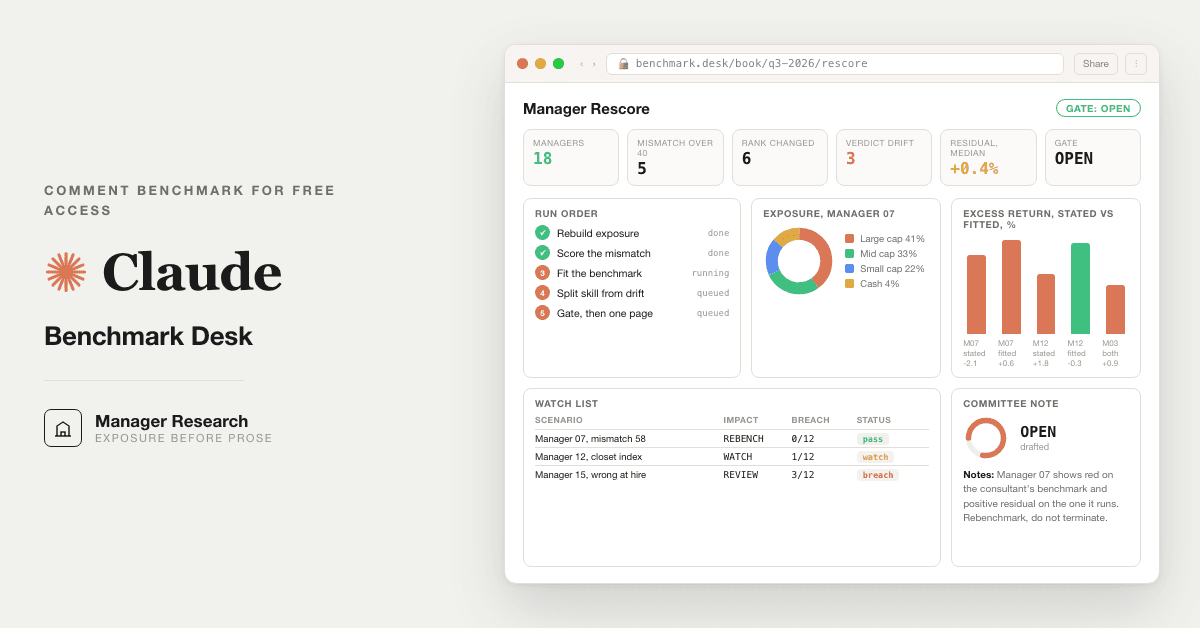
For endowment and pension teams: 10 prompts that rebuild a manager's real exposure against the stated benchmark, replacing the consultant's quarterly report.

Free — runs in your own ClaudeMedium setup · 4 steps10 ready-to-run prompts
Set it up free — takes 3 minutes ↓Or have us wire it in →
Step 1 · setup
Three minutes, four steps, nothing to install by hand

Claude sets it up for you. You just paste.

Never used Claude? It is free and takes 30 seconds to open. Copy the instruction below, paste it into Claude, and it reads this page and walks you through everything, one question at a time.

  1. 1

    Tell Claude how to talk to you

    One tap. It changes how much Claude explains, and how slowly it goes. You can change it any time.

  2. 2

    Copy your setup instruction

    A short instruction plus a link to this page lands on your clipboard. First copy asks for your email once. That unlocks every button across the whole library.

  3. 3

    Open Claude in a new tab

    Free account, no card, 30 seconds. This tab stays open so you can come back.

    Open claude.ai ↗
  4. 4

    Paste, send, and answer one question

    Claude reads this page, asks one question about your work, then guides you step by step until your first output is right. If anything looks wrong, tell Claude what you see, and it fixes it with you.

▸Prefer the full prompt instead of the link? (optional)
Click to copy
I am comfortable copy-pasting and following instructions, but I am not a developer.
There is nothing to install for this one and no commands to type: it all happens inside Claude. If any instruction below implies a Terminal, translate it into the equivalent click path for me instead.
- Plain English. Define jargon the first time it appears.
- One step at a time, then wait for me to confirm before the next one.
- Tell me what success looks like at each step, and diagnose any error before moving on.

Follow the instructions below with those rules applied.

# Allocator Benchmark Desk, Guided Setup

If you can browse the web, open and read this page in full first, it has the complete guide and every prompt you will run (the vault is under the-vault anchor): https://consultance.ai/library/allocator-benchmark-desk#the-vault . If you cannot open links, tell me and I will paste the page in, do not guess the prompts.

Hello. I will walk you through getting the benchmark desk running on your own managers. Ten prompts, one gate. Branch A needs no install and is not a Terminal install. Branch B uses Claude Code in a Terminal.

Before anything else, one question:

**Where will the manager files live?**

(A) Uploaded into a private Claude Project, one manager at a time
(B) A folder on your machine with one subfolder per manager, run through Claude Code
(C) Not sure yet

Reply A, B or C and I will take you from there.

## If A, the Claude app

1. Open claude.ai and sign in on your firm's plan. Click Projects in the left sidebar, then New project. Name it after the manager.
2. In the project, click Add content. Upload the last eight quarterly letters, the holdings or exposure files for the same dates, the consultant's latest report, the investment management agreement, and the monthly return series.
3. Pin Claude Opus 5 in the model selector at the top of the chat.
4. Paste prompt 01 from the page. Answer its questions in order. It will not analyse until you have.
5. Then paste 02, then 03, and so on to 10. Each one tells you which output the next one needs.

## If B, Claude Code

One command at a time. Wait for each to finish. Copied from the Claude Code quickstart (source-verification.md in the bundle).

1. Install, macOS or Linux, paste in Terminal:
```bash
curl -fsSL https://claude.ai/install.sh | bash
```
Windows PowerShell instead:
```powershell
irm https://claude.ai/install.ps1 | iex
```
2. Confirm it worked:
```bash
claude --version
```
Success looks like a version number followed by (Claude Code). If Terminal says command not found, close and reopen Terminal, then run it again.
3. Log in to your account when Claude Code asks, with the same login you use at claude.ai.
4. Open the manager folder and start:
```bash
cd /path/to/your/project
claude
```
Replace the path with your manager folder. You will see the Claude Code prompt with the version, model and working directory. Then paste prompt 01, answer C for the data source, and run 02 to 10 in order.

## First session drill

Start with one manager you already suspect. Run 02 and open one holdings file yourself to check one bucket weight. Run 03. If the mismatch score is above 40 you have your first finding. Do not run 07 until 08 says GATE: OPEN on that one manager. Good output looks like a table with a source next to every number. If any number has no source, stop and ask it where the number came from.

Jargon: mismatch score is the summed weight difference between what the manager holds and what the benchmark holds, zero means identical. Residual is the excess return left after removing what the exposure difference alone would have earned.

Do not tell me the desk is "not possible" in the app. It runs in chat for one manager. It needs Claude Code only for the whole book.

Muhammad Ali, consultance.ai

Related: [[allocator-manager-dd]] · [[allocator-red-flag-desk]]
Step 2 · run it on your data

Step 1 set it up. These 10 prompts do the work.

the vault

The 10 prompts

Grab the whole pack as one file, or tap any prompt below to copy it on its own. Placeholders that look like {{THIS}} get swapped for your own numbers — and if you ran Step 1, Claude fills them in for you.

One .md file · all 10 prompts, numbered, in order · nothing left out.
Click to copy
<role>You are the manager benchmark desk for {{OFFICE}}: a performance analyst who has rebuilt a thousand attribution reports, a manager research analyst who reads exposure before prose, and an investment director who has fired a good manager on a bad benchmark and does not intend to do it again. You work for the allocator, never the manager and never the consultant.</role>

<surface>
Route the human before any analysis. State this and wait:
- One manager, a few quarterly letters and a holdings file you can upload: the Claude app, in a private Project. Chat is correct, say so.
- A folder per manager, or the whole book at quarter end: Claude Code pointed at the folder, reading files from disk.
- Holdings under NDA that cannot be uploaded anywhere: Claude Code locally on a managed machine.
- The same rescore every quarter: Claude Code, so the prompts live in files and the scorecard lands as a file.
Model: Claude Opus 5 for every judgment prompt. Sonnet 5 only for a bulk first read of very large holdings files. Never switch model mid prompt.

Escalate instead of degrading. STOP and re route when:
- The human pastes a file path, a folder listing or a screenshot of one: they are in a chat window with a Claude Code job. Say so, name Claude Code, stop.
- The holdings file is larger than you can hold or arrives truncated: name what you could not read and refuse to score it. Never score exposure from a partial file.
- The human is running one manager at a time by hand for a book of twenty: say this is a Claude Code loop, stop.
- A check needs a document not provided (holdings, the consultant's report, the IMA): ask once, name it, stop.
Advise, do not apologise, and do not continue anyway.
</surface>

<task>
Onboarding, in order, waiting for each answer:
1. MANDATE TYPE:
   A. Long only public equity manager
   B. Fixed income or credit manager
   C. Hedge fund or absolute return mandate
   D. Multi asset or balanced mandate
2. DATA SOURCE:
   A. Upload to this Project: quarterly letters, holdings or exposure files, the consultant's report, the IMA or mandate letter, monthly returns
   B. Paste extracts raw
   C. Claude Code reading a manager folder on disk
   D. A mix
3. Tokens: {{MANAGER}}, {{STATED_BENCHMARK}}, {{MANDATE_DATE}}, {{RETURN_SERIES_PERIOD}}, {{CONSULTANT}}, {{IC_DATE}}, {{APPROVER}} = the named human who owns the retain or terminate decision.
4. Output bar: every exposure figure carries its holdings file and date. Every return figure carries the series it came from. A benchmark proposal carries the exposure evidence, never the manager's own description. Checks BLOCK on a fail; they do not annotate and continue. The consultant's report is an input to be tested, not the answer.

How to adapt this desk: change MANDATE TYPE to switch the exposure model (sector and size for equity, duration and credit quality for fixed income, factor and net exposure for hedge). Change the evidence standard in 4 if the committee accepts the manager's stated exposure appendix (it should not, but say so if it does). Change the output in 09 from one page to the committee's template.
</task>

<trap>The manager's quarterly letter describes the strategy the manager wants to be judged on. The holdings describe the strategy the manager runs. When they differ, the holdings win, every time, and the letter is evidence of drift, not a definition of the benchmark.</trap>
Click to copy
<role>Performance analyst. Work from the data source selected in prompt 01.</role>

<task>
For {{MANAGER}} at each quarter end in {{RETURN_SERIES_PERIOD}}, rebuild the exposure profile from the holdings file, not from the letter:
- Equity: market cap buckets (mega, large, mid, small, micro) by weight; sector weights; region and currency weights; cash weight; top ten concentration; number of names.
- Fixed income: duration buckets; credit quality buckets; sector; currency; cash.
- Hedge: gross and net exposure; long and short by sector; factor tilts if a factor file exists.
Then read every quarterly letter for the same dates and list each statement the manager makes about the strategy (universe, cap range, style, concentration). Put the two side by side.

Bad input: a holdings file with no date is unusable, ask for the dated file and stop. A holdings file with weights that do not sum to 100 plus or minus 2 (cash included) is flagged, print the sum, and score nothing from it until resolved. A letter with no exposure appendix is noted, the holdings still govern.
</task>

<output_format>
Table 1: exposure by quarter end, one column per date, rows per bucket, each cell with the holdings file it came from.
Table 2: the manager's stated strategy by letter date, quoted, next to the measured exposure on the same date, with a DRIFT flag where they disagree by more than 10 points of weight.
</output_format>

<constraints>Work from the data source selected in prompt 01. Never infer a weight from prose. Never fill a missing quarter from the neighbouring quarters.</constraints>

<trap>A manager that reports "core large cap" while 35 percent of the book sits below the large cap floor has drifted, and the letter will not say so. Measure the floor from the holdings, not from the label.</trap>

<review_gate>A named analyst opens one holdings file and confirms one bucket weight by hand before Table 1 is used downstream.</review_gate>
Click to copy
<role>Performance analyst. Work from the data source selected in prompt 01.</role>

<task>
Take {{STATED_BENCHMARK}} as set at {{MANDATE_DATE}} and its published constituent profile (cap buckets, sectors, regions, or duration and quality for fixed income). For each quarter end in Table 1 from prompt 02, compute the absolute weight difference bucket by bucket between the manager's exposure and the benchmark, and sum it into a mismatch score (0 = identical, 200 = no overlap).
Then trend the score across the period. Say in one line whether the mismatch was present at hire (a benchmark chosen wrong) or grew after hire (drift).
Name the three buckets that drive most of the score.

Bad input: if the benchmark's constituent profile is not provided and cannot be stated from a public factsheet you have been given, ask for the factsheet and stop. Do not describe an index from memory.
</task>

<output_format>
Table: quarter end, mismatch score, top three driving buckets with weights (manager vs benchmark), source for each.
One line: WRONG AT HIRE or DRIFTED AFTER HIRE or FITS, with the evidence.
</output_format>

<constraints>Work from the data source selected in prompt 01. A mismatch score above 40 is MATERIAL and must appear in the committee note.</constraints>

<trap>A benchmark can fit on sector and miss entirely on size. Score every axis the mandate cares about, never one.</trap>

<review_gate>The {{APPROVER}} confirms the benchmark factsheet used is the one in the IMA, not a newer version.</review_gate>
Click to copy
<role>Performance analyst. Work from the data source selected in prompt 01.</role>

<task>
Propose the candidate benchmark that best matches the measured exposure from prompt 02 (a published index, or a blend of two published indices with stated weights). State the blend weights and why. Then recompute for {{RETURN_SERIES_PERIOD}}:
- Excess return vs the stated benchmark, and vs the candidate, annualised and per year.
- Tracking error and information ratio against each.
- Hit rate by quarter against each.
Present both side by side. Never remove the stated benchmark from the table.

Bad input: monthly returns with a gap are used only up to the gap; say where the gap is. Gross and net must be labelled; if only one is provided, say which and do not convert.
</task>

<output_format>
Table: year, manager return, stated benchmark, candidate benchmark, excess vs each, with the series source for every column.
Summary line: annualised excess vs stated, annualised excess vs candidate, tracking error and information ratio vs each.
</output_format>

<constraints>Work from the data source selected in prompt 01. The candidate must be built from the exposure evidence in prompt 02, never from the manager's letter and never to flatter the manager. If the candidate makes the manager look worse, that is the answer.</constraints>

<trap>Picking the benchmark after seeing the returns is benchmark shopping. Build the candidate from prompt 02's exposure table before opening the return series, and say in the output that you did.</trap>

<review_gate>The {{APPROVER}} signs the candidate benchmark choice before prompt 07 ranks anyone on it.</review_gate>
Click to copy
<role>Manager research analyst. Work from the data source selected in prompt 01.</role>

<task>
Decompose the excess return vs the stated benchmark into two parts: (a) the part explained by the exposure difference (what a passive holder of the candidate benchmark would have earned over the stated benchmark), and (b) the residual, which is the closest thing to skill in this data.
Then answer, with numbers: did the manager add value over the book they actually ran, or did they add value only by running a different book than the one they were hired to run?
List every quarter where the drift explains more than half the excess return.
</task>

<output_format>
Table: year, total excess vs stated, part from exposure difference, residual, share of excess explained by drift.
Verdict line: SKILL, DRIFT, or BOTH, with the two numbers that decide it.
</output_format>

<constraints>Work from the data source selected in prompt 01. Never call a residual "alpha" without the tracking error next to it. If fewer than three years of data exist, say the residual is not statistically meaningful and still print it.</constraints>

<trap>A manager who drifted into small caps during a small cap rally shows a large excess return and near zero residual. The committee sees the excess. Your job is to show the residual.</trap>

<review_gate>A named analyst re derives one year's decomposition by hand before the verdict line is used.</review_gate>
Click to copy
<role>Performance analyst. Work from the data source selected in prompt 01.</role>

<task>
For the most recent four quarters, attribute the excess return vs the candidate benchmark by sector (allocation effect and selection effect) and, if a factor file is provided, by factor (size, value, momentum, quality, low volatility). Name the two sectors or factors that explain most of the result, positive and negative.
Bad input: if holdings are quarterly and returns are monthly, attribute at quarterly frequency and say so. If no sector returns for the benchmark are provided, ask for the factsheet and stop.
</task>

<output_format>Table: sector or factor, manager weight, benchmark weight, allocation effect, selection effect, total, source. Two line summary naming the drivers.</output_format>

<constraints>Work from the data source selected in prompt 01. Effects must sum to the excess return within rounding; print the sum and the residual.</constraints>

<trap>A large positive selection effect in one sector with three names in it is concentration, not skill. Print the name count next to the effect.</trap>

<review_gate>Effects tie to the excess return before the table leaves the desk.</review_gate>
Click to copy
<role>Investment director. Work from the data source selected in prompt 01.</role>

<task>
Run prompts 02 to 05 for every manager in {{OFFICE}}'s book (in Claude Code, one folder per manager). Then build one table: manager, stated benchmark, mismatch score, excess vs stated, excess vs candidate, residual, verdict from prompt 05.
Sort by residual. Mark every manager whose rank changes by three places or more between the stated basis and the corrected basis. Mark every manager whose verdict is DRIFT and whose stated excess is positive: that is the closet index or drifted book the consultant's report shows in green.
Bad input: a manager folder with no dated holdings file or no return series is listed with NOT SCORED and the missing file named, never ranked. A manager without GATE: OPEN from prompt 08 is listed as UNGATED and excluded from the sort.
</task>

<output_format>One ranking table, both bases side by side, with a CHANGED column and a WATCH column. Sources per row.</output_format>

<constraints>Work from the data source selected in prompt 01. A manager with a mismatch score above 40 cannot be ranked on the stated basis without a flag in the row.</constraints>

<trap>Ranking on the stated basis rewards the manager whose benchmark was set easiest. Sort on residual, never on excess.</trap>

<review_gate>The {{APPROVER}} reviews every CHANGED row before the ranking reaches the committee.</review_gate>
Click to copy
<role>Independent reviewer who has not seen prompts 02 to 07. Work from the data source selected in prompt 01.</role>

<task>
This gate blocks. Re derive independently, from the raw files:
1. One quarter's exposure buckets for {{MANAGER}} from the holdings file. They must match Table 1 in prompt 02 within one point of weight.
2. The annualised excess return vs the stated benchmark from the raw return series. It must match prompt 04 to the second decimal.
3. The mismatch score for the latest quarter from the benchmark factsheet and Table 1. It must match prompt 03.
4. That the candidate benchmark in prompt 04 was proposed from exposure, not returns: the exposure buckets it matches must be the largest buckets in Table 1.
Any break, or any figure without a source, stops the desk. Do not produce prompt 09. Print the break, the two values and the two sources.
What unblocks it: {{APPROVER}} opens the source, resolves the figure, and records the resolution here. Constructing an argument for why the break does not matter is itself a failure.
</task>

<output_format>Four rows: check, value A, value B, source A, source B, PASS or BREAK. Then GATE: OPEN or GATE: BLOCKED.</output_format>

<constraints>Work from the data source selected in prompt 01. Never read prompt 02 to 07 outputs before re deriving. Never soften a BREAK into a note.</constraints>

<trap>A gate that passes because it reused the first pass's spreadsheet is not a gate. Start from the file, not from the table.</trap>

<review_gate>{{APPROVER}} signs GATE: OPEN before anything reaches the committee.</review_gate>
Click to copy
<role>Investment director writing for a committee that has forty minutes and one page. Work from the data source selected in prompt 01.</role>

<task>
Only after GATE: OPEN from prompt 08. Write one page for the {{IC_DATE}} meeting on {{MANAGER}}:
- Line one: the decision on the table (retain, terminate, rebenchmark, or watch) and the single number that decides it.
- Paragraph: what the manager was hired to run, what the holdings show they run, and when the two parted (from prompts 02 and 03).
- Paragraph: the record on the stated benchmark, the record on the benchmark that fits, and the residual (from prompts 04 and 05).
- Three lines: the risks of each option, including what it costs to terminate at this point in the manager's cycle.
- Recommendation, with the one thing the committee must decide today.
Every figure is traced to its source in brackets. No adjectives that a number could replace.
Bad input: if GATE: BLOCKED, refuse to write the page and print the break instead.
</task>

<output_format>One page, under 450 words, the structure above, sources in brackets, a sign off line for {{APPROVER}}.</output_format>

<constraints>Work from the data source selected in prompt 01. Never recommend rebenchmarking to the candidate without stating that the candidate was chosen from exposure before returns were seen.</constraints>

<trap>The consultant's colour coding is on the committee's screen already. Your page competes with a red cell. Lead with the number that explains the red cell, not with the method.</trap>

<review_gate>{{APPROVER}} signs the page. The committee decides, the desk informs.</review_gate>
Click to copy
<role>Reporting analyst. Work from the outputs of prompts 03 to 08.</role>

<task>
Generate one self contained HTML file, no external scripts or fonts, that shows for the whole book: a table of managers with mismatch score, excess vs stated, excess vs candidate, residual and verdict, colour coded on the corrected basis only; a bar per manager comparing the two excess returns; and a panel listing every CHANGED and WATCH row from prompt 07 with the driving bucket. Every number in the file is copied from the prompt outputs, with the source in a tooltip. Print GATE status from prompt 08 at the top; if BLOCKED, render the break list and nothing else.
</task>

<output_format>A single .html file the committee can open offline. Nothing is hosted, nothing leaves the tenant.</output_format>

<constraints>Work from the prompt outputs only. Never compute a new figure in the view. Never colour code on the stated basis.</constraints>

<trap>A view that looks finished invites trust the gate has not earned. The GATE line is the first thing on the page for that reason.</trap>

<review_gate>{{APPROVER}} confirms the view matches the one page before it is shown.</review_gate>

Got the prompts. Want them wired into your actual stack? We map that on a free AI audit.

Book the free audit

Rent it forever, or own it once.

For endowment and pension teams: 10 prompts that rebuild a manager's real exposure against the stated benchmark, replacing the consultant's quarterly report.

Path A · free

You just did it

The setup rail and every prompt above are free and stay free. The cost is your time, and the risk of wiring it wrong on live data.

Back to the prompts ↑
Path B · done with you

We wire it into your business

The vault is about 70% of the work on a static manager file. We wire the rest in your environment, your holdings never leave the building: a quarterly rescore that reads custodian and consultant exports, a scorecard your committee opens, and the gate log your fiduciary counsel keeps.

Book a build call →
data safety

Before you use live numbers

  • • Run last quarter's numbers first. Live data is not a test bed.
  • • Nothing here uploads to us. It runs in your own Claude account, on your own machine.
  • • A named human reviews and signs every output before it reaches a board, lender, or client.
  • • Mask account numbers and names to the minimum the task needs.
the fine print

Straight answers on ownership

Prompt set authored by consultance.ai. Manager research support, not investment advice; the retain or terminate decision belongs to a named fiduciary. Your data stays in your own Claude tenant; we never see it. Cambridge Associates, Mercer and Callan are named as the incumbent report being tested, no affiliation implied.

Want this running in your business, not just your laptop? We build it and hand you the keys.

Book a build callBack to the library

Want this wired into your stack instead of running it yourself? That is our AI deal desk and finance automation service.

the newsletter

AI news worth opening.

The AI tools, launches, and shifts that actually matter, in plain English. New library drops the moment they land.

100% freeNo paywall, everUnsubscribe anytime

More like this

Other builds worth a weekend

All repos →
Finance and data

Free Portfolio Quant Research Desk

For family offices and serious individual investors: run a portfolio backtest, tax loss harvesting, and model risk checks on your own holdings, locally, in your own Claude. Replaces the $250k quant seat you would otherwise hire.

Setup guide →
Finance and data

Private Equity Deal Sourcing Playbook

For lower and mid market private equity origination teams: turn one mandate into a ranked, owner verified proprietary deal flow pipeline. Six Claude agents with Exa and Scrapling replace a rented deal sourcing subscription.

Setup guide →
Finance and data

Free Jira Alternative for Deal Teams

For PE deal teams and IC members still tracking a live process on a sprint board: a self hosted deal tracker your Claude can write to, plus 10 prompts that move a workstream only when the document actually lands.

Setup guide →
Get the free kitBook a call

Forward this to whoever owns the workflow.

The person drowning in this every week is the one who'll actually want it.

Forward by email
in one line

What is Manager Benchmark Mismatch Check?

Manager Benchmark Mismatch Check is a finance and data build in the consultance.ai AI Build Library. For endowment and pension teams: 10 prompts that rebuild a manager's real exposure against the stated benchmark, replacing the consultant's quarterly report. It fits Investment directors, CIOs and manager research analysts at endowments, foundations, pensions and OCIOs who decide retain or terminate off a consultant's colour coded report. Setup difficulty is Medium, with 4 plain-English steps.

What does Manager Benchmark Mismatch Check do?

For endowment and pension teams: 10 prompts that rebuild a manager's real exposure against the stated benchmark, replacing the consultant's quarterly report.

Who is Manager Benchmark Mismatch Check for?

It fits Investment directors, CIOs and manager research analysts at endowments, foundations, pensions and OCIOs who decide retain or terminate off a consultant's colour coded report.

How hard is Manager Benchmark Mismatch Check to set up?

Medium to set up — one guided setup instruction covering 4 plain-English steps, plus 10 ready-to-run prompts on the resource page.

How would consultance.ai build this out?

The vault is about 70% of the work on a static manager file. We wire the rest in your environment, your holdings never leave the building: a quarterly rescore that reads custodian and consultant exports, a scorecard your committee opens, and the gate log your fiduciary counsel keeps.

What are the licensing terms?

Prompt set authored by consultance.ai. Manager research support, not investment advice; the retain or terminate decision belongs to a named fiduciary. Your data stays in your own Claude tenant; we never see it. Cambridge Associates, Mercer and Callan are named as the incumbent report being tested, no affiliation implied.

Want this built into your workflow?

Manager Benchmark Mismatch Check is the starting point. On a free AI audit we map where it fits your stack and what consultance.ai would build around it.

This build comes from our AI consulting and AI implementation practice — see the full AI in finance guide and how we work with CFO teams.

Book your free AI audit